Desertcart purchases this item on your behalf and handles shipping, customs, and support to Ecuador.
🖱️ Upgrade your workspace with precision and control—don’t get left behind!
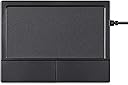
The Perixx PERIPAD-504 is a wired USB touchpad featuring a large 5.9 x 4.5 cm tracking surface optimized for multi-touch Windows gestures. Designed for ergonomic comfort and reliable performance, it offers plug-and-play convenience with stable wired connectivity. Compatible with Windows 7 to 11, it includes two tactile click buttons and comes with a 12-month limited warranty, making it a practical upgrade for professionals seeking precise cursor control and seamless navigation.


| ASIN | B07JM7FWR9 |
| Additional Features | Ergonomic Design |
| Antenna Location | Office |
| Best Sellers Rank | #7 in Computer Touch Pads |
| Brand | Perixx |
| Button Quantity | 2 |
| Color | Black |
| Compatible Devices | Personal Computer |
| Connectivity Technology | USB |
| Customer Reviews | 3.4 out of 5 stars 1,057 Reviews |
| Enclosure Material | Acrylonitrile Butadiene Styrene |
| Global Trade Identification Number | 04049571002187 |
| Hardware Platform | Desktop |
| Included Components | Touchpad |
| Item Dimensions L x W | 4.72"L x 4.7"W |
| Item Weight | 140 g |
| Manufacturer | Perixx |
| Mfr Part Number | 11572 |
| Minimum Required Operating System Version | Windows 10 |
| Model Name | PERIPAD-504 |
| Model Number | PERIPAD-504 |
| Movement Detection | Optical |
| Movement Detection Technology | Optical |
| Number of Buttons | 2 |
| Operating System | Windows 10 |
| Power Source | Corded Electric |
| Special Feature | Ergonomic Design |
| Style Name | Extended |
| Unit Count | 1 count |
| Warranty Description | 1 year |
R**F
Happy with my purchase it's a good basic trackpad
The touchpad is exactly as advertised. Very basic features, and plug & play. The gestures work fine; however, I only use double finger up and down for scrolling and single tap for click. The left and right buttons have a nice clicky snap to them that gives it nice feedback whenever you interact with them. And the surface area your fingers interact with to move the cursor has a slight texture but nothing significant. It's not smooth like glass but not rough like sand paper. For the price it meets my expectations. My hands are quite bad and I can't use a traditional mouse. I prefer this over a trackball style setup and would recommend it to anyone in my situation. I'll admit the one thing I forgot is that there's no middle mouse button, but that seems common among all trackpads and just highlights my oversight during pre-purchase.
J**N
Installs in a snap, reliable, bad feel
I'm using it on a laptop running Linux (NixOS, KDE Plasma) . I love having two-finger gestures available at my desk. It worked on without having to install or configure anything, which is great. But it's practically unuseable: There's like a half-second of delay between when you start a gesture and when the page starts to scroll. The feedback is so sluggish that by the time you take your finger off the pad you've already scrolled past what you wanted to see. Pinch and zoom is similarly too hard to control, although I'm not sure latency is the problem there. And for pointing it's much harder to use than the mouse or the trackpad built into my laptop. As a result I'm keeping the mouse plugged in; I use the trackpad to scroll pages and the mouse for pointing.
C**O
Spend an exta $20 and buy another one
The seller is fine. Item arrived promptly. The product, however, should not be sold for more than $15. Sure, it works as a touchpad. But the two-finger screen scroll is terrible. First, the screen goes up or down too fast and it cannot be adjusted without messing up the mouse speed. Second, the two fingers on the pad at the same time trying to scroll usually increased the browser zoom in or out. The previous touchpads I had put the screen scroll on the left or right side of the thumb pad so there would be no mix up between zooming in or out. The speed of the screen scroll on the other two more expensive pads matched the screen scroll speed setting for the mouse. I also miss the double tap that would act like a third mouse wheel button or you could program it to open a new window when double tapping. You get what you pay for.
M**M
Both sizes are "good", neither is "great".
I've tried both sizes in this listing (Amazon seems to combine the reviews). Neither is "great" but they are some of the only affordable USB wired touchpads I could find (wireless will not meet my needs). I've mitigated the one complaint I had with the bigger touchpad by affixing 3D printed "U" shape plastic around the lower button area using double-sticky tape, this makes it significantly easier to use by eliminating the accidental clicks while keeping the buttons easy to find and operate. If I can find a way to get used to or mitigate the height/thickness it would be perfect. Big Touchpad - I got this one first... Pros: +Large, easy to use surface +Large easy to press buttons +Wired USB - reliable, no batteries to worry about, no interference +Works with built-in drivers on Windows and Linux Cons: -Buttons not "protected" by a frame, too easy to bump when pointing/typing -Too tall (nearly 3/4 inch) Small Touchpad - Second touchpad I tried: Pros: +Good height/thickness +Buttons protected by frame edge +Wired USB - reliable, no batteries to worry about, no interference +Works with built-in drivers on Windows and Linux Cons: -Too many edge gestures, too easy to accidentally trigger -Buttons are smaller, harder to find/press -Difficult to drag, buttons are small and hard to hold with thumb operating one-handed -Small usable touch area, makes navigating multi-monitor difficult
J**A
Amazing product, easy to use, can change scroll directions
This touchpad perfectly suits my needs and surpasses my expectations. I use it with my Windows 10 Dell laptop (docked, lid closed) with an external keyboard and mouse because I also wanted access to a touchpad. The Peripad-504 was immediately recognized as a “mouse” upon connecting with no additional action required. It works wonderfully. Since I also use a Mac with a Magic Trackpad (which I absolutely love), and the scroll directions on Mac are opposite the scroll directions on Windows, I found some instructions on the internet for how to edit the Windows registry to “FlipFlop” the scroll directions for the Peripad-504 to match my Mac. Extremely happy with this touchpad.
D**N
Mediochre (Perixx PERIPAD-504)
This touchpad works, and if you're used to using the buttons to click, you'll be fine with it. However, its sensitivity to pressure seems to vary wildly, so I'm frequently unable to one or two finger tap with it. (And sometimes it goes crazy with taps when I don't want it to.) The device doesn't appear to support pressure sensitivity adjustment, though you can adjust acceleration, middle-button emulation (pressing both buttons at once), horizontal scroll, and natural scrolling. About the only thing it does well is plain-old moving the cursor around. Every laptop I've ever used has had a better touchpad -- even a perixx keyboard I had to send back recently (for a stuck key) had a better touchpad built in.
S**A
Works perfectly even for a person with crippled hands
I'm in a wheel chair with spinal stenosis which left me with lack of dexterity in my hands. I recently bought another touch pad with all controls buried within and under the flat touch surface which worked terribly. No end of gesture/tapping problems, I found it to be unusable! This Perixx Pad 504 IS A GREAT UNIT, however. It has left-right physical buttons which work much better than the first touch pad, as does the tracking on the pad itself. I did get the larger model, which I'd definitely advise to do.
P**L
Poor product performance and even worse "customer service"
Cursor movement was inaccurate and jumpy. Changing Windows settings did not improve it. Computer specifications: Windows 10, Intel i7 processor, 8 GB RAM. Reported issue to customer service and they asked me to run several checks and tests. By the time this back-and-forth was complete, the return period had expired and they refused my request for a refund -- very unprofessional. ***** I've now installed this touchpad instead, and highly recommend it: ***** KEYMECHER Mano Multi-Gesture Wired Trackpad for Windows 7 Windows 10 and Windows 11, USB https://www.amazon.com/gp/product/B0B93RSRLM/ref=ppx_yo_dt_b_asin_title_o02_s01?ie=UTF8&psc=1
A**A
Fantastico
Perfetto anche su Mac. Per quello che costa davvero ottimo. Ti ci abitui subito. Lavoro con audio video professionali: si può fare!
J**Z
Touch
funcional, cumple su funcion se conecta facilmente
A**R
Best touchpad for Desktop or laptop at a distance.
Very good for if you have finger pain or strain and you use pc for long hours. Only thing improvement they can do is provide a wireless option.
S**E
Touchpad nikel
Touchpad qui fait le job, j'en suis satisfaite pour soulager mon poignet et syndrome du canal carpien Bonne sensibilité au toucher, le moins c'est l'épaisseur du touchpad, mais on s'y habitue, je recommande pour bon rapport qualité prix.
S**A
Todo lo que esperaba
Me ha encantado. Funciona muy bien en todas las funciones y es cómodo para usar. Los botones muy suaves. Muy contenta con esta compra, pues es práctico y lo puedes llevar donde necesites. Si no puedes usar ratón convencional, este touchpad es ideal, lo recomiendo.
Trustpilot
1 month ago
2 weeks ago