🚗 Diagnose smarter, drive safer—your car’s new BFF is here!
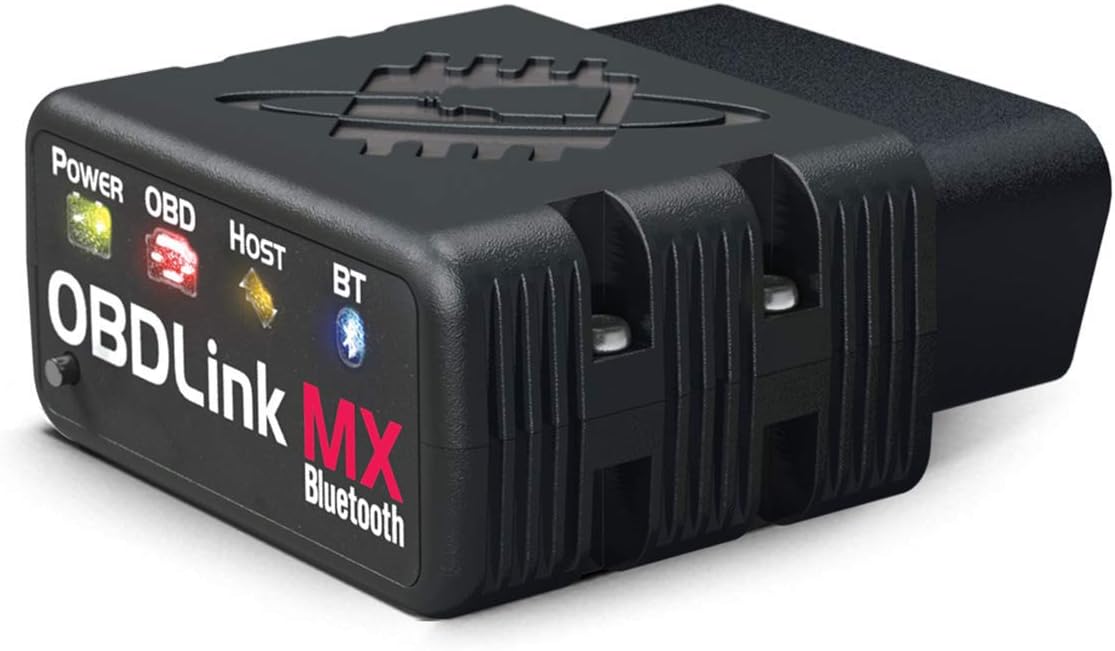
The OBDLink MX Bluetooth OBD-II Scan Tool is a professional-grade diagnostic adapter designed for Android and Windows devices. It delivers up to 4x faster Bluetooth data transfer, supports advanced vehicle protocols including SW-CAN and MS-CAN, and features innovative BatterySaver technology to prevent car battery drain. Compatible with a wide range of third-party apps, it offers hacker-proof security and regular firmware updates, making it the ultimate tool for DIY car diagnostics and performance monitoring.


| ASIN | B006NZTZLQ |
| Brand | OBDLink |
| Brand Name | OBDLink |
| Customer Reviews | 4.5 out of 5 stars 2,838 Reviews |
| Global Trade Identification Number | 00897155000012 |
| Included Components | 1 |
| Item Type Name | ScanTool OBDLink MX Bluetooth: Professional Grade OBD-II Automotive Scan Tool for Windows and Android – DIY Car and Truck Data and Diagnostics |
| Item Weight | 1.1 ounces |
| Manufacturer | ScanTool |
| Manufacturer Part Number | 426101 |
| Manufacturer Warranty Description | 3 Year Full Manufacturer's Warranty. Warranty does not apply for damages caused by owner abuse or alteration of the device. |
| Model Number | 426101 |
| Number of Items | 1 |
| Operating System | Android, IOS |
| Power Source | Adapter,Battery Powered |
| UPC | 897155000012 |
S**X
Well worth the price
I've had a few different OBD-II scanners over the last few years. First I tried a wired Actron CP9125 PocketScan Code Reader I picked up from an auto parts store. While it worked, it was a little too basic for my needs and it was difficult to navigate with only two buttons. I bought a PLX Devices Kiwi Bluetooth Wireless Trip Computer and OBDII Scanner , which is much nicer, but I stopped using it both because they seem to have abandoned support after IOS 7, and because it developed serious problems maintaining a wifi link (a common problem in their forums). Considering the price, I was very very disappointed with it. But since I work on cars for fun (both my own and friends), I wanted a reliable scanner. So, here we are. I purchased the ScanTool 426101 OBDLink MX Bluetooth OBD-II scanner a few months ago, and have been very happy. I feel like it's lived up to my expectations, so it was worth the money to me. If you haven't spent much time looking at OBD-II scanners, please keep in mind this model (426101) only works with Android. Apple devices won't work with this scanner because Apple limits access to bluetooth (probably licensing?) so it won't connect. You'll need an android phone or tablet to use this device. It works with Windows too. From what I've read, the iPhone/IOS compatible ScanTool Wifi device is NOT reliable (as of this writing) and I wouldn't recommend it. But this model (426101) gets consistently good reviews for reliability, and my experience matches that. This scanner isn't cheap, but it's complete. It offers basic OBD-II functionality, plus access to SW-CAN and MS-CAN bus information. This means it can give you a lot more state information about various systems on your car, if your car supports it. If you google "SW-CAN MS-CAN ELM327 FORSCAN" you can build a device with similar functionality for probably half the cost of this item. So why would you buy this item instead of doing it yourself? a. Time. It will take at least an hour to disassemble the knockoff product, solder on a switch/wires, and reassemble. If there's a mistake, do it all over again. b. Reliability. If the cheaper product blows up or wears out, they're not going to send me a new one. c. You'll have to flip a toggle switch on each read to get all the data. Not a big deal, but it's still an issue. d. Support/Software. This comes with free software that's actually pretty good. But their software verifies you're using their hardware, so you can't use it with a knockoff product. The last reason, which is less important, but still worth mentioning, is that this particular device is faster than everything else I've used. I connects quickly, and it updates data quickly. This scanner also works with Torque and Dash Command without issues. According to their forums, it also works with FORSCAN (some amazing looking and free diagnostic software for Ford vehicles) but I haven't tried it yet. I presume it works with other software without problems, but those are the two I own, they're popular, and they work well. The only question for me at this point is, will it be reliable? I thought the PLX was a pretty awesome device for $100 and I hoped to use it for 10+ years, but it died pretty quickly so it was wasted money. If this ScanTool device lasts for a while, I'll be really really happy with it. If I see any issues I'll come back and update this review.
B**Y
One of the pricier ones, but worth every penny! Auto-shutoff alone is worth the price.
There's plenty of OBD to Bluetooth adapters out there. You can pick up the cheapies for $20-30. So how does ScanTool get away with charging 5x as much for this one? Quality and support. If you're looking for a quick one-off to clear the Check Engine light before dragging your jalopy in for the state vehicle inspections, this isn't the device for you. Go ahead and read the reviews on the cheapie adapters. Pay attention to how long people have had them. You'll find the cheap adapters have major manufacturing quality issues, so short lifespans and incompatibilities are the norm. However, if you're wanting to keep tabs on your car and want accurate data, this IS the device for you. For about the same price as your dealer will charge to run a diagnostic on your car, you can get this little gadget which can do the same thing. This adapter has the fastest response times and supports the largest amount of data out of any of the OBD/Bluetooth adapters. If you're using a program like Torque, you'll want the extra data capacity/speed, as each gauge you add to Torque uses more bandwidth. My favorite feature by far is the auto shutoff, and this adapter is the only one I'm aware of which has it. I leave it plugged in 24/7 in my car and it automatically shuts off after I turn off the car and comes right back on when I start the engine. It pairs nicely with my Motorola Droid Maxx, every time. Initially I bought it to investigate a Check Engine light on my girlfriend's car, which ultimately lead to the dealer repairing her car for free as there was a TSB out on that particular engine error code. I now use it in my car to keep an eye on how it's running. My car has 190,000+ miles on it, so I'm a bit careful of what I do to it. Torque announces when the engine's up to its operating temperature, so I baby the car a bit until it's fully warmed up. Supposedly ScanTool stands behind their products with a 3 year warranty and technical support. I can't comment on it since I've not had any problems with mine and it sync'd up right on the first try. I even use this with rental cars and even being in and out of multiple cars, I've never had a problem getting it to connect to OBDII and pair with my phone. It's one of those rare devices which just works as it should.
M**E
OBDLink wins.
I had difficulty deciding between the Bluedriver, and the OBDLink. After testing both, I hope the review below may help you. The ability to use iOS is nice, however, the OBDLink coupled with a $63 Android phablet worked better in my situation, as described below. The layout of the included OBDLink software is excellent. I can easily see many live parameters on one screen, without jumping through hoops and dozens of clicks to display them. With the Bluedriver, I was disappointed with the layout of the real time live data screen. It is nice to have the option to show the graphs on the main page along with the data, however, it was laid out in a semi-confusing manner, hard to tell at a glance which line the data referred to, with no obvious visual breaks between lines. As a mechanic, I prefer the capability to show many items at once on the page, with the field description at the left, and the data on the right. When the graphs always included, it really limits how many fields can be displayed at once. Some of the parameter descriptions were vague, and hard to identify when on the data viewing screen, although they were clearly labeled on the parameter selection screen. It was especially hard to identify which O2 data I was looking at, and which sensor it was for. Being limited to the Bluedriver software was a large reason I selected the OBDLink device. I like the functionality and layout of the ODBLink software, and open compatibility nature of their setup. There are some custom written programs that work with ELM 327 that really do much more than either OBDLink or Bluedriver by themselves, and the ability to utilize those programs, like Forscan, was huge for me. I can get access to seemingly every parameter on my 2012 F350 with the OBDLink and Forscan. Really a dizzying array of data. Since I am not set on using iOS, this OBDLink was a great solution. One thing that would make these devices even better would be bi-directional control.
W**O
Decent OBDII scanner/reader, but falls far short of being "pro" caliber...
ScanTool OBDLink MX Bluetooth (henceforth OBDL/BT) is a pretty good OBDII reader, but falls far short of being a "pro" caliber device. First, hardware DOES NOT FULLY POWER DOWN when ignition is all off. POWER & BT LEDS continue to flash even days after pulling the key from the ignition. Many other customers also report this. The OBDL/BT can't be connected to in this state, but it sure as heck isn't 100% off. If your car battery is already marginal, this continual power drain could tip the scales against a cold start. Far better to pull the OBDL/BT after killing the engine. BT connectivity has been decent. I can't say that BT security is any better than any other one-time-numeric code authentication, but it works. Haven't tested it for man-in-the-middle BT hijack/intercept. On occasion, my OBDL/BT has auto-magically RESET its BT Authentication (no, I didn't fat-finger the black Reset button; these RESETs have spuriously occurred mid-BT-session), requiring a manual BT re-authentication, which has worked everytime, on the first try. Should a spurious BT Disconnect occur, if I wait a bit, the OBDL/BT automatically attempts to reconnect. Nice. (TIP FOR ANDROID SMARTPHONE USERS: Don't let your BT stack get gummed up with too many remembered BT authentications. There are Android BT design flaws that might force you to manually delete ALL BT data (in Settings | Apps | System Apps) or, depending on Android version, Factory Reset your smartphone, to clear the BT stack so that you will reliably connect to your OBDL/BT device. Manually/pre-emptively cleanup all old BT synchs before the BT stack becomes overflowed.) Software wise, there are several ongoing issues, as yet to be satisfactorily resolved. Custom dashboards are eye pleasing and relatively useful, BUT... Dashboards only record and remember Min/Max values when the Dashboard is displayed. Don't display the Dash and no Min-s/Max-es are ever recorded for a session. Switch away from Dash display, say to an OBDL Monitor display OR a DashCam app, and OBDL/BT Min-s/Max-es are zeroed out. This is a serious design flaw. Min/Max should ALWAYS be recorded/remembered, per BT session, once a Dashboard using Min/Max has been setup. Zero them out only when I say so, not just because the Dashboard isn't displayed. App fails to display an user reset-able Trip/FullGasTank Average Mileage, only instaneous and Vehicle Lifetime Average Mileage are displayable, even when the Toyota on-board computer holds and displays an user reset-able Trip/FGT Average Mileage value. App doesn't allow dashboarding of Engine Misfires. Other OBDL owners want this feature, not just me. OBDL/BT & app can't see ANY O2 sensors on 2010 Toyota Corolla and can't execute a Freeze Frame snapshot (these features are always RED-X-ed out). App also fails to fully decode too many Toyota specific real-time codes on 2010 Corolla, so I have no useful idea what those cryptically labled values displayed in Monitor $06 are supposed to represent. Toyota's are not niche market-share vehicles. Certainly not Corolla's. So, these rough edges are as surprising as they are unwelcomed. It would also be very nice if the app could display graphs of several user selected saved Monitor $06 Reports, rather than having to port those reports to a computer. These issues are annoyances, hindering an otherwise impressive OBDII device. If/when ScanTool fixes ALL of these problems, the OBDL/BT will become a 5-* product, in my opinion. But not until then.
A**G
OBDLink MX is extremely recommended for any chrysler owner!
I have a 2012 ram and purchased this along with software called AlfaOBD. Let me tell you. This is one awesome tool. I was able to add features to my truck that the dealership said was impossible. My truck had all the wiring but they needed to addd a sales code to my TIPM. (Totally Integrated Power Module). What the stealership has to do is call WIC (Warranry Information Center) and add sales codes to your vin. Once done use starscan to enable the sales codes on your truck. AlfaOBD eliminates this all together. You can connect to your BCM (Body Control Module) and enable a slew of features. I added TPMS Premium, Auto Dimming (EC mirror) rear view mirror, overhead compass, folding mirrors with puddle and turn lamps and so much more!! You will not be disappointed! You can enable LED light options on 2013 and up Rams so you don’t have bulb out warnings or flickeringnwirh his. Also will stop canbus B lights from shutting off due to failing to read the resistance drop over time the light is on. This was designed to prevent people from putting the wrong light into the truck and causing a fire due to high heat and incorrect wattage. AlfaOBD allows you to also change tire pressure thresholds as well as tire size and axel ratios. There is support for chrysler 300, 200, jeep, fiat, Ram, and more! Check out AlfaOBD. There is so much more you can do! It also comes with its own software that you can buy enhanced software for to change tire size and tire pressures as well as axel ratios. Check out their website. Their software is amazing and allows you to graph data. I highly recommend this tool. It also has a feature that you have to physicAlly access the tool to connect to it. Not like WiFi OBD tools that they are open and don’t require code. And you can’t change the pass. Or Bluetooth OBD scanners like cheap elm327 thatnthe default is 0000 or 1234. You have to press the button and with in 90 seconds you have to pair and accept the code. Very secure! Imagine running a WiFi tool and have a hacker pull up next to you and connect. Then shut your engine off or more!! It can also go to sleep and draw low current. Bluetooth BLE. THIS IS NOT COMPATIBLE WITH APPLE AT RHIS TIME. I do not know if they plan on supporting it, however, Windows 7,8,&1.0 are supported along with windows phones and android. AlfaOBD is also supported only on windows laptops and phones as well as android. With this tool and it’s native proprietary software there isn’t anything you can’t fix on your own car!! I would give this product 1000 stars if I could!
J**N
A must have! Read on !
This is the one! I am a vehicle dealer and have bought 3 of these MX over the past few years. I used the first one used on at least 200k cars . The plastic had worn down from being plugged in so many times. The MX has worked on every single make and model i have ever scanned. i buy cars, european korean japanese and domestic, from 2000- 2012 and it just flat works. engine codes, trans codes sent to obd command, obd readiness, monitor status, dashboards you can set up to diagnose problems, i can see if someone has just reset the obd in attempt to hide problems, it will tell you how long someone has driven with cel on, if codes are just pending or stored to computer regardless if the cel is on or off. this tool is in my pocket at ALL times! If i forget it , i have a back up in the car! This thing has saved me from buying bad cars so many times i can not even tell you.This tool is how i make a living and ensure my customers get a good vehicle. but the best thing about it is that it is twice as fast to acquire a link than any scanner i own, and i have a lot of scanners. on average it take 12 seconds, which is the most important thing as i usually see 3500 cars a day at auction, of which i scan 100-150 units daily. Trust me and spend the $ and buy this one, all the others are just junk! This is the best thing a dealer or a car buyer can equip them self with to avoid getting ripped off.
D**D
Excellent device. Works perfectly with my Lotus (which is finicky)
Ironically my 2002 Lotus Esprit has TWO OBDII ports, one in the front passenger foot well, and the other in the boot by the battery. Unfortunately, Lotus is very finicky and NOTHING that I have found thus far, such as the ScanGuage II or other generic OBDII readers works with it. I plugged this into the rear port (since the one under the seat is hanging on by a couple wires (they're kind of jenky built). Pushed the button and connected it to my Samsung Galaxy Tablet. Then I fired up the OBDLink software that you get from Google's Play store (for free) and was REALLY impressed by the polish of it. After configuring it to use ISO9141, I was getting readings and seeing error codes and all kinds of data!!!! I'm elated! Realizing that the tablet is way too big to mount to the windshield, I decided I'd try the same process with my HTC Evo 4G phone. Same thing, worked like a champ (meaning I can pair the OBDLink MX to at least TWO devices or more). AWESOME! Two things to note are that this has an auto-off mode so that it will not drain your battery, yet you can basically leave it connected and forget about it. The other is that it is way faster at sending data than the generic ones or any other one that I'm aware of for that matter. So your readings on the virtual guages should be much more real-time. I fired up Dash Commander and Torque from the market and both worked excellent as well. DC seems way more powerful than I need, but it also has the nicest default interface for the guages. The other two require a bit more pre-customizing work. I haven't tried the included CD for PC yet, but the program looks great from the screen shots I've seen.
S**E
Awesome Product, Awesome Customer Service
I bought this scan tool based solely off of a response of the owner of the company to an individual that wrote what I perceived to be a bogus review. After reading the owners response, I could feel his passion for his product and his dedication to providing the highest quality product he could make. That being said I bought this from Amazon and it arrived two days later. I wanted to use this scan tool with my Acer A500 Android Tablet. In the meantime before it arrived I went to the google store and bought Torque Pro, Dash Command, and OBD Link, the factory software. I loaded all of the software onto the tablet and before I had received the OBD Link MX. I noticed right off a problem with an intermittent wifi connection but couldn't quite figure out what was wrong with the wifi. In the meantime the scan tool arrived and I set about pairing it via bluetooth with my tablet. I also noticed that Amazon had shipped the package in an envelope that crushed the package. it was also missing the CD from the package. I plugged the OBD Link MX into my 1998 K2500 Suburban and immediately the data was not coming through to the Acer A500. It was late at night, I was tired, so I quit fooling around with it. I did though, shoot off a very short, terse, email to the OBD Link customer service, thinking I would get a response a week later if that. I was prepared to send it back to Amazon, but, by the time I was ready to crawl into bed, lo and behold there was an email reply from the OBD Link Customer Service and I thought to myself, WOW, I have never had an email response so quick. I read it and it took me a couple of days before I could try out the suggestions. It took three more email exchanges over a week to finally resolve the issue. The slowness of figuring out the problem was on my end. It took me a bit of time to finally get out to my Suburban and try something new that Customer service had suggested. I honestly think that if I had been on top of things, all of these email exchanges could have been done in less than a couple of hours. The OBD Link Customer Service was just that fast. They also sent me a replacement CD that I received just a couple of days later. The solution was that the Torque Pro software was ruining the bluetooth and wifi connections. Dash Command didn't work either. But you can bet your bottom dollar that after I uninstalled the Torque Pro software the OBD Link software worked perfectly. Bottom Line is that a measure of a company is not how they perform when things go well, it is inevitably judged how they perform when there is a problem. I give the OBD Link MX an A+ rating, but more importantly I give the OBD Link MX Customer Service an A+++++ rating. They were just that good. I really like companies like this. Unfortunately there aren't many like them that are so customer oriented.
E**E
表示が早くなりました。
今まで2000円くらいの安い商品を使っていましたが、こちらの商品に変更して表示速度が早くなりました。(Torque Pro使用) 私のは他の方が言っているような開けられた形跡はありませんでした。 中に入っているOBDLink MXを固定する紙が少し破けてましたが、海を越えてきたので破けたのかなと思います。 ソフトが日本語にならないのでよくわかりませんでした。 もちろん説明書も英語なので注意してください。 OBDLink MX本体のランプが最初はPowerとBluetoothのランプしか点灯しないから不安になりました。 左下のスイッチを結構長く押しているとBluetoothの点滅速度が変わり、スマホで検出できました。 Bluetooth登録後、Torque ProでBluetoothデバイスを選択すると数値が表示されました。 ちなみに車両はKE系CX-5です。
R**E
Lo recomiendo
Excelente producto cumple mis espectativas lo he probado con vehículos asiáticos y americanos y conecta muy bien y los diagnósticos son correctos y estables Con aplicaciones de terceros
M**Z
Bien
Le produit fait bien lit bien les codes. Est ce qu'il lit tous les codes ? Évidemment ça je ne sais pas. En attendant il est bien compatible avec un chevrolet Captiva, une Chevrolet Kalos, une fiât 500 et une clio 4 donc c'est niquel. Je partage également mon expérience, cette chose avait besoin d'une mise à jour... Hélas cette dernière a planté en cours de route... Dans ces cas là ne supprimez pas l'app. Dans l'app allez dans réglage et ensuite Firmware Upgrade. Et a partir de la vous recommencez la mise à jour. Bonne journée 👍
M**G
Great bit of kit, fast.
I brought this model because it is advertised as the fastest OBD2 adaptor and I wanted to mainly use it as another set of instruments (boost gauge, inlet air temp etc) on my turbo diesel. I am very happy with it, it hooks up quickly to my phone or pad and works well with Torque Pro. I know that I would have been very frustrated if I had brought one of the cheaper but slower ones. I am currently ordering another for my nephew as he is fascinated with it and has just got himself a turbo diesel for his 21st.
F**K
Ottimo prodotto
Ho installato questo obdlink sulla mia toyota corolla Hybrid TS 2.0 e funziona perfettamente , veloce e preciso nella comunicazione dei dati
Trustpilot
3 weeks ago
1 month ago