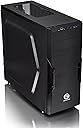

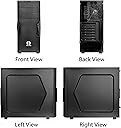


Thermaltake Versa H22 SPCC ATX Mid Tower Computer Chassis CA-1B3-00M1NN-00,Black
Product ID: 13139102
🔧Tool-free drive bay design
❄️Optimized airflow with mesh panels
🖥️ATX Mid Tower compatible
🔥 Build Bold, Stay Cool, Game On! 🕹️
The Thermaltake Versa H22 is a lightweight yet robust SPCC mid-tower chassis designed for gamers and PC builders seeking efficient cooling and easy upgrades. Featuring perforated mesh panels for superior airflow, tool-free drive bays, and support for ATX motherboards, long GPUs, and liquid cooling, it balances functionality with sleek black aesthetics. With USB 3.0 front access and advanced cable management, it’s the perfect foundation for a high-performance, dust-free gaming rig.
| ASIN | B00J0NZ5N0 |
| Antenna Location | Gaming |
| Brand | Thermaltake |
| Case Type | Mid Tower |
| Color | Black |
| Compatible Devices | ATX motherboards, CPU coolers (up to 155mm), long graphic cards (up to 315mm), 3.5-inch and 2.5-inch drives, expansion cards, Advanced Cable Management, Liquid Cooling System |
| Cooling Method | Water |
| Customer Reviews | 4.3 out of 5 stars 372 Reviews |
| Enclosure Material | Alloy Steel |
| Fan Size | 12 Millimeters |
| Global Trade Identification Number | 00841163054260 |
| Hard Disk Form Factor | 3.5 Inches |
| Internal Bays Quantity | 6 |
| Item Weight | 9.3 Pounds |
| Manufacturer | Thermaltake USA Direct |
| Material | Alloy Steel |
| Model Name | Thermaltake Versa H22 |
| Motherboard Compatability | ATX |
| Number of Fans | 1 |
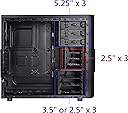
| Other Special Features of the Product | Perforated metal mesh for heat dissipation, tool-free drive bay design, trio drive bay concept, tool-free mount fan, and pre-mounting holes for cable management and liquid cooling system |
| Power Supply Mounting Type | Bottom Mount |
| Recommended Uses For Product | Gaming |
| Supported Motherboard | ATX |
| Total Expansion Slots Quantity | 7 |
| Total USB 2.0 Ports | 1 |
| Total USB 3.0 Ports | 1 |
| Total Usb Ports | 2 |
| UPC | 796594424932 012302436500 898029661407 012304358176 872182786214 841163054260 048361953856 846764214419 968423264495 809392595282 863121544392 803982744586 734911371521 |
| Warranty Description | Comes with Manufacturer Warranty. |
K**N
An inexpensive case that is not cheap.
Really nice case. It has a lot of features and works very well. Its strong enough, I don't see why people complain about it being made of thin metal. For no reason have I ever had the need to test how much weight my computer case would hold. I mounted an ATX motherboard and had to problems with stripped holes, etc. My cooler stands pretty tall and there was plenty of room to close the side panel. Tool less hard drive caddies work well and are easy to use. Had to use mounting screws on my SSD, but the main drives didn't need screws. Plenty of room to hide wires and run cables. The included fan moves plenty of air and while it is not silent, its not noisy either. I added two more fans to the top and they all pull air through the front and out the back/top. No issues with cooling. The little plastic cover for the rear PCI slot opening that cover the screws is pretty flimsy and cheap, but since it doesn't affect anything about the performance of the case, its not a problem. Its an inexpensive case that is not cheap, and it has plenty of features for the price.
D**Z
Best, Cheapest, Lightest Case I've Ever Used
I bought the Thermaltake Versa H22 SPCC ATX Mid Tower Computer Chassis CA-1B3-00M1NN-00. That's the black one with no windows, since Amazon keeps mixing together reviews of different products. Simply put, this is the best case I've ever used, and I include OEM cases in that. This case is not as rugged as some I've had that probably would have survived being dropped of a cliff, but who cares? I'm not planning on doing that. Is the metal thin? Yes, so it's lightweight. Does it hurt anything? No, not if you're not kicking it or tossing in your car's trunk. And it's less than half the weight of the case the last Dell I bought came with, umm.... 15 years ago? The rest of the design is awesome. Both sides remove, so you can manage the wires on the back side. It has cages for every drive you're likely to have. It has lots of places to put fans, which is good, because my build tended to overheat until I added three more 120mm fans, two in front, one on top. Very, very easy. And for the dingbats complaining that there's not enough room for the cable connections on the hard drives, YOU'RE DOING IT WRONG! Mount them THE OTHER WAY, and the problem is solved. There's a reason you can open both sides, you muppets.
J**.
Nice case on a budget
The Good: 3 slots for ODDs/whatever on the front, or you could fit a 140mm case fan there. There's a decent amount of space in the case, so you shouldn't have any problems fitting hardware inside. Several HDD slots. Looks pretty good. The built-in case fan is adequate for a budget productivity PC that isn't going to generate too much heat. Lightweight design. The Bad: There space between the HDD slots and the back panel is tight. I didn't use a particularly beefy power supply cable, but it still pushes against the side panel a little more tightly than I'd like. The PCI expansion bay covers need to be twisted and broken off, rather than being separate gates that can be replaced when expansion slots are swapped out. Overall poor airflow. Due to holes in the PCI expansion covers and negative pressure from its single rear-mounted case fan, hot air from the power supply may get sucked back into the case; additional fans to generate positive pressure are needed to prevent this. No meaningful cable management built in. Overall, it's a decent case for the price. Good for novice builders who aren't trying to spend a fortune, or if you're building a budget PC for somebody who isn't likely to change components.
A**N
Perfect case even for modern motherboards as Z690 Aorus pro
The package was received from a Canadian hardware store and arrived in perfect condition.Easyto assembly with innovation in the way Samsung EVO ssd drives are set up.Thermaltake always will alway surprise you with innovation. What I liked the most of the chasis is that it has not tempered glass as the new ones, so it is more resistance and durable having rolled steel in both sides. Installation was very easy and everything worked as expected. Truly happy with this amazing case VersaH22 There is good room for an HD 7950 so I expect for the new large video cards too. Comes with bolts and an installation manual. Fully recommended.
R**N
Gets the job done
If you're a big RGB fan, then this is not the case for you (unless you buy the fans of course). No frills ATX midtower case. Used a GIGABYTE B360 HD3 with Intel Core i5-8400, Corsair Vengeance LPX 16GB (2x8GB) DDR4 DRAM, Corsair CX Series 650 Watt PS, Crucial MX500 500GB 3D NAND SSD and Gigabyte Geforce GTX 1050 2GB GDDR5. Everything fit correctly and I was able to run cable mgmt fairly easily. The case currently sits in a media closet, so there is no need for aesthetics. Again, this is a fantastic inexpensive case for a budget build that I'd highly recommend.
A**R
Look Elsewhere
Negatives: 1) Case included plenty of small screws that fit almost nothing (a few in the PSU, 2 in my SSD, and one in a motherboard standoff). It does include 6 larger screws that do fit most components, all of which I had to use on my motherboard. The case does not need standoffs placed in many locations (raised "bumps" in the case are used instead), but the small screws do not fit them - only the standoffs. The smaller screws do not even fit the PCI slot covers. One PCI slot comes already removed so good luck getting it back on. My graphics card, an NVIDIA RTX 2060, installed in the top PCI slot on an ATX motherboard needed the second and third PCI slot covers removed, meaning the first did not even need to be removed, and the screws provided do not allow me to reattach the first PCI slot cover. I just have a big hole there instead - not a deal-breaker but certainly janky. 2) The back-plate for attaching your CPU cooling fan is extremely hard to attach to the your fan. I would advise screwing each screw from the fan only slightly to get them all in and then proceeding to tighten each of them afterward. A lot of force is involved. My CPU is a Ryzen 5 2600x with the Wraith Spire cooler for reference. 3) My case only included 3 screws for the side case covers. 4 is what I would consider standard and optimal - 2 for each side. 4) An additional two fans need to be purchased and installed on the top vents to "complete" the case. Positives: 1) It's a simple, stylish case, especially with no window. 2) All electrical components work fine - buttons and USB ports on the top/font. 3) Cheap. 4) It does fit components as advertised (just be careful of the screw issue for actually installing those components). Conclusion: I am keeping this case. However, if I where buying everything over again, I would choose something else.
R**N
A Good Case For The Money
I built a computer for a friend and needed a cheap case that was not made from recycled Bakelite. The reviews for this case were good so I gave it a shot. It was not hard to build in this case and everything went in without me loosing a finger or my confidence in the Chinese labor force. My Cooler Master Hyper 212 EVO fit with thirty or forty atoms to spare. Cable routeing was not too bad and my brain did not overheat from creating a 3D model of the case in my head a laying out the best routes for all the cables. This case, unlike others now days, does not look like the Las Vegas strip during Christmas with lights on everything. It won't be long before they have led back lit screws! Don't steal that, it's my million dollar idea. All in all a good case for the money.
A**A
Great case
Pros: 1. Easy to assemble a PC. 2. Cable management, for the price of this case, it has the best cable management I have seen. 3. Easy to clean air filtration. Cons. 1. Not to strong of a metal. It is easy to bend... so weak however, it is easy enough to bend back. 2. Only one USB 3 port up front. Be nifty if it had more. Wish list: 1. There is room from the top of the 5.25 drive bay and the radiator mount.... do something cool. Like add in a wireless fast phone charger. I did it myself. Looks mind cheesy.... but hey, I dont have the tools for this, I am sure Thermaltake does. 2. Wi-Fi mounts for antenna's. Using the expansion slots to wi-fi antenna's kinda defeats the purpose from bad placement. 3 A SD reader be nifty.
Trustpilot
2 days ago
2 weeks ago