We remain fully operational. Our teams are working around the clock to ensure your deliveries continue safely.

Descargar la aplicación


Servicios al cliente
Sobre nosotros
Copyright © 2025 Desertcart Holdings Limited
Descargar la aplicación
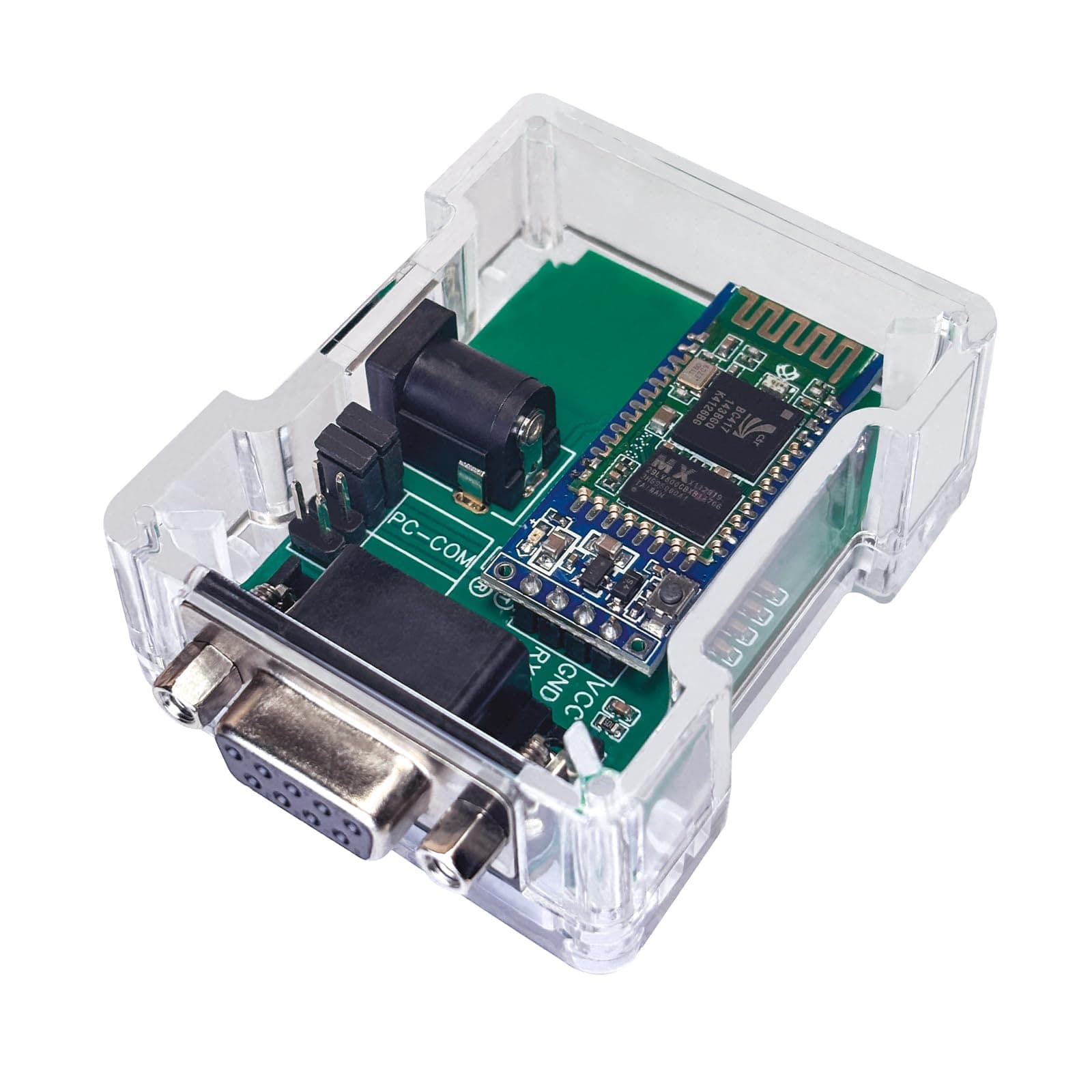
🔗 Cut the cables, not the connection — wireless RS232 made smart and simple!
The DSD TECH SH-B23A is a Bluetooth 2.0 to RS232 serial adapter featuring a DB9 interface, designed for wireless communication with RS232 devices on Android and Bluetooth-enabled computers. It offers a 20-meter transmission range, pre-set baud rate of 9600 8N1, and customizable settings via free software. With a compact transparent design, 1-year warranty, and dedicated customer support, it’s a cost-effective solution for modernizing legacy serial connections without sacrificing reliability.


| ASIN | B07FP6NZB7 |
| Best Sellers Rank | #209 in Serial Adapters |
| Brand | DSD TECH |
| Color | Transparent |
| Compatible Devices | Android, Laptop |
| Connector Type | db9 |
| Customer Reviews | 3.6 out of 5 stars 160 Reviews |
| Input Voltage | 5 Volts (DC) |
| Item Dimensions | 2.1 x 1.4 x 0.3 inches |
| Item Weight | 0.11 Kilograms |
| Item dimensions L x W x H | 2.1 x 1.4 x 0.3 inches |
| Manufacturer | DSD TECH |
| Model Number | SH-B23A |
| Number of Items | 1 |
| Number of Ports | 1 |
| Package Quantity | 1 |
| Power Plug Type | No Plug |
| UPC | 606479964067 |
| Unit Count | 1 Count |
| Warranty Description | 1 year warranty |
| Warranty Type | one-year warranty |
D**K
Very cheap, but quality control needs work
I'd been using the IOGear GBC232A for my projects and spending $70/ea on them. Wish I'd found out about this unit sooner - it does the same thing for a fraction of the price. I've only been using it for < 24 hours, but so far it seems to perform just as well as the IOGear. It also defaults to the sensical 9600, 8N1 so it pretty much works for me right out of the box without any configuration whereas the IOGear's default is 19200. The one issue is that when I use it with devices where a straight-through cable typically works, I have to pair a null modem gender changer with this box instead of the regular one they include - not sure why they don't just include a null modem instead? UPDATE 2/13/2021 - at this point I have purchased and deployed around 20 of these units in the past few months to various customer sites. So far, one simply died after a few weeks of use and another has struggled / refused to connect out of the box. A ~10% defect rate is quite high. Update March 2023 - at this point I have over 80 of these at customer sites and they perform well and are reliable. Other than the occasional one that doesn't work out of the box, none have died since my previous review so I'm updating this to 5 stars.
M**.
Works with microsquirt
I found a guide to program this little guy to work with my microsquirt. I guess the main instructions are missing a key item. Oh, -1 star because half the pins in the gender adapter were bent. As posted by PFloor on msextra: Download their app. Use the HC-05 tab in the software. OPEN up the case (remove 4 screws). Make sure jumpers are on "PC" Connect to pc via serial port. Select UART (comm port), 9600 Baud and "Open". IMPORTANT!!! Press the tiny button on the board to put it in "programming" mode (this critical step is missing from all instructions). Press "Test". If you get an "OK" reply, you are good to go. If no "OK", you will not be able to program it. You may need to press the button first, then open the port. Set the name and PIN if desired. Change the Baud Rate to 115200 (this is required). Leave role as "Slave". IMPORTANT!!! Put jumpers on "Device" Test on MS Re-assemble case
C**.
I got it to work, and it works well!
I'm an IT hobbyist, not an IT professional. I have above average knowledge for sure. I'm using these for perhaps a unique use case, having one computer transmit data to another computer (multiple, actually). I'm a court reporter, and I can send my realtime transcription to other computers so it can be viewed by attorneys or whomever. There are a few ways to do this (many cloud based options charge high fees), but the classic/free way is via wired serial connection. Ancient tech, but (with a USB to serial cable) it works. I wondered, could I possibly find some wireless solution? And I found this. Like many others, hours of trial and error later, and it works! I could not get it to communicate with the built-in Bluetooth on my laptops, but when pairing it with the Startech USBBT1EDR2 (which I literally had lying around), it works like a charm. I wish I didn't need the extra Bluetooth dongle -- maybe a geekier man than me wouldn't -- but I'm happy.
L**2
Gave up after 2 days. Auto power off, lack of doc for setup.
Bought this to allow reading of RS232 scale to be placed inside a vac chamber, to allow wireless weights while chamber was sealed. Barely worked outside (have to move jumpers from PC-COM to DEVICE or scale would not respond at all), with power provided by computer USB port. Once placed inside chamber, power coming from a 5V supply (battery phone recharger) or from lithium battery stack, would turn off after 60s. Gave up. Odd that it worked with a computer 5V USB out, but not with 6.4V battery or phone recharger. Don't trust this to work - many other reviews about random product substitution. Other reviews have some workarounds that are handy, but look for a different widget than this.
D**C
cts, rts and dtr lines unasserted
The box is really nice. The entire thing must be taken apart when attempting to change the jumpers. Will not drive a DCE if the DCE required DTR/RTS/CTS hardware handshake (unlike usb portio interfaces). Also, be prepared with a null-modem to get 2/3 to cross and get a breakout box to debug. Do not see the +-10vdc level converter, so your device must respond to ttl levels. When programming a modem ignore all dtr and cts/rts settings. Here is a setup that might work: USRobotics Courier V.Everything Settings... B0 C1 E1 F1 M1 Q0 V1 X1 BAUD=9600 PARITY=N WORDLEN=8 DIAL=TONE ON HOOK TIMER &A1 &B0 &C0 &D0 &G0 &H0 &I4 &K1 &L0 &M4 &N0 &P0 &R1 &S0 &T5 &U0 &X0 &Y1 %N6 #CID=0 S00=000 S01=000 S02=043 S03=013 S04=010 S05=008 S06=002 S07=060 S08=002 S09=006 S10=014 S11=070 S12=050 S13=000 S14=001 S15=000 S16=000 S17=000 S18=000 S19=000 S20=000 S21=010 S22=017 S23=019 S24=150 S25=005 S26=001 S27=000 S28=008 S29=020 S30=000 S31=000 S32=009 S33=000 S34=000 S35=000 S36=000 S37=000 S38=000 S39=000 S40=000 S41=000 S42=126 S43=200 S44=015 S45=000 S46=000 S47=000 S48=000 S49=000 S50=000 S51=000 S52=000 S53=000 S54=064 S55=000 S56=000 S57=000 S58=000 S59=000 S60=000 S61=000 S62=000 S63=000 S64=000 S65=000 S66=000 S67=000 S68=000 S69=000 S70=000 I use: ati4 to print this out on an external USR modem. DSD tech support can't really help, they can just offer to do a replacement, which very nice, but not helpful. This is just got design issues, no hardware handshake, incorrect level voltages, etc. Replacement will not help! This is not an RS232 EIA compatible device...close, but not quite!
A**.
Worked great for Microsquirt
Purchased as a inexpensive option to connect with my Microsquirt ecu. After downloading the app from the manufacture and following the instructions from Pfloor on the msextra forum, it connected immediately after pairing to my phone. I will ad the jumper wire to eliminate the need for external power (as shown by other reviewers). I am happy with the product.
R**T
Software Works but Incorrectly labled: Took 2 Days and 4-5 Hours to Get Device Working
I almost gave up multiple times. But at 3AM on the 2nd day, I finally got it to work. Attempted two USB to serial converters and a desk top computer with an actual serial port in back to communicate with device. Manufacturer's instructions are incorrect and poor at best. Manufacturer's website is useless except to down load software. As other reviewers have written, you must disassemble unit, then ensure 2 jumpers are on "PC" pins to set correct baud rate, then use command tab HC-05 in software (not SH-B23 which is what this device is supposed to be!), open UART, select correct Comm port on your computer, press micro-button inside device, then press "test" in software and most importantly, receive an "ok". Remember to switch the jumpers from “PC” back to “device” after changing baud rate. If you don't get an "OK" after pressing “test”, you're not connected to your computer. And even though it looks like you are changing the device parameters in the software, you are not. Worse, You will still be able to "connect" or "pair" via blue tooth with another device, but the baud rate likely won't be correct (because you never actually changed it) and it will be connected via blue-tooth, but it won't work (ie will not transmit data). For example, a mega-squirt fuel injection computer, where the baud rate MUST be set to 115200, will not transmit data using this device’s default 9600 baud rate. If not for the other reviewers on Amazon, I would not have been able to change the devices baud rate or gotten this device to work. Also Device sent by Amazon is not the same as pictured or as listed on Amazon. Device shipped was a SH-B30, which doesn't even have a command tab in the software. If your time is more important to you than money, use something else.
J**A
Good
Good
Trustpilot
Hace 3 semanas
Hace 2 semanas