We remain fully operational. Our teams are working around the clock to ensure your deliveries continue safely.

Descargar la aplicación


Servicios al cliente
Sobre nosotros
Copyright © 2025 Desertcart Holdings Limited
Descargar la aplicación


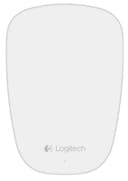
🖱️ Elevate your Mac experience with the sleekest, smartest mouse you didn’t know you needed.
The Logitech Ultrathin Touch Mouse T631 is a precision-crafted, ultra-portable Bluetooth mouse designed exclusively for Mac users. Featuring a brushed metal body and a smooth touch surface, it supports OS X Multi-Touch gestures and pairs with two devices for seamless switching. Its rapid USB charging delivers one hour of use per minute charged, making it perfect for busy professionals who demand style, speed, and versatility on the move.
| ASIN | B00DR8LA60 |
| Additional Features | Wireless |
| Antenna Location | Laptop |
| Are Batteries Included | No |
| Are Batteries Required | No |
| Battery Average Life | 1 Hours |
| Best Sellers Rank | #2,821 in Computer Mice |
| Brand | Logitech |
| Built-In Media | Computer Mice |
| Color | White |
| Compatible Devices | Laptop, Personal Computer, Smartphone |
| Connectivity Technology | Bluetooth |
| Customer Reviews | 4.2 4.2 out of 5 stars (1,628) |
| Enclosure Material | Metal |
| Finish | Brushed |
| Global Trade Identification Number | 00097855097910, 10097855097917 |
| Hand Orientation | Ambidextrous |
| Hardware Platform | Mac |
| Item Weight | 6.88 ounces |
| Manufacturer | Logitech |
| Model Name | 910-003856 |
| Model Number | 910-003856 |
| Movement Detection | Optical |
| Number of Batteries | 1 Lithium Polymer batteries required. |
| Operating System | Mac OS X 10.6 Snow Leopard, mac os x |
| Power Source | Battery Powered |
| Range | feet |
| Style Name | Modern |
| UPC | 801940459718 809394265244 803982773234 631058219320 801940115461 097855097910 617407426496 978550979100 679113208551 012303341742 808112929932 021112155730 801964695321 801940714145 804067189223 |
| Unit Count | 1.0 Count |
A**N
Works out of the box with MacBook. Tiny! Flawless.
This mouse is insanely small and thin! Great as a travel mouse or for kids. I have 2XL hands and have no problem using it, but my initial impression was negative. I bought it because I left my usual Magic Mouse behind and I'm traveling, so Amazon "next day" to the rescue. When it arrived, I immediately thought "oh dear ... well, better than nothing and it's a great size for a travel mouse or give it to one of the kids." After less than the first day of use, I realized I'd forgotten all about it -- it's as easy to use as the Apple mouse. One thing to note, at least for OS X, the scrolling is poor until you install the driver and reboot, then it's liquid smooth. The driver download link is included in the box (samsung.com/download/t631) and it's about a 50MB file that installs with no drama. Note that it has some cool features such as supporting two bluetooth host devices (a mechanical slide switch underneath toggles between "1" and "2" ... this was a major selling feature for me because I have two laptops ... my sort of "dual monitor" solution for traveling.) I still prefer using a virtual desktop app, but it overcomes the problem I had of the two Macs each trying to grab the mouse connection and a lot of boring software clicks to get from one to the other for specific tasks. It's about a 3 second handover process to flick the switch between 1 and 2, then bluetooth does the rest with no intervention. It also works as a mouse on the Nexus 10 with no fiddling, just click search for device, then pair ... bingo. Quite handy once you have the Nexus with a bluetooth keyboard if you want to do precise work. It charges off a micro USB cable, supplied in the box, but that's (for me, at least) one less cable to carry. Battery isn't an issue, it has an off switch, but left on, it seems to last about two days. I charged it this morning. It's little blue pin prick light glows and pulses slowly, then it turns solid and the preferences app updates as you unplug it to report a full battery of charge (no percentage, no estimated hours of remaining battery.) Good enough, but the metric Logitech offers (one minute of charge equals one hour of operation) just suggests that if you have the cable and it dies, you're only five minutes away from ample battery. Because the connect is underneath, it disables the mouse entirely during charging, but since you're talking about just a minute or three to revive it, I guess that concession to design aesthetics is fine by me. I saw some comments on it being difficult to click on soft surfaces (like a mattress) which I don't quite follow since it does the original "jeans test" from Apple ... you can use your knee as a mousing surface ... it seems to track beautifully on any surface except a glass table. This device raises my opinion of Logitech up to equal Samsung and even Apple itself.
W**E
Very nice mouse
02/18/2014 I ordered this mouse because of its dual Bluetooth connectivity, the allure of the touch sensitivity, its looks and the Logitech brand. For mice, I tend to be brand loyal to Logitech and to Microsoft, so I recognize that I may be biased. I have medium/large sized hands, but I prefer small notebook mice as I tend to manipulate them primarily using my fingertips and not with my palm. Larger mice simply seem clunky to me now. This is quite literally the flattest mouse I've ever used, and after just a few hours of use, my previous mouse (the venerable MS Notebook Mouse 5000, of which I have had many copies) even seems large. After ordering, I was initially worried that this would not suit my intended casual purpose after reading that the mouse buttons are hard to press on soft surfaces. Immediately upon inspection of the mouse on arrival, it became clear why this is the case: traditional mice have a rigid body composing the bottom and sides of the mouse, and flexing buttons on top. This enables the couch/bed user to hold the device firmly by grasping the sides of the mouse with the thumb and ring or pinky finger while the index or middle finger depress the mouse buttons. This mouse (and, I imagine, other touch-surface mice like Apple's magic mouse) inverts this by creating the top and sides as a single unit. Underneath is a 'platform' that clicks into the upper body of the mouse to create the click. This particular mouse is a bit extreme in design for this style, as the metal sides wrap under the mouse about 1/4" all around before the platform underneath begins. In order to 'click' the mouse while in the air, one must press the floorplate into the body of the mouse from underneath as grasping the sides will serve no functional purpose in this endeavor - save, perhaps, to keep from dropping it. That said, though I will avoid them with this mouse when convenient to do so, I was eventually able to reliably get this mouse to click on soft surfaces. I accomplish this by essentially raising back of the mouse a few mm and angled so that the button side I want is the only one in contact with the surface and I sort of drag the mouse back slightly as I press it into the surface (Note that the mouse need not actually slide along the surface - I am merely attempting to describe the direction of force). This sounds somewhat complex or tedious, but after a few minutes of concentration, I developed a rather efficient 'wrist flick' that accomplishes this task without having to even consciously pay attention to what I was doing. On a solid surface, I have found that when I reach for this mouse, I feel like I am simply reaching for a part of the desk that is slightly taller and moveable. I predict that, in time, I will cease to use my thumb and ring finger/pinky to obtain a significant purchase on the device, opting instead to move it around like a checker piece. Using three fingers to prevent its rotation. Although I had planned to use this mouse at home with my devices, because of the relative difficulty of using this on the arm of a chair and clicking the mouse quickly (for games like minecraft, etc), I think I will leave this at work instead and bring home my MS Notebook Mouse 5000 which will work better for my purposes - unfortunately negating the dual Bluetooth feature's raison d'être. However, I will still enjoy mousing with this device at work (where it's sure to see more action) and can appreciate its quality materials and construction. ****** Update 2/27/2014, rated down to 3 stars The right mouse button is becoming increasingly inconsistent and difficult to click...many attempts register as left mouse clicks. Other times, the right button performs flawlessly. A mouse has 3 main functions that must be consistent to be of use...report {X, Y} delta, left click and right click. All other features are superfluous, but help differentiate between products. This mouse has almost everything going for it (save for wireless charging...that would be awesome!), except for that dang right-click. Side scrolling is awkward so far (regarding hand position), and sometimes difficult to even actuate. Inconsistent across applications. I do like how silently these capacitive mice are when scrolling...the clicks with this mouse are on the noisy side, though. On a positive note, the mouse has been on for almost an entire work week, without switching it off at the end of the day, and with ~35 hours of actual use the battery is just now getting low. But not low enough that I'm getting an alert from Logitech's monitoring software, so it would seem that recharging only over the weekend might be plausible - though charging once mid-week may eventually become necessary. Also, I have not experienced any loss of connectivity with the mouse. So far, this has been rock-solid. I will point out that my MS mouse loses its signal with my laptop every 20 or 30 minutes, but had no issues with my workstation. This leads me to wonder if reported connection issues with this mouse is an issue with the mouse itself, or some other interference. ****** Update 2/28/2014 - Back to 5 stars! AHA! I just discovered the issue I was having with the right click...which apparently others have also discovered, and is something I should have read about before. This is my first touch-sensitive mouse, so I'm not sure how this compares to the MS or Apple offerings, but it would seem that there is only one clicking "button", and the mouse cleverly uses the touch sensitivity to determine which 'button' you want to use. Or rather, if all fingers are on the right side (for right-handed people), then a right-click is registered - otherwise, it's a left mouse click. Unfortunately, this means one must either raise their index finger, or reposition it to make the right-click - contrary to traditional mousing habits. Regarding the middle mouse click, I cannot seem to configure that with Windows, as if it doesn't recognize the presence of the third button on the mouse, so I disabled that feature with Logitech's software. I never use that feature anyhow. To make using the right "button" simpler, I would recommend to Logitech that that introduce a subtle but perceptible line on the surface for the user to index on. This would give the user more confidence that they will be actuating the correct function. Still, simply knowing this has already made life with the mouse much easier.
J**O
Es un mouse muy pequeño, se puede tomar solo con los dedos. La palma de la mano no descansa en el mouse, esto podría resultar incomodo. La superficie tactil es excelente, funciona muy bien! Sin instalar software extra
R**V
An excellent mouse. Connected to my Dell xps 13 Linux laptop like a breeze. The resolution is good, highly responsive. It automatically connected when the laptop resumed after a suspension. No worries about batteries as it can easily be recharged. I would recommend this mouse to all the Linux users. Dell xps 13, ubuntu 16.04, kde window manager. 16 gig RAM 512 gig disk.
M**R
Good mouse with a touch surface but a bit small for large hands. Nice built quality and compact if thats what you are looking for.
V**B
This is a superbly designed, small mouse. It replaces my Apple Magic Mouse, which was fine when new, but the reliability over time was terrible. The Apple Mouse first stopped tracking effectively on non-pad surfaces, then exhibited terrible pointer lag. I have had to replace several, so my first suggestion is to avoid the Apple mouse. The Logitech is an outstanding replacement. Very good ergonomics. It cups perfectly in the palm and the front width perfectly fits the three middle fingers for left, middle and right clicking. Pairing was just as simple as with the Apple Mouse. (Download the Logitech software) And the software offers multiple custom options with the same visual assist as the Apple mouse software. There are also two Bluetooth channels, so the mouse can be paired easily with two different computers. Build quality is much better than the Apple mouse. For general computer work and photographic post-processing, it's a delight. I personally don't think that hand size is a consideration, as mentioned by one reviewer. The size is also ideal for travel. I highly recommend this mouse. Apple blew it; Logitech got it right.
K**A
I use the touch mouse with my laptop. The mouse works on almost any surface. Its sleek & small to carry in my pocket or laptop bag. Suitable for regular home & business users. Due to its size, it may not be suitable for use by drafting/designing professionals. For those who have trouble using the mouse, I have put photos showing how to hold/use the mouse. Also put photos to give an idea of the size of the mouse. Regarding price: Mice are available starting from Rs 200/- in the marketing. Each have its own features & quality, hence prices vary. This is a stylist mouse, not meant for the average user. Its for those who prefer to feel some style/class while working on their computer.
Trustpilot
Hace 2 días
Hace 2 meses