
Descargar la aplicación


Servicios al cliente
Sobre nosotros
Copyright © 2025 Desertcart Holdings Limited
Descargar la aplicación

🎮 Elevate your workflow & game with silent precision and pro-level control!
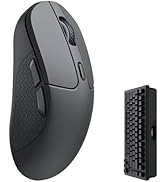
The Keychron M6 Silent Wireless Gaming Mouse combines cutting-edge 1000Hz polling with Bluetooth 5.3 and 2.4GHz wireless modes, powered by a high-precision PixArt 3395 sensor up to 26,000 DPI. Its ultra-light 86g ergonomic design and fully programmable buttons via browser-based software make it a versatile powerhouse for professionals and gamers alike.






| ASIN | B0FP2D8DW6 |
| Batteries | 1 12V batteries required. (included) |
| Best Sellers Rank | #98 in Computer Mice |
| Customer Reviews | 4.3 4.3 out of 5 stars (259) |
| Date First Available | August 28, 2025 |
| Item Weight | 11.3 ounces |
| Item model number | M6S |
| Manufacturer | Keychron |
| Package Dimensions | 7.72 x 5.71 x 2.44 inches |
J**Z
Great value for the features.
This is a great "do everything" mouse. Productivity work is excellent, easily customizable, and you can do it all on a web browser, so no software needed. I mapped the side scroll wheel to the left and right arrow keys for music production and it works insanely well. I love the tactility of the side scroll. I've had it for 2 months and charged it only once last week at around 40% while using it at least 4 hours a day. And up to 6-7 hours on the weekend using the dongle. And you can use it while it's charging (imagine that Apple). The mouse is really light which didn't bother me as much as I thought it would. The clicks are quiet, and feels really comfy in my hand. I used it for gaming in MOBAS and it's great. Biggest downside, is that there's only 1 profile. So if you want to map different buttons for different uses, it doesn't seem like you can. Not even on the software. Kind of a bummer but not a deal breaker for me. Either way. This is a solid mouse for the cost. Yeah you'll get a more premium experience with an MX master, but this is like 85% there at a quarter of the cost.
K**O
More than worthy replacement for MX Master 3
Completely replaced my MX master 3 (non-silent). First impressions was that it's all plastic compared to the logitech mouse, lighter and feels less sturdy, but no issues so far w/ heavy use. Clicks feel a bit unstable compared to some of the silenced MX masters I've tried, and the infinity scroll lock is a bit unwieldly. However, very reliable, no inputs ever dropped on me. Have even used it for non-comp gaming with little to no noticeable lag (on USB dongle, forget about bluetooth). Trades the thumb button (switches Destkop 1-2) with a left/right rocker on the middle mouse, the latter of which offers more functionality imo. Huge benefit exists in the software, which can be accessed from a browser rather than an app. Mouse configuration exists entirely its own memory, which is huge. Can't believe this is not more common.
S**E
Great Mouse - But Quite Slim
Love the free scroll wheel, buttons are muted rather than loud and clicky, and no issues with connectivity and there is little to no noticeable lag or latency. Battery life is solid as well. Only downside I’ve found is that, coming from a Logitech Triathlon, it is a bit too slim for my hands to the point of being a bit uncomfortable. It is also very light - which can be a positive or a negative depending on your preference. Overall, solid option at a good price.
P**R
Ergonomic, good battery, quiet
Great mouse, no complaints. Wireless works very well, browser program is easy to use and effective. Quiet clicks that don’t feel too soft (good tactile feedback) but don’t click loudly. Ergonomics are good for bigger hands. Incredible battery life. Perfect for the casual gamer who also uses computer for spreadsheets/word processing or other productivity. 5/5
L**H
Good not great
This is overall a good mouse overall. I used it for a full day of CAD work. The issue was the scroll wheel, it required a heavy press and did not perform as well as I hoped. The build quality is nice with the exception of the scroll wheel, it has almost a rattle or grainy feel to it.
L**.
Keychron PixArt 3395 1K (All Silent) vs MX Master 3S
Important note before unboxing ------------------------------------- Don’t let the box fool you. Keychron seems to have some printing errors that they really should fix, otherwise they will face many unnecessary returns. In my case, the box says M6 LITE, SKU M6S-A1, and lists the PixArt 3311 sensor, including all specs for that sensor—which is incorrect for my mouse. Because of this, I almost returned it and even opened a support ticket. They suggested I try the mouse first. After testing, I realized the mouse was actually the PixArt 3395 1K version. Here’s how I confirmed it: - In the online Keychron Launcher, I was able to set DPI up to 26,000 - The firmware version installed is exclusive to the PixArt 3395 1K So yes, it was clearly a printing error (come on, Keychron 😅), and I decided to keep it. Why I started looking for an MX Master 3S replacement ---------------------------------------------------------------- There were two main reasons: Right click issues: 1. The right button started to become unreliable. Sometimes it wouldn’t register clicks depending on how the button was pressed. 2.Terrible 2.4 GHz connection: The wireless connection on the MX Master 3S is a nightmare unless the dongle is less than 10 inches from the mouse. During work, it would randomly become laggy. Turning it off and on temporarily fixes it—but expect the issue to come back. After discovering that the same 2.4 GHz dongle is used for the MX Master 4, I concluded this is likely a protocol issue. That’s when I decided to try another brand. Why the Keychron PixArt 3395 1K is better than the MX Master 3S (and possibly MX Master 4) ------------------------------------------------------------------------------------------------------------- - Much smoother gliding than the MX Master 3S. I use a PU leather desk mat, and the difference is huge—mouse movement feels far more pleasant. - Great materials: The Keychron plastic feels premium and solid. In contrast, the rubberized coating on the MX Master started peeling after about one year. - Left & right click buttons: Very different from standard mice. They have more travel and better tactile feedback, which I personally love. - Middle button: Hard to describe, but noticeably easier to press than on the MX. - Side buttons: Forward and back buttons are much easier to press compared to the hard MX Master 3S buttons. - Weight: It feels significantly lighter—almost weird at first—but I ended up really liking it. - Polling rate: 125 Hz (MX) vs 1000 Hz (Keychron). Pointer feels softer and more responsive - Connectivity: Keychron: 5 devices (3 Bluetooth + 2.4G dongle + wired) MX Master: 3 devices (2 Bluetooth + 2.4G dongle) The Keychron 2.4G connection is stable 60 inches away with no lag. - Software: No more glitchy software. Keychron Launcher is free, web-based, and works flawlessly. Being picky ------------- - The metal scroll wheel on the MX Master 3S rolls more smoothly. - The side wheel on the Keychron feels a bit stiff when scrolling.
S**N
Really nice mouse, especially for the price!
The scroll on the horizontal scroll wheel was really slow, and there doesn't seem to be a way to adjust it in the keychron web app. BUT you can (in windows) go into control panel and turn the speed up on the horizontal scroll to fix it. The shape of the mouse feels fantastic. Its really comfortable, and all the buttons are easily reachable without contorting my hand. Its a lot lighter than I'm used to, but I've gotten used to it pretty quickly. It might be a bit small for someone with big hands, so if that's the case, I'd try to get a hold of one to see if its comfortable first. The buttons are also very silent, which threw me off a bit, but I can see where that's a benefit if you're in an office environment.
H**N
The mouse is perfect for me, I wanted an MX Master however I cannot deal with the low polling rate for gaming, for me this is the next best thing. The mouse wheel takes some time to get used to as it scrolls either notch less or semi notch less but is great now I'm used to it. Button clicks are quiet and soft which is perfect for me, if you're used to normal gaming mice with hard loud clicks this will be a bit jarring.
K**R
This is basically an alternative to Logitech MX Master mice, but with a higher polling rate for those who want productivity and gaming features together. I've got the 8K version, as it was the only one with the metal scroll wheel. With a price tag of $140 this is an expensive mouse. My main problems: * Mushy left and right buttons with low feedback * Left and right buttons are not silent and also have noticeably different noises. My left button sounds way louder and cheaper * The scroll mode selector button should be pressed hard to change mode * Scrolling does not wake the mouse up so reading a long documents requires constantly moving the mouse to stop it from going into power save * Plastic side scroll wheel that is difficult to use * The overall shape of the mouse is uncomfortable for me * Keychron refers warranty to the supplier rather than upholding their own product
C**Z
Es un muy buen mouse, basicamente es plug & play, no es necesario instalar ningun software para configurarlo (a menos que necesites algo especifico) por lo que me sirve para la computadora del trabajo, es cómodo, liguero, con buena conectividad sin embargo los materiales a pesar de verse bien no se sienten de lo mejor, por el precio esperaba unos materiales no top pero mejores. De todas formas lo recomiendo al 100%
J**G
What can I say? 1000Hz polling rate is so much better. I previously was using a Logitech MX Master 3s for the sole purpose of the side/horizontal scroll wheel and ergo shape. But the non-replaceable rubberized coating degrading over time and very low polling rate of 125Hz was taking away my work efficiency. I work from home. At first with the low refresh rate monitor I got from work was working fine with that one, as soon as we got hardware upgrades, it was very noticeable and the Logi+ Option software sucks big time on my work Mac. lol But the M6 solved all of my Logitech issues: PROS: -no more icky rubberized coating -higher polling rate -browser-based launcher for mouse settings, no need to rely on slow Logi+ Options software that works 50/50 on Macs -much lighter -can finally game better on my Mac with just one mouse instead of bringing another "gaming" mouse. when I have to travel for work and my Mac is the only thing that I can game on(Timberborn) CONS:(at first, but have gotten used to the M6 after some time) -a little to slippery(bought off-brand replaceable rubber grip tape) -middle scroll wheel feels looser/cheap compared to MXSM3S) -middle scroll wheel button switcher feels cheap and awkward?(used to MXM3S button seamless button switcher) -side scroll wheel short distance(fixed with a MacOs App)
H**N
Good so far, not worth the price. Side scroll feels cheap material quality. Connectivity is good with overall solid performance
Trustpilot
Hace 2 semanas
Hace 4 días