We remain fully operational. Our teams are working around the clock to ensure your deliveries continue safely.

Descargar la aplicación


Servicios al cliente
Sobre nosotros
Copyright © 2025 Desertcart Holdings Limited
Descargar la aplicación
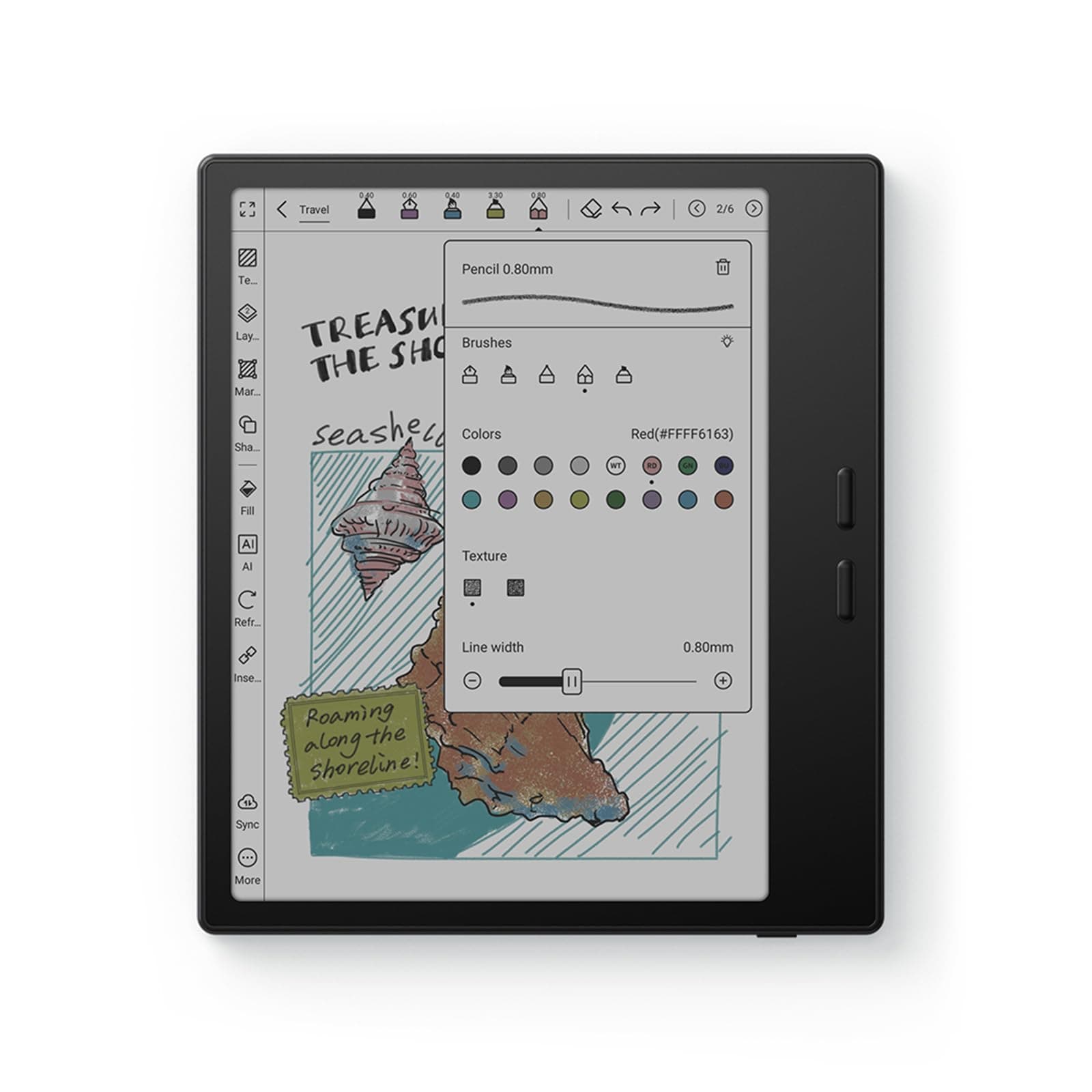
📚 Elevate your reading game with color, control, and Android freedom!
The BOOX Tablet Go Color 7 Gen II is a sleek 7-inch color E Ink tablet featuring a 1680x1264 Kaleido 3 display with 4096 colors, powered by an octa-core CPU and 4GB RAM running Android 13. Designed for avid readers and digital note-takers, it offers multiple refresh modes to optimize display quality, ergonomic page-turn buttons, and extensive app compatibility with 64GB storage. Its 2300mAh battery supports weeks of use, making it the perfect companion for professionals who demand a premium, eye-friendly reading experience on the go.


| ASIN | B0F58ZHCX2 |
| Active Surface Area | 7 inches |
| Additional Features | E INK |
| Best Sellers Rank | #3,819 in Electronics ( See Top 100 in Electronics ) #86 in Computer Tablets |
| Brand | BOOX |
| Built-In Media | Device |
| Color | Black |
| Compatible Devices | Stylus Pen |
| Connectivity Technology | Wi-Fi |
| Customer Reviews | 3.8 out of 5 stars 245 Reviews |
| Display Type | E Ink |
| Item Dimensions L x W | 6.14"L x 5.39"W |
| Item Weight | 0.39 Kilograms |
| Manufacturer | BOOX |
| Model Name | Go Color 7 Gen II |
| Model Number | Go Color 7 Gen II |
| Native Resolution | 300 dpi in Black 150 dpi in Color |
| Operating System | Android |
| Pressure Sensitivity | 4096 Levels |
| Screen Size | 7 Inches |
| Special Feature | E INK |
| Specific Uses For Product | Reading, Drawing, Note-taking |
| Warranty Description | 1-Year non-hardware warranty |
J**K
Amazing device, but definitely not for everyone.
I've been using this "tablet" for a while and I love it, but I was looking for an e-reader that happens to run Android, and that may put me in the minority. So, what is this not good for? Technically, by name, this is a tablet, but I wouldn't call it that. You are not going to watch movies or YouTube videos on this. You can browse the web in a pinch, but a lot of content will seem very unusual because of the screen's refresh rate. Most of your apps will not work very well, also because of the screen type. You will not be playing anything but the most basic games, again because of the screen, and because the SoC is very lower power in order to get better battery life. So, what IS it good for? Reading!!! It comes with its own book store/app, but you can also install Kindle, Goole Play Books, Libby, news apps, whatever you want to read. The colors are a bit muted, so if you're a fan of visual novels, you might be unimpressed, but it works just fine for that otherwise. The screen is pretty good. Not quite as good of detail as my last Kindle, but the backlight has more configuration. It's nice and light, and I really like the page flip buttons. Technically, they're volume buttons, but they can be configured to flip pages in apps I use. The battery life has been great for me. I charge it about once a week, but I could probably wait 2-3 weeks. It makes use of pretty aggressive power saving features to enable that battery life while running Android. Expect to wait close to a minute for it to start up when you want to use it.
L**A
Nice E-Reader with cool features
1. Yes, the name states color e reader. But keep in mind this picks up certain a colors. It won’t be as vivid as your tablet or phone. The colors appear more mute see image! . 2. Screen was great no issues, no specks! 3. If you’re having issue with ghosting. The settings I used had the least amount of ghosting + good quality! * Remember to do this for EVERY APP! Steps : Open E-Ink Center Color mode : optimal Refresh mode : speed Refresh mode -> More A pop up box will appear with two tabs For HD : Turn ON -> System Refresh Drag to refresh -> set to 2S When scrolling use : HD Current app : set to 5 Animation Filter -> set to 20 For Speed : Anti Flicker -> set to 2 4. Has two speakers, sounds pretty nice! 5. Semi-User friendly… you might need to watch a few TikTok’s for some “how to” 6. It’s android based so you can download other apps! Like Libby, kindle, Spotify 7. It has BooxDrop, which is (your own) personalized QR + Link to upload stuff from your laptop or cellphone (images, files etc)
A**N
Great if you love tinkering
First, let me preface that I'm a power user. I only really had 2 options when upgrading my Kindle: 1) purchase the most current Kindle and figure out how to jailbreak it to run Alpine Linux (and hope it doesn't get bricked at some point down the line), 2) get an Android based e-reader. The latter being a more turnkey solution, I looked at the offerings from Boox. As luck would have it, the v2 of the Color Go happened to be launching the same week that I started seriously considering making a purchase, so the timing was impeccable. With regards to the device itself, it feels pretty robust. The weight and feel of it is premium to my hands. The large bezel on the side makes it very easy to hold and I do like the texture on the back of the device for even better grip and feel. While the weight makes it feel more substantial than my outgoing Kindle, it's still nowhere near heavy enough for me to feel uncomfortable during 4-5 hour reading sessions. I think my own gripe with the device is that the volume buttons feel slightly loose in the housing, but this is being nitpicky. Battery life so far has been acceptable to me. With stock settings the device completely shuts down after 10-15 mins. At these power settings, the device easily lasts weeks between charges. Since the startup time of the device is quite long (~1 min), I only shut the device down after 8 hours of idling, since I don't always have long reading sessions. Oftentimes, I'll read a few chapters in between other activities, and doing this setting allows me to hop straight back in within 1-2 secs. Even at this setting I'm getting about a week of life. When it comes to actually using it, the glass of the screen has a nice finish and the touchscreen is plenty responsive for an e-reader. The resolution seems more than adequate for the content I consume. There are lots of refresh modes and a few toggles with regards to contrast and vividness, and I've found that each type of content has its own optimized setting. Manga: There's enough resolution and contrast to where this reads almost like an actual tankoban. Only downside is when using Viz or ShonenJump app, there's no way to map the volume buttons to page turn. I believe this is an app limitation, not a device limitation. My manga through the Kindle store works just fine. Comics: I was hoping to use this to catch up on back issues from series that I've fallen behind on. This is probably where the device is the weakest. The colors are muted and cause the screen to be very dark. I'll either have to turn up the brightness really high (which causes even more washing out of the color), or use an external light source. However, for my use case, this is still completely passable as the only other alternatives are to use a bulkier Android tablet, or reading from the actual raw books instead. This is mainly where I'm taking off a star, since this was my primary reason for going with color instead of black and white. Ebooks: Being that the device runs on Android, I have access to literally everything. Over the last decade, I've amassed a collection of DRM ebooks from different marketplaces, as well as random epubs and pdfs. I can read my Kindle books through the Kindle app, Google books through Google Books, etc.. I also have a Calibre server at home which I can easily access using this device. I'm able to open all of my books using its respective native app. Compared to other devices, there's a fair amount of customizability that you're able to do. The device is great once you figure everything out, and it's somewhat required to get the most out of it. That said, I suspect that people looking for a turnkey ereader for all of their content might get frustrated. As an Android and Linux user, I'm no stranger to any of this, and it's right up my alley. Last note, I had no desire to get the pen for this device since I have other devices for that. I have no idea if this feature is any good.
T**K
Terrible ereader
I really wanted to like this device. An Android-powered e-reader with access to Play Books, Libby, Kindle, and other apps sounds excellent in theory and offers a level of flexibility most dedicated e-readers lack. Unfortunately, the execution falls short. The device is extremely slow—consistently lagging to the point where even basic navigation feels cumbersome. Page turns, app launches, and general interactions take far longer than expected, which significantly impacts usability. Ghosting is another major issue. The screen artifacts are persistent and distracting, to the extent that they interfere with reading. Adjusting the display settings provides only minimal improvement, and the problem remains pronounced enough to make the device difficult to use comfortably. While the concept is compelling, the performance and display issues ultimately undermine the experience. I may consider trying a different brand, but this particular device did not meet expectations.
L**R
Current state of the art in e-ink readers
I was a Boox early-adopter. Their products have all been over-priced, laden with bad custom software that you can't remove, and misguided, but ... this is still hands-down the best reader ever. Most importantly, it is insanely lightweight. With the textured back and side-handle, holding it up for hours is not an issue. The page-turning buttons are great, but, because the Boox UI software is so awful, you'll have to figure out how to repurpose them from volume to page-turning or scrolling, but at least you can. It's very unfortunate, but it is worth the hours it takes to figure out the settings through the awful UI. I use it almost exclusively to read online articles (news & research) with a combination of Feedly+Instapaper. I don't use it for books.
J**S
Big disappointment
First, while many of other Onyx Boox tablets are compatible with 3rd party EMR-compatible pens, someone made the decision that for these Boox Go 7 tablets, they will use USI 2.0 pens instead of EMR pens. For those not familiar with USI 2.0 pens, they have many disadvantages. (1) They have a hard plastic end, so it's like hard plastic writing on glass, not a very comfortable writing experience. With EMR pens with their rubber tips, they have a very smooth feeling when writing. Perhaps I can find a screen protector which will help with the feeling of plastic on glass, but if it needs a screen protector to improve the writing experience, they should have included it with the tablet. (2) USI 2.0 pens need to be charged. That makes EMR pens amazing because you don't have to worry about charging them or turning them one. With the USI 2.0 pens, you have to make sure it is charged and then make sure it is turned on. (3) Many EMR pens support the back end of the pen acting like a eraser. This doesn't appear to be the case with the Boox Go 7 tablet and USI 2.0 pens, (4) I bought a 3rd party USI 2.0 pen and while it "works", it actually doesn't leave a smooth line when I am writing, but it leaves a series of dots. Ugh. Perhaps the pen I am using is not sending a continuous current through the tip, so the tablet thinks I am lifting and positioning the pen on the screen multiple times while writing. The tablet should know it's unrealistic for a user to be lifting and placing the pen back on the screen so many times in a short period of time, so it should treat this as a continuous line or at least have an option to design the behavior this way. These are just the negatives that have to do with the pen. One reason I was attracted to Boox tablets was because it is running Android and actually comes with Google Play Store. My use case for this tablet is to make it a place for my 93-year old mom to write down notes. For my 93-year old mom, the UI is not intuitive. Therefore, I wanted to actually run some other Android apps like a customized launcher. And while the normal Androids setting is not accessible through what is provided by Boox, I can load a launcher which provides access to the standard Android settings panel. From there, I can override the default launcher... But guess what? After a little bit of time, it reverts back to the Boox launcher. Ugh. In addition, when I load other apps, from the customized launcher, the apps are no longer available. In Google Play Store, after installing, it provides a button to enable the app. After enabling the app, after some time, they get disabled again, and I must enable again in Google Play... Or use the Boox launcher to launch the apps. This also makes widgets and other programs which run in the background useless because eventually they will be disabled. Since the use case is to have this as a tablet for my mom, the font settings available through Boox settings were insufficient in making this a tablet which my mom can read. However, through the Android settings, there is more flexibility in getting the right fonts, including the ability to make the default fonts bold. And finally, the tablet seems unresponsive at times, like when I want to scroll to see further options in an app, it just completely ignores my gestures. I have no idea why. Also, to make the screen bright enough for my mom, I am setting the maximum brightness but it drains the battery so quickly. This basically defeats the purpose of going to an e-ink tablet to reduce the frequency of needing to charge the tablt. So in summary: The negatives: 1. USI 2.0 pen instead of EMR pen - Feeling of pen on screen is not a comfortable experience - Pen has to be kept charged and turned on vs EMR pen - Pen is leaving dots on screen instead of continuous line 2. Cannot use custom launcher, always reverts back to Boox launcher 3. Android apps can be installed but are continuously being disabled 4. Out of the box font settings are insufficient for someone with poor eyesight 5. Setting brightness high enough for someone with poor eyesight drains the battery quickly The nice part of the tablet is the form factor. I like that there is one bezel which is used for holding the tablet. It's also very lightweight like many e-ink tablets are. If someone though were to invent a case which is similar in concept where a wide bezel on one side, then there'd basically be no reason to try to use a Boox tablet for my particular use case.
C**L
Boox is the best E-reader!
I am loving my Boox! I actually bought a Kindle Colorsoft and Bigme B7 color to try them all, and I've returned them. These are the pros and cons. Kindle Colorsoft pros: -Longest battery life. -Color ink. Cons: -Kindle only options so no other reading apps like Libby, Hoopla, or Kobo. Bigme pros: -Runs on Android, so I was able to have all my reading apps in one place. -The best color e-ink out of them all. -Loved the buttons. -Came with pen and case. Cons: -Battery was the worst out of them all. -Doesn't have very many options for accessories or cases. Boox pros: -Runs on Android, so I was able to have all my reading apps in one place. -Battery life is mid, but it has an auto power off option after inactive use for an hour, which I love! -Has access to multiple accessories like a clear case and charging charms, similar to Kindle. -Loved the buttons. Cons: -Has the most Ghosting, but you can set one of the gestures as the refresh button, so it's still not a huge con.
B**I
Needs improvements, but still a great device once you get used to it.
I really like my Boox Go Color 7 gen ii, however, If you want something with easy set-up and an intuitive user experience then this is not the device for you. I usually tinker with all the settings every time I get a new computer or cell phone, so I expected to do the same with this, it still took me a full week to get the device setup in a way that worked for me. I even considered returning it. Main things to know: - not intuitive - Color images are muted and best viewed under direct sunlight. (color images improved with update v4.1) -You can (and will need to) customize the optimization settings for each app individually. -You will need to change the refresh mode to best suit what you are looking at. HD is great for images, but absolutely horrible for scrolling. Speed works for most things, but does not have the clearest images. -Ghosting is an issue. I have one of my physical buttons set to refresh, plus my screen refreshes after so many taps, because the screen will get cluttered very quickly with ghost images. -Night mode isn't very good and is specific to each app (unless you just choose to invert the colors), but using the normal mode is still better than reading on my phone. -The Control Center is a pull down menu and the easiest way for me to adjust brightness. You can set it up to change brightness by running a finger up or down the screen, I like the drop-down menu better. The device is setup with two dropdown menus that are at the top in different locations: Notifications (on the left top) and Control Center (on the right top) - the pen feature is good for notes, bad for art, and a little weird for writing in books (you have to save each page of a book separately or what you wrote just follows you to the next page). Saved page goes to your gallery. The notes do not stay in the book. -This device is not a replacement for a tablet or computer. Best used as an e-reader, but you can download any app you want from the playstore. My reading has increased significantly due to my e-reader, and I'm not playing on my phone before bed. I like the size of the device and its lightness. Hopefully they improve future models.
Trustpilot
Hace 2 semanas
Hace 2 meses