We remain fully operational. Our teams are working around the clock to ensure your deliveries continue safely.

Descargar la aplicación


Servicios al cliente
Sobre nosotros
Copyright © 2025 Desertcart Holdings Limited
Descargar la aplicación


🔥 Power Meets Precision: Dominate Your Game & Workflow
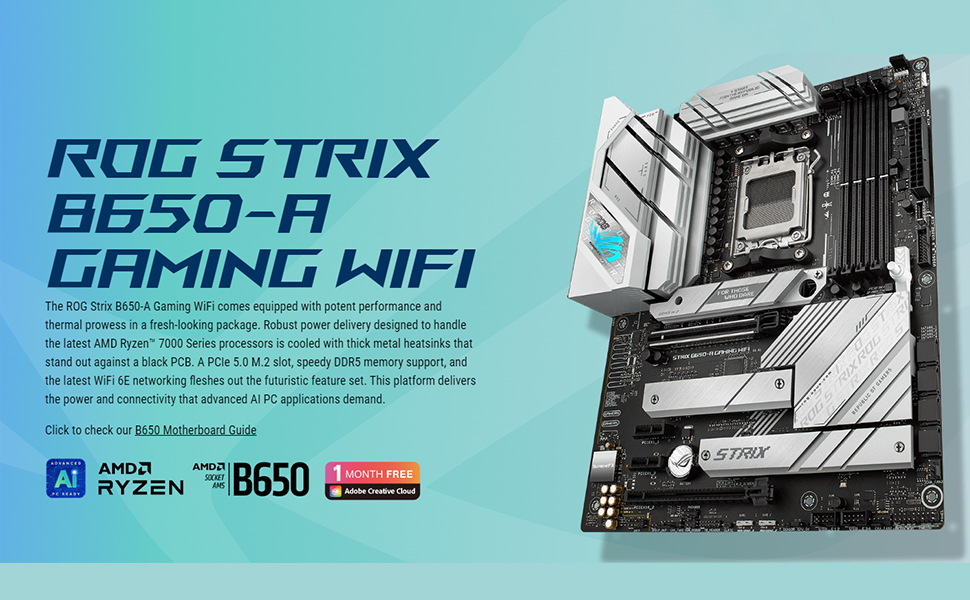
This Micro Center bundle pairs the AMD Ryzen 9 9900X 12-core, 24-thread processor with the ASUS ROG Strix B650-A Gaming WiFi 6E motherboard, delivering cutting-edge performance with 5.6 GHz max boost, PCIe 5.0, DDR5 memory support, and advanced connectivity options including Wi-Fi 6E and Bluetooth 5.2. Designed for gamers and professionals seeking ultra-fast, reliable computing with optimized thermal management and extensive expansion capabilities.


| ASIN | B0DGPWKRXZ |
| Best Sellers Rank | #88 in Computer Motherboards |
| Brand | Micro Center |
| CPU Model | AMD R Series |
| Chipset Type | AMD B650 |
| Compatible Devices | AMD Ryzen 7000 & 9000 Series Desktop Processors |
| Compatible Processors | amd_a_series |
| Customer Reviews | 4.5 4.5 out of 5 stars (25) |
| Graphics Card Interface | Integrated |
| Main Power Connector Type | 8+4 pin |
| Manufacturer | Micro Center |
| Memory Clock Speed | 7600 MHz |
| Memory Slots Available | 2 |
| Memory Storage Capacity | 192 GB |
| Model Name | 9900XROGSB650AGWF |
| Model Number | 9900XROGSB650AGWF |
| Number of Ports | 9 |
| Platform | Windows |
| Processor Socket | Socket AM5 |
| RAM Memory Technology | DRAM |
| Total Number of HDMI Ports | 1 |
| Total PCIe Ports | 1 |
| Total SATA Ports | 4 |
| Total Usb Ports | 9 |
| UPC | 618996779154 |
R**T
Title: Runs Smooth and Fast — Micro Center Knows What They’re Doing
I’ve been building and repairing systems for years, and this AMD Ryzen setup from Micro Center has really impressed me. The performance is rock-solid, temps stay low even under load, and it fired right up without any issues. Micro Center packaged it perfectly and had it ready when they said they would. You can tell these folks know their stuff — no nonsense, just good hardware and service. Definitely a five-star product from start to finish.
M**R
Don’t forget to use the thermal paste!
Great motherboard absolutely love the bundle option very easy to install and labeled very well on what goes where.
R**T
Great motherboard, the first startup could take a lot longer than expected, but only the first one
Outstanding motherboard. Extremely easy to install and set up. I really like the release button for the video card. The only thing to pay attention to is the initial startup can take an extremely long time depending on how much RAM you put in this system. On the initial startup it does a ram check that could take up to 5 minutes. Depending on how much RAM you put in. This is only during the initial startup. After that the computer starts normal.
A**L
Excelente tarjeta madre
C**R
I love multi core proccesors
Hello NSA please spy on me as I am a CIA officer
G**M
Frustrating to build build
Building this combo was very frustrating, and I'mplanning on returning it. I'm not a novice at this, built a number of machines over the years, but we could not get a POST after we built it. Everything lit up, the fans were spinning, but no POST, nothing but black screens. After extensive troubleshooting found an article that said the RAM has to train for 5 or so minutes before the system boots. Its set that way in the BIOS by default. So be aware, let the system sit for 5 minutes or more to let the DR5 RAM 'train'. Now its up and running, but it takes the BIOS five minutes or more every time to boot which is frustrating, and even worse, it says there are no drives visible. There are 4 sata SSD drives and one sata spinning drive that all worked just fine on my old motherboard. UPDATE: Solved the drive issue - and the boot issue. The boot issue was a defective DDR5 16GB stick - brand new out of the box, and it locked the system up trying to 'train' it. Once that stick was removed system stopped doing the lengthy RAM checks. Sent the RAM back. The drive issue was caused by the power supply. We had to change out all the power cables to the new cables that came with the new 1000W power supply we installed. The other brand of power cables - even when they are an exact match on the plugs, did not work at all with the new power supply. Once all the cables were changed, the drives became visible. That's an issue with SSDs, they don't spin, so we didn't know they weren't powered. We reused the old cables because they were only 2 years old, and seemed better made, but something about them makes them incompatible with the new unit. Upgrading my review to 3 stars now. Will update again once it's been running a while.
A**R
Cannot connect to the internet
Computer runs lightening fast out of the gate BUT it’s been 24hrs since I’ve powered on my new build and I’m still not able to get the lan or WiFi to work. The box was sealed on the mother board but I got a message that new processor was being installed and it asked me if I wanted to keep the same settings when initial power on. Also windows says a virtual network adapter was installed not allowing me to connect to the internet. All signs that the motherboard was previously used… I’m about to take my tower to microcenter and leave them to troubleshoot shoot it. Never ordering computer parts off Amazon again. Actaully after reading reviews I’m certain I got a bad board with a broken either net port. Crappy asus board. Guess I’ll be going back to gigabyte or msi next time
G**G
dud
Motherboard was a dud
Trustpilot
Hace 1 mes
Hace 2 semanas