We remain fully operational. Our teams are working around the clock to ensure your deliveries continue safely.

Descargar la aplicación


Servicios al cliente
Sobre nosotros
Copyright © 2025 Desertcart Holdings Limited
Descargar la aplicación
Buy anything from 5,000+ international stores. One checkout price. No surprise fees. Join 2M+ shoppers on Desertcart.
Desertcart purchases this item on your behalf and handles shipping, customs, and support to Ecuador.
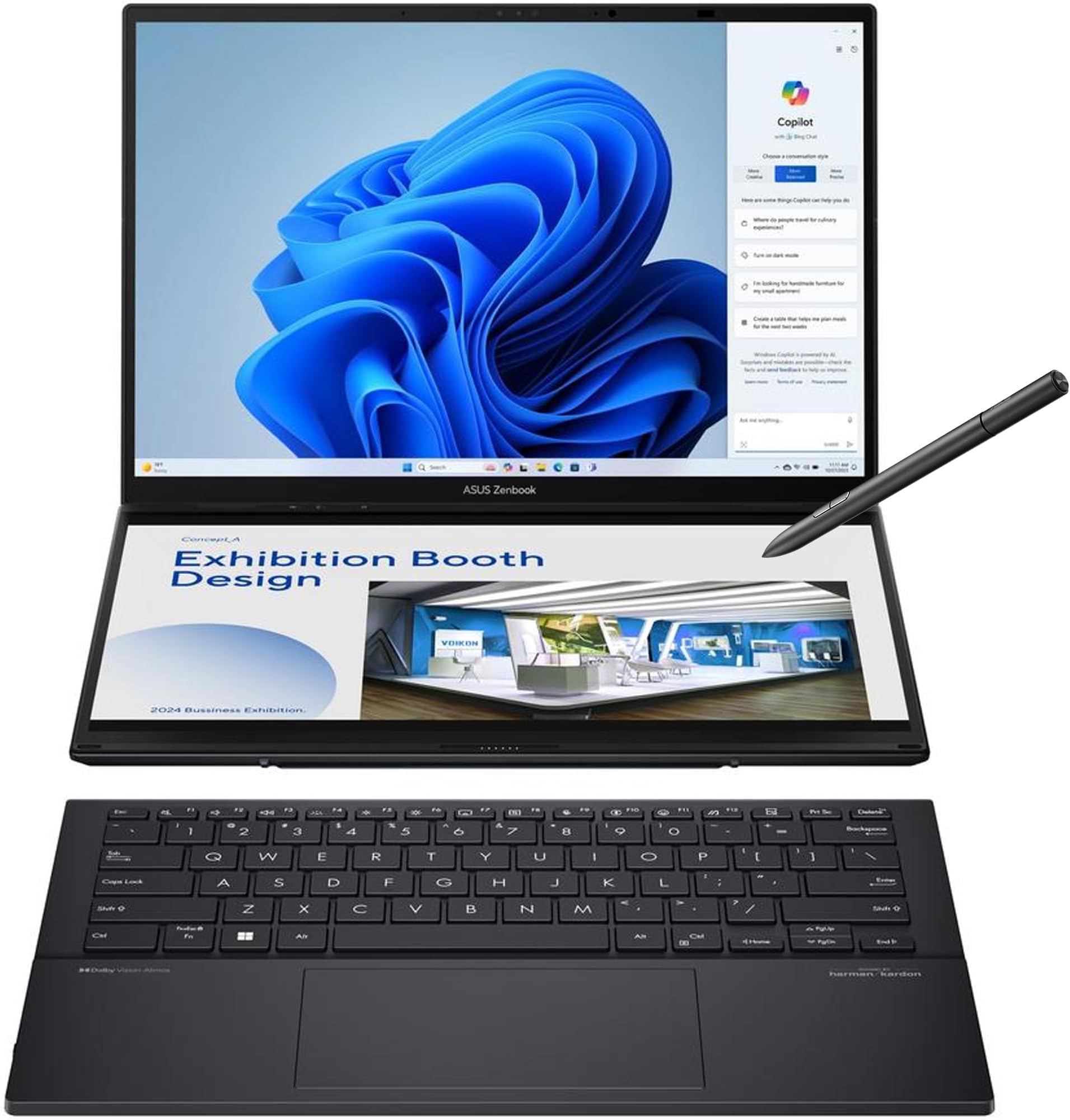
Relax, you can DUO it. Introducing the ASUS Zenbook DUO — a revolutionary dual-screen laptop with two 14-inch OLED touchscreens, a detachable full-size Bluetooth® magnetic keyboard that charges when attached and a built-in kickstand. Expertly combining multitasking versatility with superb mobility, the dual displays instantly expand your workspace up to 19.8 inches. Outstanding performance is assured with the AI-powered Intel® Core™ Ultra 9 285H processor and 32GB LPDDR5x memory, plus 1 TB PCIe® 4.0 SSD. Paired with dedicated smart software, intuitive gesture control and a 75Wh battery, the easy-to-use Zenbook DUO maximizes productivity with zero fuss. Review: A worthwhile upgrade from my 4 year old Zenbook Duo, the flexibility can't be beat - For the past 4+ years, I have been using the first generation Zenbook Duo laptop that had the second screen that was much smaller and built into the top of the keyboard when the keyboard and both screens formed a one-piece laptop. This model took some getting used to due to its flat keyboard style and position of the trackpad compared to the old model, but having the large second screen made up for that. The laptop is simply gorgeous. The 3K OLED screens image quality are perfect and the flexibility in positioning the screens to how you want to use them can't be beat by any other laptop out there right now. The laptop is fast, and MUCH lighter than the old Zenbook Duo I had. I was surprised at how light the whole thing was with two screens and a keyboard nicely stacked and docked together. The 120Hz monitors have nice, smooth motion during video and even window animations compared to a 60Hz. The 32GB of RAM and 1TB hard drive are more than adequate for a powerful laptop like this. I do wish it came with Windows 11 Pro instead of Home though. As you can see in my image, I opted to use my screens stacked and I attached a dual-monitor mount to the top monitor so I have a total of four monitors on the small desk I use this laptop on when I am not using my desktop PC. The USB4 port on the laptop allowed me to attach a hub with another USB4 port on it, which I attached the dual monitors to for the two additional displays. This setup helps me mimic my desktop setup where I also have four displays. Since I don't move this laptop around much or travel with it, I opted to swap out the keyboard with a Logitech MX Keys Mini keyboard since it fit better on my desk, wasn't as flat as the Asus, and didn't have the trackpad since I prefer to use a mouse (a Logi MX Master 3S). The setup is now exactly what I wanted. This purchase was well worth the money for this laptop. It is a fantastic upgrade from my old Zenbook Duo. Five stars all the way. Review: Best Productivity Tool - The ASUS Zenbook Duo UX8406 is not just a laptop; it’s a game-changer that redefines what portable computing can be. With its innovative dual 14-inch 3K OLED touchscreens, powerful Intel Core Ultra processors, and a sleek, versatile design, this laptop is a dream for multitaskers, creators, and professionals alike. Intel Core Ultra 9 285H processor with an AI Boost NPU, 32GB of LPDDR5x RAM, and a 1TB PCIe 4.0 SSD, handled everything I threw at it—from video editing to light gaming—without breaking a sweat. The Intel Arc graphics provide a surprising punch for creative tasks, though this isn’t a gaming rig. The laptop’s AI capabilities shine in tasks like real-time video effects and optimized power management, making it a forward-thinking choice for the AI-driven future. Pros: Dual 14-inch 3K OLED touchscreens are gorgeous and versatile Powerful Intel Core Ultra 9 with AI capabilities Impressive battery life for a dual-screen device Detachable keyboard and stylus enhance flexibility Sturdy build with a clever kickstand Cons: Speakers lack depth Slightly heavier than single-screen ultraportables (but worth every extra for the productivity!) Reflective screens can be tricky in bright light (I use Matte screen protectors and this is a great addition) This is my everyday laptop for work and for home. I have a separate gaming pc with an RTX GPU. That said, this can run GTA V Enhanced no problem and even Stalker 2 at low settings. This by far is Asus's best creation so far for productivity yet.


| ASIN | B0DPQ35KMW |
| Audio Output Type | 1 x 3.5 mm Headphone/Microphone Combo Jack |
| Audio Recording | Yes |
| Audio features | 1 Speaker, Smart Amp Technology |
| Automatic Backup Software Included | CapCut, MyASUS, ScreenXpert, GlideX, 1-month trial for new Microsoft 365 customers (Credit card required) |
| Battery Cell Type | Lithium Ion |
| Battery Life | 12 Hours |
| Best Sellers Rank | #1,995 in Computers & Accessories ( See Top 100 in Computers & Accessories ) #177 in Traditional Laptop Computers |
| Bluetooth Version | 5.4 |
| Bluetooth support? | Yes |
| Brand | ASUS |
| Built-In Media | Powercord & Adapter, Sleeve, UX8406CA-PS99T, User Guide |
| CPU Model | Intel Core Ultra 9 |
| CPU Model Generation | 13th Gen |
| CPU Model Number | INTEL ARL H Core™ Ultra 9 |
| CPU Model Speed Maximum | 5.4 GHz |
| Cache Memory Installed Size | 24 MB |
| Chipset Type | Intel C627 |
| Color | Inkwell Gray |
| Compatible Devices | Keyboard |
| Connectivity Technology | Wi-Fi 7, Bluetooth 5.4, HDMI, USB, AUX |
| Customer Reviews | 4.5 out of 5 stars 231 Reviews |
| Display Resolution Maximum | 2880x1800 Pixels |
| Display Technology | Glossy |
| Display Type | OLED |
| Form Factor | Notebook |
| Graphics Coprocessor | Arc Graphics |
| Graphics Description | Integrated |
| Graphics Ram Type | DDR5 SDRAM |
| Hard Disk Description | SSD |
| Hard Disk Size | 1 TB |
| Hard-Drive Size | 1 TB |
| Human-Interface Input | Keyboard |
| Item Dimensions L x W x Thickness | 12.34"L x 0.57"W x 8.58"Th |
| Item Weight | 3.64 Pounds |
| Keyboard Description | Chiclet |
| Keyboard Layout | QWERTY |
| Lithium-Battery Energy Content | 75 Watt Hours |
| Manufacturer | ASUS |
| Maximum Display Brightness | 500 Nit |
| Memory Clock Speed | 5.6 GHz |
| Memory Slots Available | 1 |
| Memory Speed | 7467 MHz |
| Model Name | Zenbook DUO |
| Model Number | UX8406CA-PS99T |
| Model Year | 2024 |
| Native Resolution | 2880 x 1800 pixels |
| Notebook Pointing Device Description | Keyboard and Touchpad |
| Number of Ports | 5 |
| Operating System | Windows 11 Home |
| Other Special Features of the Product | Lightweight |
| Processor Brand | Intel |
| Processor Count | 9 |
| Processor Series | Intel Core Ultra 9 |
| Processor Speed | 5.4 |
| RAM Memory Installed | 32 GB |
| RAM Memory Technology | LPDDR5X |
| RAM Type | DDR5 RAM |
| Ram Memory Maximum Size | 32 GB |
| Refresh Rate | 120 |
| Resolution | 2880 x 1800 |
| Screen Size | 14 Inches |
| Specific Uses For Product | Personal |
| Total Number of HDMI Ports | 1 |
| Total Thunderbolt Ports | 2 |
| Total Usb Ports | 1 |
| Touch Screen Type | Capacitive |
| Touchpad Feature | Precision Touchpad |
| UPC | 197105765399 |
| Unit Count | 1.0 Count |
| Video Output | HDMI, Thunderbolt |
| Video Processor | Intel |
| Warranty Description | 1 Year |
| Warranty Type | Limited |
| Webcam Capability | Yes |
| Wi-Fi Generation | Wi-Fi 7 |
| Wireless Compability | 802.11ax |
| Wireless Technology | Wi-Fi 7, Bluetooth 5.4 |
J**E
A worthwhile upgrade from my 4 year old Zenbook Duo, the flexibility can't be beat
For the past 4+ years, I have been using the first generation Zenbook Duo laptop that had the second screen that was much smaller and built into the top of the keyboard when the keyboard and both screens formed a one-piece laptop. This model took some getting used to due to its flat keyboard style and position of the trackpad compared to the old model, but having the large second screen made up for that. The laptop is simply gorgeous. The 3K OLED screens image quality are perfect and the flexibility in positioning the screens to how you want to use them can't be beat by any other laptop out there right now. The laptop is fast, and MUCH lighter than the old Zenbook Duo I had. I was surprised at how light the whole thing was with two screens and a keyboard nicely stacked and docked together. The 120Hz monitors have nice, smooth motion during video and even window animations compared to a 60Hz. The 32GB of RAM and 1TB hard drive are more than adequate for a powerful laptop like this. I do wish it came with Windows 11 Pro instead of Home though. As you can see in my image, I opted to use my screens stacked and I attached a dual-monitor mount to the top monitor so I have a total of four monitors on the small desk I use this laptop on when I am not using my desktop PC. The USB4 port on the laptop allowed me to attach a hub with another USB4 port on it, which I attached the dual monitors to for the two additional displays. This setup helps me mimic my desktop setup where I also have four displays. Since I don't move this laptop around much or travel with it, I opted to swap out the keyboard with a Logitech MX Keys Mini keyboard since it fit better on my desk, wasn't as flat as the Asus, and didn't have the trackpad since I prefer to use a mouse (a Logi MX Master 3S). The setup is now exactly what I wanted. This purchase was well worth the money for this laptop. It is a fantastic upgrade from my old Zenbook Duo. Five stars all the way.
A**R
Best Productivity Tool
The ASUS Zenbook Duo UX8406 is not just a laptop; it’s a game-changer that redefines what portable computing can be. With its innovative dual 14-inch 3K OLED touchscreens, powerful Intel Core Ultra processors, and a sleek, versatile design, this laptop is a dream for multitaskers, creators, and professionals alike. Intel Core Ultra 9 285H processor with an AI Boost NPU, 32GB of LPDDR5x RAM, and a 1TB PCIe 4.0 SSD, handled everything I threw at it—from video editing to light gaming—without breaking a sweat. The Intel Arc graphics provide a surprising punch for creative tasks, though this isn’t a gaming rig. The laptop’s AI capabilities shine in tasks like real-time video effects and optimized power management, making it a forward-thinking choice for the AI-driven future. Pros: Dual 14-inch 3K OLED touchscreens are gorgeous and versatile Powerful Intel Core Ultra 9 with AI capabilities Impressive battery life for a dual-screen device Detachable keyboard and stylus enhance flexibility Sturdy build with a clever kickstand Cons: Speakers lack depth Slightly heavier than single-screen ultraportables (but worth every extra for the productivity!) Reflective screens can be tricky in bright light (I use Matte screen protectors and this is a great addition) This is my everyday laptop for work and for home. I have a separate gaming pc with an RTX GPU. That said, this can run GTA V Enhanced no problem and even Stalker 2 at low settings. This by far is Asus's best creation so far for productivity yet.
K**D
This laptop is the best
I really like this laptop a lot. It is so well engineered that I can’t think of anything I would change. It is so convenient to be able to use it as a laptop with a single screen or using it as a dual screen powerhouse. The keyboard is great and the quality of the displaying is great. I take a lot of educational courses and it is perfect for being able to watch a video of the instructor on the upper screen and doing exercises on the bottom screen. Performance is good but not stellar, There is one thing I would change now that I think about it and that is the processors. I prefer that Snapdragon ARM processors like in my Surface Pro. The performance would be better and it would not need a large fan so it would be quieter.
R**S
This was worth the wait!
The 2025 version of this laptop comes with the Ultra 9 285H CPU, which was worth the wait. There are a ton of YouTube video reviews, so I will not go into all of the details - you should definitely watch them first, but here are my pros and cons: Pros: You can use it like a regular laptop, and it is totally stable and the keyboard is *great*. The OLED screens are beautiful and bright (though reflective in bright light). The vertical mode is super stable and easy to get used to. Moving apps between screens is simple, and I have had no problems at all. In "standard" mode, I almost never hear the fans, even with multiple programs running. The system uses a small 65W power brick...any 65W or higher PD brick will be fine. The premium body is not a fingerprint magnet. Battery life seems good, but I have not used it too much without AC Comes with the active pen, but I have no use for it The MyAsus application is very good, and puts the system controls in one place Cons: Heavier than your usual 14" laptop, but you have 2 screens :-) Two Thunderbolt 4 ports - why not TB 5? The keyboard battery life when removed from the body seems a bit short when the backlight is on The CPU can take more power, but it is limited in this machine to prevent it from throttling too much Battery life is limited due to the two screens, but that is to be expected Why not Win 11 Professional instead of Home for a premium device? There is only 1 M.2 slot for storage, which is a bummer Overall, this is one of the best machines I have ever used. Applications are quick, and I am never waiting for something to respond. This is NOT a gaming machine, regardless of what you might hear. The iGPU is not the best that Intel has to offer, and the NPU for AI is weaker than most - but for what it is meant to do, it excels. This is a business laptop dream - if you multi-task a lot, edit multiple documents at once, etc., it is perfect. Did I mention how great the keyboard is? :-) Highly recommended! R
C**N
Runs Hot, But Slaughters The Competition…
It’s fast. The screen setups are incredible. OLED is gorgeous. But it runs hot. I have bumped max power to 98% and fan curves up 15%. It is much cooler now, but still handles all multitasking extremely well. And the Arc’s AV1 encoding is outright beautiful. My recordings are a breeze with it. If I ever get my husband to build me a PC, it’ll have an Arc, it is that good. The removable keyboard and such works and the stand functions well. It isn’t bulky and the drive has plenty of storage and is blazing fast. Aside from the ridiculous heat output, I don’t have a single concern here. It is a wonderful machine for my work and travels. Oh, and the Thunderbolt is blissfully useful. I love my Duo, just not the heat it dishes out in spades.
M**E
ASUS Zenbook Duo: Stunning Dual OLED Displays with Excellent Battery Life
This is a very powerful and impressive laptop. The dual 3K OLED displays are extremely vibrant, with rich colors that look fantastic for both work and entertainment. Battery life has exceeded my expectations. I’m able to watch more than two full movies back to back and still have over half the battery remaining. Fan noise is minimal to nonexistent during normal use, which makes the experience even better. There are a few minor downsides I’ve noticed. When plugging/unplugging the charger, the screen briefly goes black for a second. The laptop also tends to heat up slightly when used on a bed, which is understandable given the airflow restrictions. I also encountered a one-time screen flickering issue while watching Netflix; changing the display scaling from 200% to 175% resolved it. I’ve since switched back to 200% scaling and haven’t experienced the issue again. Overall, this has been an excellent experience. I would highly recommend the ASUS Zenbook Duo to anyone looking for a powerful, premium laptop with outstanding displays and battery life.
G**R
More than happy customer here. Fits my needs perfectly.
I bought this to replace my Microsoft Surface Laptop. I was a Surface diehard. I was on my 3rd Surface device. But after becoming a full-time day-trader, I needed the extra screen space when I travel. This has been an incredible laptop for my purposes. I was a bit worried about getting an Ultra 9 processor. Some of the trading platforms can be resource hogs. I even got an additional two travel monitors to go with the Asus. So I'm running four monitors with multiple virtual desktops, and this laptop is keeping up just fine. The price is great for this quality of machine. The monitors are beautiful and crisp. I keep my charts and options chains shrunk down so I can see more information, and the monitors are so crisp I can see everything very clearly and in detail. The sound is decent, but I don't really use it. I connect my headset via Bluetooth. I thought I'd use the pen and touchscreen more than I have. I guess since the Zenbook Duo doesn't really have a tablet mode, I haven't found much use for the pen yet. The battery life has been pretty good. I can get about 4 hours with just the two native screens. But with two more external screens, the power drains much quicker. It's not my daily-use computer. I have a desktop for that. But I took this to the Bahamas a few weeks back and traded on it for 5 days straight with no issues whatsoever. I'm very happy with my purchase.
K**J
Overall great laptop for my purpose
The laptop was purchased to be mainly used as my stock/options trading platform due to the 2 screens offered into one laptop. The screens are beautiful. Both screens provide a lot of screen estate and the quality is top notch. I really like the "feel" of the keyboard as well. Touch screen works well. It is soft but firm enough to provide satisfaction when pressed. The built-in software to control the screens feels a bit odd but once you get used to it, it's pretty easy to use. Battery life is mediocre, but this is expected when 2 screens are used simultaneously. When single screen is used, the battery provides around 6-7 hours of usual web browsing and videos. Noise level can be louder than expected, but you can toggle between performance, normal, quiet, etc. When left in quiet mode, the laptop performance is still great while keeping noise level quiet. Overall, really satisfied with the purchase. The laptop build feels solid and premium. Love the duo screens and keyboard.
Trustpilot
Hace 2 semanas
Hace 2 días