We remain fully operational. Our teams are working around the clock to ensure your deliveries continue safely.

Descargar la aplicación


Servicios al cliente
Sobre nosotros
Copyright © 2025 Desertcart Holdings Limited
Descargar la aplicación
![Bit Trade One USB Cable Checker2 [Assembled] Supported USB MiniB/microB/TypeC Cables/USB Digital Tester/USB c Cable Tester/USB Cable Tester Tool / H0.5xW3.5xD2.1 inch ADUSBCIM](/_next/image?url=https%3A%2F%2Fm.media-amazon.com%2Fimages%2FI%2F81MTfycxcnL.jpg&w=3840&q=75)


🔍 Don’t get left behind—know your cables, know your speed!
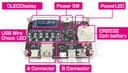
The Bit Trade One USB Cable Checker2 is a compact, battery-powered digital tester designed for MiniB, microB, and TypeC USB cables. It precisely measures cable resistance and verifies data line integrity, displaying clear English status on an LCD. Ideal for IT professionals and tech enthusiasts, it helps identify power-only cables and ensures your USB connections deliver optimal charging and data speeds.


| ASIN | B07Y8BPVV4 |
| Best Sellers Rank | #119,210 in Industrial & Scientific ( See Top 100 in Industrial & Scientific ) #242 in Network & Cable Testers |
| Customer Reviews | 4.5 4.5 out of 5 stars (418) |
| Date First Available | December 8, 2022 |
| Item Weight | 1.59 ounces |
| Item model number | ADUSBCIM |
| Manufacturer | BitTradeOne |
| Package Dimensions | 5.98 x 4.33 x 0.79 inches |
A**.
❤️ Very accurate, informative and precious cable tester
I am providing an overall comment for three USB testers, all of which deserve to be purchased as they complement each other perfectly and are consistent in their results. I would like to dedicate the majority of this review to the Bit Trade One model, which has recently arrived on Amazon. It deserves a shoutout because the tool is exceptional and inexpensive for what it offers. The ADUSBCIM is a USB cable tester that truly complements traditional USB cable testers. Only the cable to be tested needs to be plugged into the A and B ports, and the tool does the rest. The reference value for calculating the cable's resistance is taken using a CR2032 battery, and I note that the calculation is very precise and stable. You can find on Bit Trade One's ADUSBCIM GitHub page, in the Pull Request section, a manual in English in PDF format. This is my small contribution to the project, as the current official English manual is more of a word-by-word description that is difficult to understand. Thanks to this tester, I discovered, for example, that Anker cables, the 765 series, were actually poor high-resistance cables, and that I had much better options for charging. I ended up wasting money on cables that turned out to be slower than cables that were given to me for free with computer accessories. The FNIRSI FNB58 is a very comprehensive USB-A and USB-C port tester. It notably offers numerous rapid charging protocol tests, can test the quality and resistance of a cable, and obtain oscilloscope-like graphical representations. Now that we are on PD3.0 and with PD3.1 approaching quickly, owning one of these tools is now essential to validate the proper functioning of an installation. I've read a lot of advice on Reddit, and if you're looking to equip yourself with the best products offering the most testing possibilities, here are the tester references to get: - Bit Trade One ADUSBCIM (very thorough cable tester testing all the lines of a cable) - FNIRSI FNB58 (the most comprehensive, many ports, many scenarios, USBA/C Micro) - ChargerLab KM003C (the most modern, TB4, 250W) If you have these three or at least a combination of the cable and usb tester, it will take you no more than a few days to become a USB expert. 👌
G**F
Good, but getting to be too expensive for its limited capability
I bought this cable tester about a year ago, and it has worked flawlessly since then. It's actually very simple and also quite satisfying to use. However, at $60 it's a little too expensive for what it offers, and at over $100 (which it was in January), it's out of the question. Now, a year later, there are more sophisticated USB cable testers available that test more functions (e.g., eMarker parameters and PD 3.0/3.1 compliance) for less cost. For example, see ASIN # B0DYJL5Z67. I'm about to switch to this one.
J**N
Best USB cable checker on the market
Arnaud D.'s review is quite good, so I won't recap too much. But after looking at the other USB cable checkers on the market, I concluded this one was the best one to get. Some key and unique features of this cable checker compared to cheaper alternatives that only show simple wire connections via LEDs: - Measures USB cable resistance of VBUS and GND: if the resistance is too high, the cable cannot handle high electrical current. (NOTE: remember that resistance is a function of wire gauge and length, so short cables could still risk overheating if they have low overall resistance but a small wire. However, the feature is still useful to categorically rule out anything with high resistance that is sure to result in a big voltage drop and power loss.) - USB-C cables have various pull-up / pull-down resistors such as on the CC pin. This cable tester will measure the resistance values and show them on the OLED screen. These resistors in the cable are used to signal various charging configurations available to chargers. - USB-C cables can also have an e-marker chip that signal advanced capabilities to chargers and computers. This tester will show whether an e-marker chip is present, but it will not attempt to decode it. Of course, the tester will also show things like whether each pin in the cable has continuity and has been connected correctly, but cheaper testers could also be expected to do that. What cheaper testers don't have is the more advanced measurement features I just described. What this product won't do is actually decode the USB-C e-marker chip. For that, I would recommend the excellent ChargerLAB Power-Z KM003C USB multimeter tester, which is a good complement to the ADUSBCIM. That will decode the e-marker chip and show you the programmed information in the USB cable. And, that product is also great at reading charger capabilities, measuring power consumption, etc. However, the KM003C cannot tell you things like cable resistance, the pullup/down resistor values, or show you LEDs for the individual wires to show continuity. Therefore, I'd recommend buying both products. NOTE: The packaging is in Japanese. However, the OLED screen itself does not have any Japanese characters, so the product itself is approachable to English speakers. You can find the product manual on GitHub if you search for "GitHub ADUSBCIM" on Google Search. Someone recently provided a good English translation of the documentation, look at the README_en.pdf file when you find the GitHub repository. I would recommend reading that before buying if you would like a better understanding of the full capabilities of this product.
A**.
An invaluable tool for assessing USB-C cables
This is a clever, self-contained device that provides detailed information on an USB-C cable's features. Documentation is readily available on the web. It makes it easy to figure out if a USB-C cable is just for charging (which usually means that it transfers data at USB 2.0 speeds) or if it can provide various levels of charging power and/or high-speed data transfer. Almost no USB-C cables are labeled with this information, making this an invaluable device.
L**Y
Quick and useful USB cable checker
Very handy for checking USB cables for the number of conductors, the resistance of the power leads, and the maker's electronic coding, if any. Operation is easy: plug in both ends of the cable and turn it on. LEDs indicate which conductors are present and the little alphanumeric display shows a bit more information such as shield grounding. As an example use, cables included with USB devices are seldom described; this device can instantly show that a cable is for charging only (no data conductors), or just capable of USB-2 speeds because it only has the two basic data wires. It can't generally show the actual maximum data speed or power limit, but it can often help decide the better of two cables or whether one is unsuitable or faulty.
矢**文
これのお陰で本当のUSBケーブルが解りました。ただそれだけです。
L**T
When every product comes with its own USB-C charging cables these days, this is an extremely useful tool to have. This nifty little gadget helps me separate the good cables from the e-waste!
I**N
充電が遅いコードがあることに気づきどうにかならないものかと思っていた矢先にこの製品を見つけ購入 増えすぎたコードの処分があっという間に済み高抵抗の遅いコードと通信無しの安物コードの山ができた 残念ながらフルスペックのコードは所有していなかったが当方の環境だと無くても不便ではないことが分かった 少々値は張るものの男心をくすぐるメカメカしい見た目と優れた実用性でコードがたくさんあるなら買って損はない 刺してゆすると表示が不安定になるので耐久性が未知数なので星四つ
常**ん
先に間違えてフィルム買いました😅ヤット本体購入! 何を買っても(笑)USBケーブルが付属! 外観では判断つかずデータ転送を探すのもそうだが、ケーブルで充電電流が大きく違うので捨てる物を選んでます🤣
井**上
凄く良い製品で とても気に入ってます
Trustpilot
Hace 1 semana
Hace 2 semanas