
Descargar la aplicación


Servicios al cliente
Sobre nosotros
Copyright © 2025 Desertcart Holdings Limited
Descargar la aplicación

🏓 Elevate your ping pong game with the ultimate smart training partner!
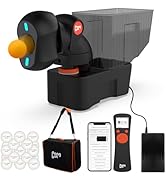
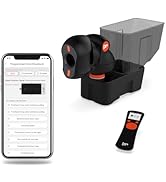
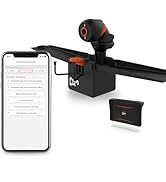
The PONGBOT NOVA S Pro is a portable, app-controlled table tennis robot featuring 264 built-in and customizable training drills, a 150-ball capacity, and precise control over spin, speed, and ball placement. Designed for players from beginners to pros, it offers unmatched versatility and reliability for solo practice and coaching, all backed by a one-year warranty.





| ASIN | B0CTXY6NVQ |
| Age Range (Description) | Adult, Older Children |
| Assembly Required | Yes |
| Base Material | Plastic |
| Best Sellers Rank | #27,813 in Sports & Outdoors ( See Top 100 in Sports & Outdoors ) #6 in Table Tennis Accessories |
| Brand | PONGBOT |
| Brand Name | PONGBOT |
| Color | Black |
| Customer Reviews | 4.2 4.2 out of 5 stars (133) |
| Date First Available | March 4, 2024 |
| EU Spare Part Availability Duration | 1 Years |
| Frame Material | Plastic |
| Included Components | Table Tennis Robot(NOVA S Pro)*1, Remote (N Control S)*1, Power Adapter*1, User Manual*1 |
| Item Dimensions LxWxH | 13.38 x 7.32 x 24.13 inches |
| Item Package Dimensions L x W x H | 23.86 x 18.43 x 9.06 inches |
| Item Weight | 8.81 Pounds |
| Manufacturer | PONGBOT |
| Material | Iron, Plastic |
| Model Name | NOVA S PRO |
| Number of Items | 1 |
| Number of Players | 1 |
| Package Weight | 5.18 Kilograms |
| Part Number | NOVA S Pro |
| Product Dimensions | 18.31"L x 6.93"W x 13.39"H |
| Set Name | 264 Pre-Programmed Drills |
| Size | 18.31*6.93*13.38" |
| Sport | Table Tennis |
| Suggested Users | unisex-adult |
| Top Material Type | Plastic |
| UPC | 794414353998 |
| Warranty Description | One-year Warranty |
D**X
A game changer, literally
I absolutely love this robot. I've used others in the price range and none of them even come close in functionality. The app is good but not great. It has significant limitations and requires Wi-fi in addition to bluetooth. But there are open source programs on the web available for free and designed by users that unlock all of the functions this machine has. For example, they allow you to program a drill where each ball is served at different heights. The stock software doesn't allow this. It also allows you to modify the stock drills the machine comes with. They also don't need Wi-fi. Finally, they allow one to design drills with more than 5 consecutive unique balls and allow one to save many more custom drills than the stock program. The machine has limitations that every 2 wheel robot has, namely the speed and spin are directly related. It does allow one to place the machine anywhere on the table, so if you want very spinny, low, short, slow balls sent to you you can move it closer to the net. The other thing I don't like about it is that the head is on the large size. To place it on the table means that you will hit it very frequently and have balls bounce back at your head and everywhere else. It's not a dealbreaker but it can get annoying. What I did was move it off the table and adjusted the throw, which opens up 100% of the table to me. I created a custom stand, but others have put the machine on a chair and have had great results. When you do that you do have to reprogram the drills so the balls land where you want them. It's also been reliable for me - I've never had a misfeed with many thousands of rallies under my belt. I think this is a great robot at any price, but with the discount offered recently it's an unbelievable deal.
J**R
Amazing features for this price range.
No other mass-produced robot under $1000 allows creating custom drills and from a well-designed app, no less. The drills can be an array of up to 5 shots that can be positioned around the table. It's easy to set up a Falkenberg drills, for example. There are a couple of things to note that aren't clear from the description. The height/trajectory of the head can be set via the app, but it cannot change within a drill. So, one drill has one common trajectory for each shot. That means you can't really set up a serve, a push and a loop in one drill. I have been able to set up underspin pushes and topspin loops in a single drill, no problem. But short serves require that the trajectory of the head be pointing downwards. That being said, because this is a tabletop robot that can be placed anywhere, it can replicate serves better than other (often much more expensive) robots that are permanently mounted at one height at the center of the table. Also, one drill can have two spins only, meaning topspin and backspin. Sidespin is possible by manually rotating the head, but this is not automated so you'll have that side/topspin or side/underspin until you manually rotate it again. The shot quality is great, no complaints. The build quality is impressive and the robot has yet to jam after 10+ hours of use. If the manufacturer is reading this, I would like to make a suggestion. The more expensive PongBot models have automated trajectory and head rotation for sidespin so you can get all possible spins and trajectories in one drill. However, they are mounted in the center of the table to allow for ball recycling. The Nova is far more versatile because it can be placed anywhere on the table, making for more realistic serves, counterlooping, etc. Many robot users don't really care about ball recycling. A human multi-ball feeder doesn't have constant ball recycling so why would I need that in a robot? 150 balls is plenty of workout before needing a break and I could easily rig up an extension to the Nova's basket to allow for another 100 balls if I need that. I'd like to see a "Nova Pro" model that is a tabletop unit that has the automated rotation/trajectory of the more expensive PongBots. I'd pay good money for that.
Z**U
This is definitely the best table tennis robot for beginner!
This bot is definitely the best bot in sub-400 dollar mark. It is really well built. The greatest thing about it is the consistency of each shot. Any other sub-100 or 200 USD bot has way worst consistency in term of precision of each shot. The software has a wide range of setting, angle, spin, frequency and speed. It also allows you to set multiple combo and execute them either in sequence or randomly. It is about 150 USD more expensive than the other similar design bot, like the S101, HP07, but those are way worst in terms of configuration of each shot, making than much more difficult to use. I live in a small apartment and only have a mini table tennis table, but I can use this bot with the small table without any issue. See my video with random configuration of 3 combos at different angles.
R**S
Impossible to Use or Operate
The so-called "Operation Manual," written in Chinese English, with usage instructions and diagrams that are so small that you literally need a magnifying glass to read them, is absolutely useless in instructing you how to use the robot or even how to get it to throw balls. And instead of providing instructions on how to use the accompanying remote control, the "manual" forces you to download an app to use with your cell phone, circumventing the use of the remote control. In addition, the instructions that appear in the window of the remote control are, again, so tiny they are all but impossible to read, and the steps required to use the robot are so convoluted that three of us spent over an hour trying to decipher them. The result: we could only use the robot intermittently, on one setting, before it shut off, and then we had to spend another ten minutes trying to get it to shoot balls again. So unless you're a computer nerd or have nothing better to do with your life than spend hours trying to figure out how to use this thing, I suggest you buy another robot from a different company.
E**C
je ne m'attendais pas à un robot aussi efficace , ne bloque pas une balle , les effets sont bien réalisés , la vitesse bluffante , et tout est réglable , avec des combinaisons. l'appli est intuitive , très satisfait
G**I
Buon robot per utilizzo casalingo.
S**S
Good product with variety of functions Easy to set up and start immediately
C**L
Not cheap, but it is really a nice device. The setup was easy, basically no hardware setup, it is required to setup an app in the phone through bluetooth. Once it is setup, it works very nicely. It is with all basic training options and it can be programmed as well. The remote control is not very user friendly, the screen is too small. But the phone app is good enough for all you need!
Q**I
I purchased the Nova S Pro after reading many positive reviews, and after a week of use, I have a very positive impression. It’s a well-built robot that delivers balls with impressive accuracy and consistency. The marketing claims of 264 prebuilt programs are a bit misleading, as I only found 36 standard drills and 8 near-net drills. That said, this isn’t a dealbreaker for me because the custom drill feature is where the real value lies. The possibilities are virtually endless—limited only by your imagination, not the robot. Despite these strengths, I’m giving it 4 stars instead of 5 for the following reasons: 1. The package arrived unsealed, which almost made me reject the delivery. Thankfully, everything inside was intact. 2. I ordered from Amazon Australia, but the unit came with an EU plug, which is quite inconvenient. 3. The price difference is frustrating: it sells for $350 USD in the US, but $699 AUD in Australia. At today’s exchange rate, that’s about $543 AUD, leaving a $156 AUD gap—it feels unfair. 4. The ball height setting can be adjusted between drills, but not between individual balls within a drill. This design flaw makes no sense. For example, to simulate a serve, I need a height of -50, but for regular shots, I need around 20–30. Because of this limitation, I can’t create realistic combinations of one serve followed by several rallies. If the robot allowed ball height adjustments between individual balls in a drill, I would happily give it 5 stars and call it perfect.
Trustpilot
Hace 1 semana
Hace 2 días