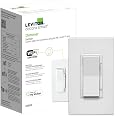
🎛️ Elevate your lighting game—control, customize, and connect like a pro!
The Leviton Decora Smart Controller Switch (2nd Gen) is a versatile Wi-Fi enabled smart switch featuring 4 push buttons for direct load control and custom scene activation. Compatible with major smart home ecosystems including Alexa, Google Assistant, and Apple HomeKit, it supports multi-location wired or wireless 3-way setups. Rated for 15A loads and designed for easy installation with neutral wire, it empowers professionals to personalize lighting experiences effortlessly while maintaining robust connectivity on 2.4GHz networks.


| ASIN | B0CQD7BCRF |
| Actuator Type | virtual |
| Best Sellers Rank | #404 in Tools & Home Improvement ( See Top 100 in Tools & Home Improvement ) #4 in Electrical Light Switches |
| Brand | Leviton |
| Circuit Type | 3-way |
| Color | White |
| Compatible Devices | My Leviton, Alexa, Google Assistant, Apple Home/Siri, IFTTT, HomeKit, SmartThings, Schlage |
| Connectivity Protocol | Wi-Fi |
| Connector Type | Wire Leads |
| Contact Material | Copper |
| Contact Type | Physical |
| Control Method | App, Voice |
| Control Type | full |
| Controller Type | Push Button |
| Current Rating | 15 Amps |
| Date First Available | December 15, 2023 |
| Global Trade Identification Number | 00078477472668 |
| International Protection Rating | IP65 |
| Item Weight | 3.84 ounces |
| Item dimensions L x W x H | 1.4 x 1.7 x 4.13 inches |
| Item model number | D2SCS |
| Manufacturer | Leviton |
| Number of Items | 1 |
| Number of Positions | 4 |
| Operating Voltage | 120 Volts (AC) |
| Operation Mode | MANUAL, AUTOMATIC |
| Product Dimensions | 1.4 x 1.7 x 4.13 inches |
| Smart Home Compatibility | Smart Home Compatible |
| Terminal | Screw |
| UPC | 078477472668 |
| Unit Count | 1.0 Count |
| Wattage | 1800 watts |
F**H
Great system.
Easy to set up. Works good. Easy to wire. Expensive, but worth it. I use mine as a kill switch for the house, because everyone leaves everything on in my house, no matter how much I complain.
T**N
Alexa integration does NOT include scene buttons!
You would think with 4 smart buttons that Alexa would have access to all of them. Nope. It only has access to the light switch itself, rendering the other three useless.
S**1
Works well, upper 3 buttons only trigger a single scene each
Like the other Leviton smart switches, this works really well. A small physical annoyance unique to this 4 button switch that I don't really like the feel of the button presses (hard to describe, but not a very firm push or click or etc, so sometimes you aren't really sure you pushed it hard enough, or in the right place, or not). Another thing to note is that the 3 upper buttons only control 1 scene each. That means that any push of the button triggers the same scene. Apple's Home app doesn't easily let you create a "toggle light" scene. So if you want each button to first turn a light on, then on the next push to turn it off, you need to go through some hoops to convert the Apple Home scene into a "shortcut" and then use IF/ELSE conditions in the shortcut to make this work. This is really an Apple Home limitation, but something to be aware of since there is really no way to make it work without these steps. After that setup, the button does work perfectly fine to toggle a light, but note that the response time is a bit extra delayed (2-3 seconds between button push and action... again, likely this is a result of the need to setup the special Apple Home shortcut that has to run, and not caused by the switch itself)
K**.
Works great
these have been great. We added one in each room to controller shades, fans and dim setting scenes that we could only control previously with our phones or Siri. easy to setup with home app.
C**K
Very Limited Controller
This review is of the Scene Controller. I constructed a scene to turn on a few lights. But to turn them off, I need another scene. So, I've used 2 of the 3 scene buttons just to turn the lights on and off! Also, different scenes cannot have different fade rates. Scenes do not link with Alexa.
A**L
Cannot get it to work with Alexa
The physical device has 4 buttons but the Alexa app only recognizes one.
R**M
Could be great.
Scene switch does not also turn off selected scene. Only turns on. Have to use 2 buttons to turn scenes on and off. Edit: I was able to make a single button work using the shortcuts app and scripting. So it can work as intended, just with some workarounds.
D**H
Top thee buttons only work in Leviton app
The top three buttons only work in the Leviton app. So if you want to control anything other then a Leviton product you are out of luck
A**.
Excelentes ,con cosas por mejorar: notificaciones de haberse realizado una acción, El grabado de los botones y en términos generas súper bien . Requieren de internet paran funcionamiento de las escenas .si NO hay sigo,las escenas no funcionan. Por lo demás EXCELENTE
M**.
These switches work as advertised. It is nice to turn the outside lights on/off from the phone - especially if you end up coming home in a rural area after dark. The feature within the App to group switches together allows one 'click' to turn all lights in the group. Programming the top three buttons to trigger any action set up in the App also allows one light switch to turn on all the outside lights in the group also.
Trustpilot
Hace 1 semana
Hace 2 meses