We remain fully operational. Our teams are working around the clock to ensure your deliveries continue safely.

Descargar la aplicación


Servicios al cliente
Sobre nosotros
Copyright © 2025 Desertcart Holdings Limited
Descargar la aplicación


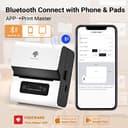



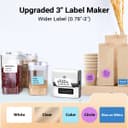


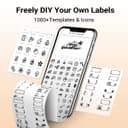
🏷️ Label like a pro, anywhere you go!
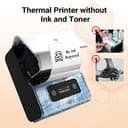
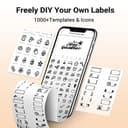
The Phomemo M221 is a sleek, portable thermal label printer designed for professionals and small businesses. It offers inkless printing with waterproof, oil-proof labels, fast Bluetooth 4.2 connectivity, and supports a wide range of label sizes and types. Powered by a rechargeable lithium polymer battery with Type-C fast charging, it pairs with a versatile app featuring 100+ templates and multi-language support, making it an efficient and mess-free solution for organizing, branding, and mailing needs.


| ASIN | B0BJ1QTZ5S |
| Additional Printer functions | Print Only |
| Batteries | 1 Lithium Polymer batteries required. (included) |
| Batteries Included | Yes |
| Batteries Required | Yes |
| Battery cell composition | Lithium Polymer |
| Colour Depth | 1 bpp |
| Compatible Devices | Laptops |
| Control Method | App |
| Customer Reviews | 4.2 4.2 out of 5 stars (32) |
| Date First Available | 1 January 2023 |
| Display Type | LCD |
| Dual-sided printing | No |
| Duplex | Automatic |
| Form Factor | Printer |
| Hardware Interface | Bluetooth |
| Included Components | Labels |
| Ink Colour | Black, White, Blue, Pink |
| Item Dimensions LxWxH | 12.2 x 11.9 x 9.4 Centimeters |
| Item Weight | 499 g |
| Item model number | phomemo m221 |
| Manufacturer | Phomemo |
| Max Input Sheet Capacity | 36 |
| Max copy resolution black-white | 203 dpi |
| Maximum Black and White Print Resolution | 300 dpi |
| Maximum copies per run | 36 |
| Model | phomemo m221 |
| Model Series | M221 |
| Number of items | 1 |
| Output sheet capacity | 36 |
| Print media | Labels |
| Printer Ink Type | Thermal |
| Processor Count | 1 |
| Product Dimensions | 12.19 x 11.94 x 9.4 cm; 499 g |
| Resolution | 300 x 300 |
| Scanner Type | Portable |
| Series number | 221 |
| Sheet Size | 75 millimeters |
| Special Features | Portable |
| Specific Uses For Product | [INFERRED: Home and business organization, Barcode labeling, Address labeling, Logo printing, Mailing labeling, Sticker creation] |
| Supported Media Sizes | 50 x 30 millimeters |
| Total USB Ports | 1 |
| UPC | 757837244533 |
K**K
I bought the phomemo label maker M221. This would not connect to 3 different phones. This app was more worried about getting my GPS location, as well as copying all my photos. It could do all that but it would not connect to my phone? Seems like this app is a gimmic to steal your information for what ever government this product comes from. Other apps after they request permission to private things like my location or photos of my family, I deny and we move on. Not this one. It said if I did not agree to this i cant use the app. I really wanted to print something so I gave it permission. It did a great job of uploading my location and info to a server somewhere over seas. It did a poor job on connecting to my phone and printing things like a good printer should do. I don't know if I got a dud or what. So far in the state that its in I would not recommend this product. Even if it worked im not sure I would feel comfortable giving some strangers access to my private information. I would have to get an old phone that has nothing on it and install it on there. Update: i was surprised this company cares about their customers. Instead of me sending emails and hunting customer support down they contacted me and made it right. Im going to change it to 5 because even though i had issues they went above and beyond to make it right. Im used to gettimg the run around. Not with this seller. I can recommend this product because you can trust the seller. Any issues and they will take care of you. I would still install the app on an old phone etc for privacy concerns.
J**E
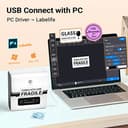
((UPDATE - 5/11/23)) Phomemo reached out to me to assist with the off-center labels. There is a more recent driver included with the Labelife software. For the M221 you MUST use that driver and not version 1.2.10 listed on the driver downloads page. The old driver will install and recognize the printer but will print everything to the right of center. I had an issue where I needed to install the new driver more than once but I would chalk that up to Windows behaving abnormally. With version 1.3.0 installed Labelife and other third party software has worked flawlessly. Huge shout-out to the Phomemo support team for their quick response and willingness to support their product! ((Original Review)) I purchased this to print labels designed on my computer, but I was unable to get it to print in the center of the label without adding a huge offset in the device settings. As it turns out the reason is the driver made by Zhuhai Quin Technology. (parent company or supplier for Phomemo) The same driver software is used across several models, one of which is the M220. The problem is the labels in the other devices are aligned to the right side of the machine and on the M221 they are centered. This was accounted for in the phone app but completely missed in PC app and included driver. So everything printed on the M221 is off center unless manually corrected. Not worth the time and effort to change the offset for different rolls of labels in my opinion.
R**Y
It is a good product, however the battery doesn't hold a charge after it is plugged in for at least 24 hours. The charge is 15 minutes at best. Can't be used for portable projects.
E**F
It does what it needs to do and is so easy to use! Would recommend!
K**N
This is a nice label maker, I use it for my business for price tags and it prints our logo and everything on the tag. Very nice.
Trustpilot
Hace 1 mes
Hace 2 meses