We remain fully operational. Our teams are working around the clock to ensure your deliveries continue safely.

Descargar la aplicación


Servicios al cliente
Sobre nosotros
Copyright © 2025 Desertcart Holdings Limited
Descargar la aplicación
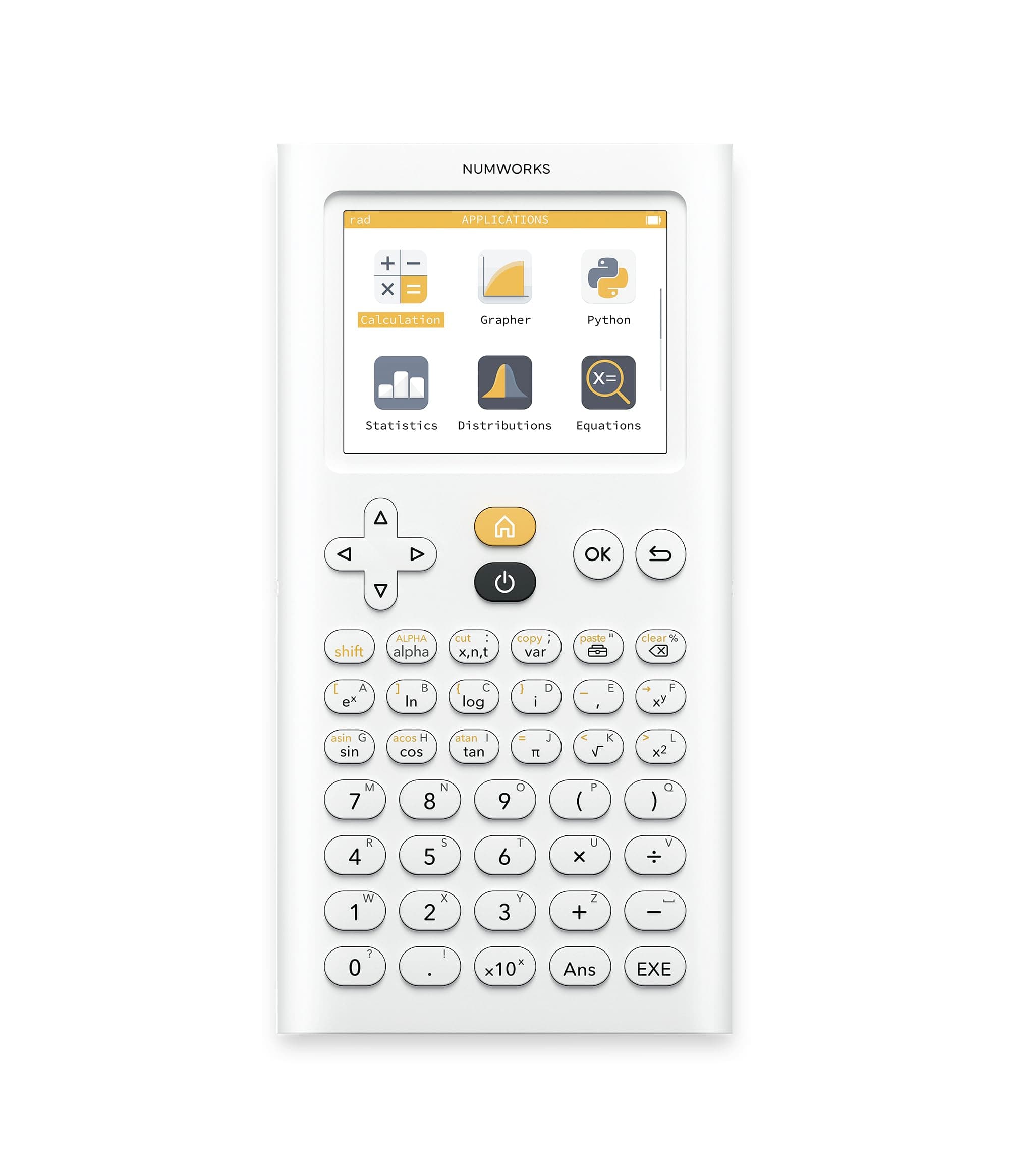
📊 Elevate your calculations with the sleek, smart NumWorks Graphing Calculator!
The NumWorks Graphing Calculator is a lightweight, rechargeable device featuring a vibrant 320x240 color LCD, powered by a modern ARM Cortex M4 processor. Designed for students from middle school through college, it supports six languages and includes a USB-C charging cable. Its open-source software receives frequent updates, offering fast graphing, an intuitive interface, and a built-in Python shell for coding enthusiasts.
| ASIN | B0747RQGF5 |
| Best Sellers Rank | #19,422 in Office Products ( See Top 100 in Office Products ) #9 in Graphing Office Calculators |
| Brand | NumWorks |
| Calculator Type | Graphing |
| Color | White |
| Compatible Devices | Smartphone |
| Customer Reviews | 4.7 out of 5 stars 8,494 Reviews |
| Display Type | LCD |
| Enclosure Material | Plastic |
| Item Dimensions L x W | 6.3"L x 3.2"W |
| Item Weight | 220 Grams |
| Manufacturer | NumWorks |
| Mfr Part Number | N0100 |
| Model Name | Graphing Calculator |
| Model Number | N0100 |
| Number of Batteries | 1 Lithium Ion batteries required. |
| Power Source | Battery Powered |
| Screen Size | 2.8 Inches |
| Unit Count | 1.0 Count |
R**Z
Great software, good hardware
Pros: -Excellent software, open source. Numworks (the company that makes it) releases updates every 2 months or so, bringing new features each time. -Easy to use, feels modern and well thought-out. -Compact and very light. -Graphing is really, really, really fast. Basically instant. -Regression is very easy to use, and accurate. -The equation solver is the best I've ever seen in a calculator. It solves almost any equation/system of equations extremely fast, and does not stutter or lag. -It includes a Python shell that can run almost any program with basic modules. Great for beginners in coding. You can also upload scripts from the computer. -Screen is nice and clear, and the brightness is able to be adjusted. -Battery life is nice and long. Cons: -No finance application. Hopefully this will be fixed soon. -Python editing on the calculator feels slow. -Buttons can be a bit sticky. -Secondary function letters can be hard to see. -There is only 4 KB of memory available for Python scripts. This could be fixed in an update, by allowing scripts to be archived in ROM. -Scripts clear when the battery completely dies. Conclusion: A great calculator for high school, with several things that could be fixed through future updates, and few that cannot. Easy to use and program. Would recommend.
A**R
Pretty much the best calculator I've ever owned
Pros: More updated interface than the TI-84 Simple to use Open source hardware Epsilon (the calculator's "OS" (more like a math interpreter) is open source Thin and light Costs less than the TI-84 plus ce Less confusing naming scheme than TI Uses a more updated chip than the TI-84 Plus CE (STM32 ARM Cortex M4 based microcontroller vs Zialog eZ80) Runs MicroPython (which is good for running custom code on the calculator, like a stoicheometry calculator for chemistry) Web-based interface on computer that allows you to update the calculator and upload python code Clean design App-based interface It doesn't just give decimals and fractions, it gives both, and can simplify expressions Can calculate complex numbers Cons: No dark mode (Small complaint though (and it wouldn't fit in with the white theme of the calculator) Cannot write custom apps or install custom firmware. I found this out when I was trying to add an overclocking script. I got everything set up, but a critical folder on GitHub was blocked off. This does make sense because it prevents people from writing cheating software for the calculator. Since it's been approved for exams like the SAT (and that's one of the main selling points), it has to store all user data in RAM, and if you could modify its code you could have a user program permanently on the calculator that could allow you to cheat on a test. They could have made it completely open source in hardware and software, but that would have made it not legal on any standardized test. Buttons are somewhat mushy Limited button layout compared to ti-84 plus ce Nobody else really has this calculator so there is less available for it than is available for something more popular like the ti-84 plus ce White plastic is easy to scratch and mark Graphing program is slow when navigating because it redraws all of the graph every time you move. Keyboard is hard to use (but that's because I am not used to typing on a calculator and there are not very many buttons) The video shows some of the calculators features in calculator mode.
A**R
“NumWorks Graphing Calculator: Modern, Simple, and Student-Friendly”
The NumWorks Graphing Calculator is a breath of fresh air compared to bulky, outdated models. Its sleek design, color screen, and intuitive app-style interface make it easy to learn and fun to use. Built-in Python programming is a great bonus for students interested in coding. The rechargeable battery and lightweight build add to its portability. The only downsides are its slightly limited features compared to high-end CAS calculators and the occasional firmware restrictions for exam compliance. Still, for most students, this is a stylish, user-friendly, and forward-thinking option.
S**R
Best graphing caclulator hands down!
I love this calculator. I am a math teacher, and purchased one for my son. He loves it and it is now all I use for my Calculus students. It has great features and is easy to use. I only wish this was around when I was in school!
G**G
Prefer this calculator for ease of use
I'm not in the education field, I use this calculator occasionally, often for unit conversions and some analysis. I find this calculator one of the most intuitive graphical calculators I have tried, and one of the faster ones as well. It's not the most featureful calculator, but it works well for me, and I don't have to reference the manual a lot. Numworks has been extending this calculator's feature set consistently from its introduction. The early models used a really light color yellow to label the second functions on the keys, but that has been corrected. The calculator seems pricey at first, but the software upgrades make it worth the money. Updating the software is very easy, you plug the calculator into a computer, point the browser at the Numworks website, log in and off you go, no need to install any vendor specific software as with so many other products out there. All in all I'm very impressed with the quality of the software.
D**D
an attractive programmable calculator with nice features
There is a lot to like about this calculator and the company that makes it. The calculator is a great example of excellent and attractive engineering. The simplicity of the design is much appreciated, especially when compared with standard graphing calculators. It is a beautiful product and has some nice unexpected features that really set it apart from others. It is one of a few calculators that can perform prime factorization of an integer with the factor() command. Although it does not support general number base conversion, it will easily display the hexadecimal and binary values of any integer, in addition to the prime factors. That is a nice unexpected touch. The calculator is programmable via the MicroPython language. Python has become one of the most popular programming languages today, and many refererence books and Internet sites are available to help the programmer. Python can be difficult for a new programmer, but I will report that Numworks support is excellent. I contacted Numworks via their support email address about a programming problem and the president of the company replied with excellent information on my problem. It doesn't get any better than this. While MIcropython programs can be entered directly on the calculator, it is much easier to enter programs on your computer using the Numworks workshop website and download them to the calculator with the supplied cable. That process was flawless on my Chromebook. All in all, a terrific little calculator.
W**T
Great for High School Math!
***EDIT March 20, 2018 NumWorks has had several updates (now at version 1.3) in the last few months and I've upgraded it to 4 stars. Not yet perfect, but much more capable than it was. I've updated my review. *** This is a fantastic scientific and graphing calculator. I am a high school math teacher, and I can now recommend it for all high school classes. It performs basic calculations very nicely. I love how it gives both exact and approximate answers. Even with logs! Enter "log 49" and the response is "2 log(7) ~ 1.69196". Awesome! Would give students an unfair advantage, so I wouldn't allow this on a test! NumWorks has become my go-to scientific calculator, as nearly every operation you want to do for high school math is available with a single key press (I get so tired of hitting the "2nd" key on my TI-84). Some actions need a "shift", such as absolute value and factorial, but it is really well designed to have common functions easily available. My biggest complaint is accessing the memory function. Unlike the TI products, you can't just press the "x" key, you must use a capital letter such as "X", available after pressing the alpha key and finding the proper letter, which as other have mentioned are nearly unreadable because yellow on white isn't enough contrast. Unless there's a shortcut I don't know about, it takes 7 key presses to store the number 6 in memory. As a GRAPHING calculator, the NumWorks is now superb. It graphs quickly and beautifully. I love how it can auto-calculate the y values for the window -- setting the window size is faster than the TI. With the graph displayed, press the OK button to get a menu which will find intersections, zeros, min and max. There is a trace feature, but jumping to a specific x value isn't as easy as on the TI. REGRESSION: Most students in the US now learn about regression and lines of best fit. The NumWorks performs a linear regression quite nicely. It's easy to enter and edit data, and the graph is easily displayed, both data points and line of best fit, with nice colors. The equation of the line of best fit is calculated along with the regression coefficient. The problem is that only linear regression is available. And while this is the only type of regression required by Common Core, I always introduce other types of regression (quadratic, exponential, etc.), as I like to model real-world phenomena. To me, this is the largest downfall of the NumWorks. Until it's provided, there are some nice online tools that do regression (Desmos, Wolfram Alpha, etc.). I haven't touched the probability, sequences, or python part of the calculator so I can't comment on that. In most ways, the NumWorks calculator surpasses its TI competitors, but it lacks important functionality with regression. Once this is provided, we'll have a 5-star calculator!
P**Z
Best graphing calculator
Great calculator, it super intuitive and has many useful features
Trustpilot
Hace 1 mes
Hace 2 meses