We remain fully operational. Our teams are working around the clock to ensure your deliveries continue safely.

Descargar la aplicación


Servicios al cliente
Sobre nosotros
Copyright © 2025 Desertcart Holdings Limited
Descargar la aplicación
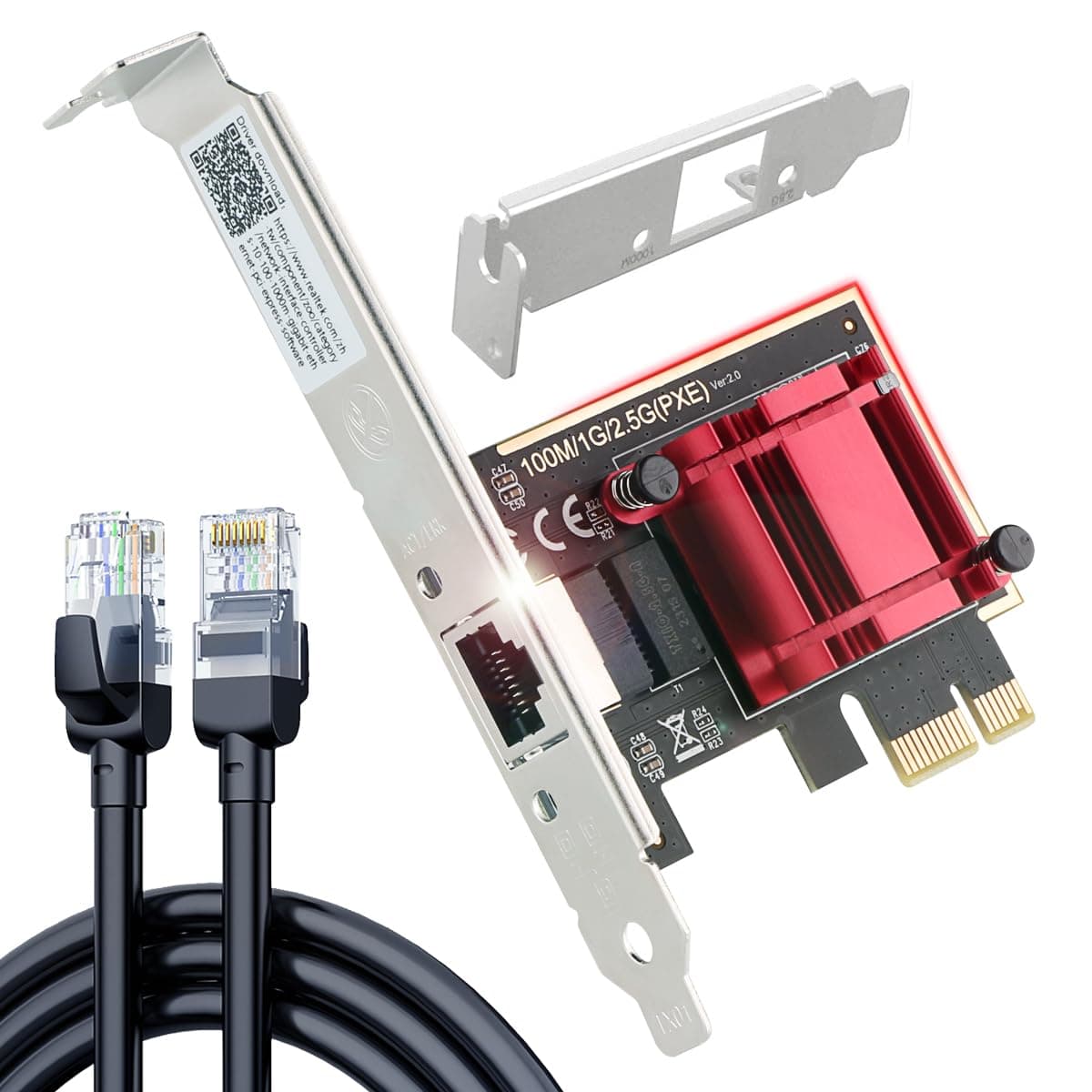




🚀 Upgrade your network, upgrade your hustle!
The Ubit 2.5GB PCIe Network Card delivers ultra-fast 2.5 Gbps Ethernet speeds with a high-quality 1m Cat6 RJ45 cable included. Designed for professionals demanding reliable, low-latency connections, it supports a broad range of operating systems including Windows and Linux. Its dual bracket design ensures compatibility with various desktop cases, while QoS technology prioritizes your critical traffic for smooth gaming and streaming. Elevate your desktop networking with this plug-and-play powerhouse.


| ASIN | B0C88SCN9J |
| Best Sellers Rank | 1,415 in Computers & Accessories ( See Top 100 in Computers & Accessories ) 2 in Network Cards |
| Box Contents | 1* Ubit 2.5G RJ45 Network Card with a Full-Height Brackets, 1*1M(39’’) RJ45 Ethernet Patch Cable, 1*8CM Low-Profile Brackets, 1*Online Driver Download Address |
| Brand | Ubit |
| Brand Name | Ubit |
| Color | Red |
| Colour | Red |
| Compatible Devices | Desktop |
| Compatible devices | Desktop |
| Country of Origin | China |
| Customer Reviews | 4.4 out of 5 stars 3,599 Reviews |
| Data Link Protocol | Ethernet, Gigabit Ethernet |
| Data Transfer Rate | 2500 Megabits Per Second |
| Data link protocol | Ethernet , Gigabit Ethernet |
| Data transfer rate | 2500 Megabits Per Second |
| Hardware Interface | Ethernet |
| Hardware interface | Ethernet |
| Item Weight | 0.12 Kilograms |
| Manufacturer | Ubit |
| Model Number | PE25 |
| UPC | 717019244652 |
F**R
Great network card
Great Network adapter at an excellent price, easy to fit and configure and set up, comes with mini CD with drivers on but if you dont have a CD drive they are easily findable online using the links provided by the manufacturer, you can download the drivers on a phone and transfer them to PC if you have no Internet access on your PC before installation. Build quality is good and the item fit easily into place. It has a decent WiFi range and performance is good. Design is good with the twin antenna on the outside to enhance coverage. Would highly recommend as a wifi adapter.
A**W
Intel AX210 Wi-Fi 6E adapter has good compatibility and performs well
I purchased this Intel Wi-Fi 6E AX210 PCIe WiFi 6 Card for £22.95. I chose an Intel AX210 based card as that adapter is well regarded and is compatibile with Windows 10, Windows 11, and Linux on both AMD and Intel computers. I have tested it with Windows 10 (version 22H2) on an AMD computer (Ryzen 5600X). Installation was quick and easy, although I did not bother with the Bluetooth cable as I have no current need for Bluetooth. The two antennas were easy to screw in after the card was installed. Device drivers are needed for Windows 10. The evisionde website didn't work well for me (it doesn't suport https and requires JavaScript enabled) and so I did not look for the drivers there. But I easily found the drivers on Intel's website and installed Intel's Wi-Fi drivers 23.150.0 (dated 22 July 2025). I didn't bother to install Intel's Bluetooth drivers. The computer needed a single reboot after installing the Wi-Fi drivers. My Wi-Fi router only supports Wi-Fi 6 rather than 6E, so I set the Intel Wi-Fi card's "Ultra High Band (6GHz)" property to "Disabled". I also changed the "Transmit Power" from "5. Highest" to "1. Lowest" as my computer is only about 4 meters from the Wi-Fi router. The card is currently connected on the 5 GHz network band with link speed (receive & transmit) of 1297 Mbps; however the link speed changes from time-to-time and the transmit speed is sometimes less than the receive speed. I might get greater link speeds by switching the transmit power back to "5. Highest"; however, my broadband connection is only 500 Mbps (symmetrical) so I currently have no need of greater link speeds. Cloudflare's Internet Speed Test reports "Download 486 Mbps" and "Upload 375 Mbps", but this test probably says more about my broadband and Wi-Fi router rather than the Intel AX210 adapter or this PCIe card. Given that the more recent Intel Wi-Fi adapters have limited CPU compatibility, I recommend using a PCIe card that uses the Intel AX210 Wi-Fi 6E adapter. This particular PCIe card has worked well for me so far.
G**R
Good product for the price
Pros: Dual-band 2.4 GHz/5 GHz with speeds up to 867 Mbps USB 3.0 for faster data transfer speeds Easy to install and use Compatible with Windows, macOS, and Linux Cons: The included antenna is not very strong May need to purchase an external antenna for optimal performance Overall: The TP-Link Archer T4U AC1200 USB Wi-Fi Dongle is a good product that offers fast speeds and easy installation. However, the included antenna is not very strong, so you may need to purchase an external antenna for optimal performance. I was using the included antenna for a while, but I was not getting the speeds I wanted. I decided to purchase an external antenna with an extended cable, and this made a big difference. I am now getting the speeds I expected, and I am very happy with the performance of the TP-Link Archer T4U AC1200 USB Wi-Fi Dongle. I would recommend this product to anyone who is looking for a fast and easy-to-use USB Wi-Fi dongle. However, I would also recommend purchasing an external antenna if you need the best possible performance. Rating: 4 out of 5 stars Recommendation: If you are looking for a fast and easy-to-use USB Wi-Fi dongle, the TP-Link Archer T4U AC1200 is a good option. However, I would recommend purchasing an external antenna if you need the best possible performance.
D**T
Much better than internal WiFi or cheap USB ones
Usage Experience: I installed this AC 1200Mbps WiFi card into my desktop's PCI slot and was immediately impressed. While I haven't maxed out the speed, the connection is rock-solid, especially compared to my PC's built-in WiFi and a cheap USB alternative. For my gaming sessions, this has been a game-changer, literally. Pros: - Easy PCI slot installation - Stable, reliable connection - Significant improvement over built-in and USB WiFi - Tested and seamless with Windows 10 Cons: - Max speed not yet determined, but hasn't been an issue Target Audience: If you're a gamer or anyone in need of a robust WiFi connection on a desktop PC, this card is a no-brainer. First Impressions: The card came in secure packaging with straightforward installation instructions. Once fitted, it integrated effortlessly with my Windows 10 setup, demanding no extra tinkering. Longevity: Given its performance and build quality, I foresee this WiFi card being a long-term asset to my gaming rig. In summary, this WiFi card delivers where it matters most: consistent, reliable connectivity for high-stakes online gaming. It outclasses built-in and USB alternatives with ease.
M**T
Compatible with Bazzite, Linux. No configuration required through Bazzite!
Fantastic equipment! I wasn't sure whether this would be compatible with a Linux based system and how much configuration they would required as most bluetooth/wifi PCIE cards are designed for Windows drivers. Much to my surprise, this worked out of the box! Just insert the board into the PCIE slot on the motherboard, lock the screws in to secure it and install the antennas. Straight on boot up, I could see wifi and bluetooth interfaces showing within the OS menu bar, no configuration required! I was able to connect to my home wifi and pair with BT Headphones without issue, first time! I am running Bazzite, a Fedora distribution of Linux and it worked flawlessly! I highly recommend this PCIE Wifi/Bluetooth card for similar (non Windows) systems! I didn't need to refer to the manual, but if you do, the instructions are clear and in colour! There is also a driver disk if you need it.
A**4
Worked immediately from the box
I got this to replace a USB WiFi adaptor as I wanted to free up the USB port. Having the Bluetooth connectivity is a bonus, but I haven't really used that feature yet; just to check, I tested the Bluetooth with my phone and it did connect easily. The signal is better than the adaptor I was using previously, which isn't surprising as this has two external antennas on it and running a speedtest, the speed was good. As I haven't don't any gaming with it, I can't vouch for that, but the speed seems decent and I imagine there would be no issues as long as you're happy gaming with a wireless signal. It was easy to fit into a spare small PCI Express slot I had, however the plugging the power lead into the card required a bit of effort, it went in eventually though with no damage. A screwdriver was provided with screws which was a nice touch. It came with a driver CD, but it wasn't required and the connection worked immediately with Windows 10, no need to reenter my Wifi password or anything. All in all it was a good buy for the price.
J**H
It works. Badly.
I've got a 300mbps full fibre line. I wanted to avoid doing an ethernet run through my flat, so I figured that picking up a WiFi card would probably save me a lot of time and energy. And yeah, it works. HOWEVER, the speeds are abysmal. No matter what I do to improve the speeds, it either makes it worse, or improves it so little that it was not worth the amount of time and research. I did some speedtests on all my devices via Ookla speedtest, running from the same room - I even ran them from the floor, next to the PC, as well as on the desk (with no discernible change). PC, with this WiFi card - 125.57mbps down / 59.86mbps up Laptop - 301.49mbps down / 323.20mbps up Phone - 305.33mbps down These numbers speak for themselves. At one point I got the download speeds using this card to 220mbps - but they have levelled out at ~125mbps after multiple tests. The upload speeds, however, will not go past 60mbps. I have updated the driver to the most recent version (23.70.2.3 as of writing this), I have gone into device manager and made sure it's running at a 5GHz band (the highest my router supports), I've made sure it's not doing any sort of power-saving under the hood. I've done just about everything I can think of to make this thing work as advertised. The throughput in my router settings says my PC should be getting 250mbps down and 400mbps up. The link speed in my WiFi settings says it's 288mbps down and 432 mbps up. Everything says that this card should be fully functional and receiving 300mbps up/down, but it simply is not. It also has an ugly red LED you cannot turn off (not shown in any of the images), and the Bluetooth version is actually 5.3 instead of the 5.4 in the title - but that's small compared to the fact that this does not work as advertised. I have spent the better part of a day changing settings and restarting my computer. If you just need WiFi that works, go ahead and buy this. If you have any expectations for the speeds you'll be getting *at all*? Do not bother.
O**S
Good but dodgy
Works well and is fast, however the disc for drivers doesn’t work and the link is blocked by mcafee for a virus threat
Trustpilot
Hace 4 días
Hace 2 semanas