We remain fully operational. Our teams are working around the clock to ensure your deliveries continue safely.

Descargar la aplicación


Servicios al cliente
Sobre nosotros
Copyright © 2025 Desertcart Holdings Limited
Descargar la aplicación


🚀 Print Faster, Smarter & Sleeker — Join the 3D Printing Revolution!
The AnkerMake M5 3D Printer redefines speed and precision with a 500 mm/s max print speed, 0.1 mm ultra-fine detail, and AI-powered error detection. Its die-cast aluminum alloy frame ensures stability at high speeds, while the 7x7 auto-leveling system guarantees flawless first layers. Designed for both beginners and pros, it offers quick 15-minute assembly and seamless remote control via the AnkerMake app, making it the ultimate tool for fast, reliable, and high-quality 3D printing.

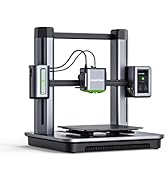


| ASIN | B0B78K165Y |
| Best Sellers Rank | 61,482 in Business, Industry & Science ( See Top 100 in Business, Industry & Science ) 61 in 3D Printers |
| Guaranteed software updates until | unknown |
| Item model number | V81112C1 |
| Manufacturer | AnkerMake |
| Product Dimensions | 50 x 47.3 x 43.7 cm; 12.4 kg |
M**K
Just amazing
Amazon delivered in perfect order. I was worried i would choose the wrong machine because i read probably 200+ reviews on multiple machines and models and choices which quickly became fairly overwhelming. I settled on the M5 over the Bambu A1, which i believe is also a great printer, because the earlier reviews which had some negatives (no deal breakers by any means) for the M5 were based on early firmware which has been rapidly updated since. I wanted the speed and the camera and the seamless online features that this printer offered, as well as the very positive reviews of later firmware. I also loved the look of it. Reminds me of Star Trek. The last worry i had was some people were saying how loud it is. Not a problem as it will end up in the back room, but due to excitement i set it up instantly in the lounge area, and yeah it really is not that bad at all. At high speed you can hear the fans, like a gaming laptop running a high spec game. It is currently next to the TV and by no means do we have to raise the TV volume and no one has complained about what i though might be a small jet engine. There was also the concern that some said the fans never turn down or off when not printing. I can confirm that after prints the fans do in fact tapper down to inaudible, possibly off (i do not know because i cannot see them) when it cools which is pretty quick, about 3 or 4 minutes max at this point. I also purchased 2 x AnkerMake PLA+ 1kg, 1kg Sun and 1kg Creality filaments. So far only using the AnkerMake filament as 1kg really does go a lot further than i expected. I am still on the first roll, though i expect i will be putting a new one on soon. 3d printing is addictive. Unpacked and followed the manual for a very quick setup. literally under 10 minutes and this was going slow to verify the very few required steps. Inserting the filament was super easy. Started printing instantly. I have not once used the glue provided in the box. Figured i would see if it was really needed. Printing with AnkerMake PLA+ and i have not had a single mishap or misprint. First night I printed a turtle keychain. about 11 minutes. Then printed a bed scraper. about 23 minutes. Then printed 6 x star trek coasters. about 25 minutes each as i set the speed down a bit as i wanted these to be awesome. They came out awesome. I cannot state how amazing this printer is. I have the Anker studio software at home and on work machine. The camera view from anywhere is amazing and i just basically dont stop printing now. When done i message someone at the house to remove and quick wipe the bed and i start again. Been printing bins, toolbox holders, filament spacers for the M5. Printed Samsung Watch 5 charging holder, high speed you can see the picture attached. This came out amazing, pics do not do it justice. At a lower speed I expect the small Samsung writing would be perfect. This took about 1hour 55 minutes if i remember correctly. The Bin in the video attached show the utility bin for the side of the M5 and you can hear the printer fans in the background this is about 2 meters from the printer and it is printing another job at high speed. Actually all the prints have so far come out so much better than i was possibly expecting. Granted i have zero experience with other printers as this is my first. But simply wow. Its fast and so stupidly easy to use. I am now printing my designs created in FreeCad. For anyone looking to get into 3d printing, i can honestly say this machine is simply incredible. The Anker mobile app with complete real-time updates of the printer is next level. The searchable library in the app of existing 3d prints that you simply select and hit print on is crazy. Thank you to AnkerMake for what a device that i expect is going to continue to exceed my wildest expectations.
D**J
Amazing, brilliant, fast, easy to use
The build quality is excellent, it’s extremely easy to use and prints good quality objects very fast. Admittedly I had a cheap slow XYZ (but very reliable) printer before, but the difference in build quality, size and speed is huge. Small projects that took 10 to 15 hrs on my old printer are taking around 2 or 3. Small objects that took 2 or 3 hrs are completed in 20 to 30 minutes or less. In part this is because I find I have much less need for supports so the increase in speed is largely the rate at which it extruded but also because you need less supports and are using a lot less filament. I suspect I get away with less supports because the printer is so solid that there is very little vibration of the build plate compared to the XYZ, also the cooling fans which some claim are noisy (I think they are fine) probably cool the laid down filament much more quickly and the machine can therefore print bigger unsupported overhangs without the need for support structures. Would I recommend it ? Absolutely this printer is so much better than I expected and it’s speed and build size means I can try ideas, prototype and modify an item without wasting days. With my old printer I might leave something printing for 12 hrs only to have it fail or fall over on the build plate in the last few layers. So far the M5 has functioned perfectly, with no failures even when printing much more complex items than I have ever tried before.
T**Y
M5 ITS FAST clue is in the name
I have been looking for a new 3d printer for a long time. Ive also been printing a long time. I've had a few printers over the years. Several different brands and done days and hours of research. The Ankermake M5 is the printer of the moment and in my opinion nothing comes close. with Auto bed levelling, wifi, camera, magnetic print bed, touch screen, app to control it or Mac/windows software and speed its an awesome bit of kit for the beginner to semi. the slicer needs work but it works fine if you don't know to much about slicing. its incredibly sleek and very well engineered and built with quality materials. I can't believe it's not a £1000+ machine. only downside its quite loud compared with a Prusa. it has to powerful cooling fans and the noise is funnelled into to an outlet Shute's at force to cool your print. overall I can handle a bit of noise for the pure speed of the machine. very happy with my new machine.
C**U
M**I
Finalmente la prima stampante 3d precisa e che fa il suo dovere facile intuitivo il Software e soprattutto porta a termine qualsiasi lavoro. Piccola nota dolente il rumore leggermente rumorosa quasi fastidioso se hai persone in casa, ma non possiamo voler tutto. Per il complesso finale 5 stelle
B**D
Bad product it makes a noise the manufacturer can not identify and after 3 months it stopped working and the manufacturer will not give me a replacement and only wanted to give me a 80% refund saying it has 3 months after ware. I contacted them after about 2 months but thay are dragging out the warranty process. I do not recommend the printer and would never buy this brand again.
D**D
I love it But i wonder why its not available now on Amazon We trust amazon and i want to purchase another one
B**T
I have bought it on Black Friday and didn't regret it for a second. It is my first 3D printer and very easy to use with default settings. If you enable expert settings, it has tons of customization. For "download from the internet and print" use cases, it is really doing its job. All of the above is for PLA+ filament type. I've had some trouble getting settings for PETG right, my first few prints with that material ended up in the waste bin, but then I learned what to set and where, then it is also good with that material. As for the sound it generates, I didn't find it too loud unless you have 100% fan working. Even when it is on idle, there's some basic fan working, but then you can just switch it off without fear of settings being deleted or something.
Trustpilot
Hace 1 mes
Hace 2 semanas