We remain fully operational. Our teams are working around the clock to ensure your deliveries continue safely.

Descargar la aplicación


Servicios al cliente
Sobre nosotros
Copyright © 2025 Desertcart Holdings Limited
Descargar la aplicación
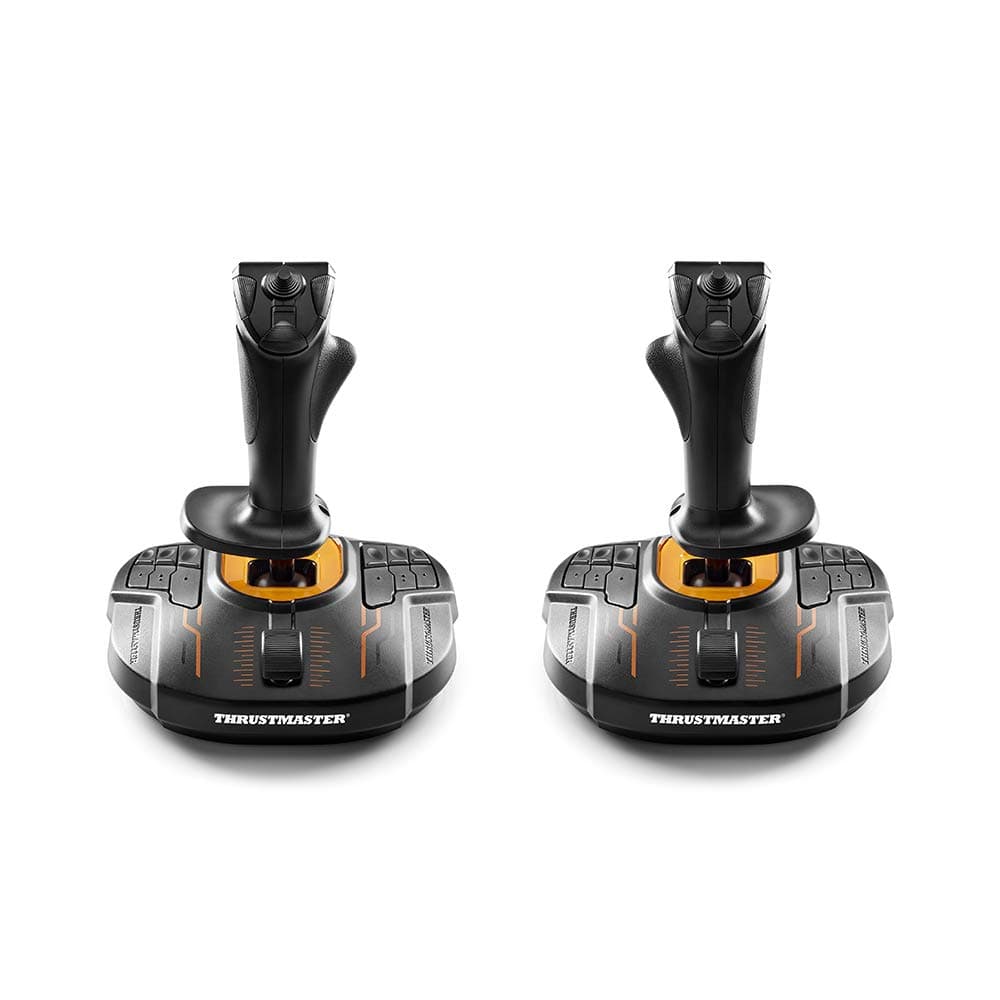
🚀 Take command of the cosmos with precision and style!
The Thrustmaster T.16000M Space Sim Duo is a wired USB PC joystick set featuring dual ambidextrous sticks with magnetic sensors for high-precision control. It offers 32 programmable buttons with tactile Braille-style markings, ergonomic design with weighted bases, and advanced customization through T.A.R.G.E.T software—making it a top-tier choice for immersive space and flight simulation gaming.


| ASIN | B076XKZML8 |
| Additional Features | Button Mapping, Ergonomic, Magnetic, Multiuse, Wired |
| Best Sellers Rank | #812 in Video Games ( See Top 100 in Video Games ) #2 in PC Game Flight Controls |
| Brand Name | Thrustmaster |
| Button Quantity | 32 |
| Color | Black |
| Compatible Devices | PC |
| Connectivity Technology | USB |
| Controller Type | Flight Stick |
| Customer Reviews | 4.3 4.3 out of 5 stars (8,211) |
| External Testing Certification | Não Aplicavel |
| Hardware Platform | pc |
| Included Components | Instructions manual & flightstick |
| Item Dimensions | 12.99 x 10.51 x 9.02 inches |
| Item Type Name | Joystick |
| Item Weight | 5.5 Pounds |
| Manufacturer | Thrustmaster VG |
| Model Name | Thrustmaster T.16000M FCS Space Sim Duo Flight Sticks (Windows) |
| Package Quantity | 1 |
| Power Source | Corded Electric |
| UPC | 663296421043 |
| Warranty Description | one year |
S**T
Incredible Beginner's Set!
I have a lot of things to say about this incredible piece of equipment, but here's a TLDR for people who want a quick glance at multiple reviews: it's one of the cheapest flight control sets you can find on the market that still delivers high quality performance to any game you choose, however it must be noted that the controls can easily move around if you push or pull too hard and that right-handed people will naturally feel better with the controls. Now, let's start with all of the negatives just so everyone is aware. 1. Firstly, the material that the set is composed of is relatively cheap plastic. This doesn't detract from the feel of it (at least in my opinion), as the handles have nice grips to assist you (the yoke actually has a rubber siding for your comfort, which I love). Because of this, it's not exactly the heaviest thing in the world, so you can imagine what it might be like jumping into an FA-18 Super Hornet and absolutely sending it into a steep turn. If you can't, I'll put it this way: the controls will fly, not you. They don't fall off the table, but they may raise up a little bit and disorient you. Also, the rudder pedals function the same way. Make sure you are not pushing or pulling down on them too hard or they will end up moving (and in my case that's bad because I have a foot-rest bar from one end of the bottom of my desk to the other, and you can put two and two together). Wear shoes when you're using the rudders for maximum comfort and performance. A solution to this entire problem could be to buy some clamps for the desk and floor, but I have yet to do that since the issue isn't big enough for me to throw away more money. 2. The throttle and yoke combo is made for right-handed people, so if you are left-handed like me, be mindful that holding the controls the way you'd prefer may not feel exceptional. That in no way means it isn't comfortable, however my hands begin to ache a tiny bit after long hours of gameplay because of the unnatural angle they're positioned at. This only happens after extremely long sessions, though, and all things considered, holding the controls still feels nice the wrong way. If you easily get carpal tunnel or other hand aches, be mindful of this, please. 3. Last but not least, make sure you are wary of the fact that if you're in a game and need to use your mouse for something, the controls may disconnect and require that you press a button to recalibrate them. This sometimes puts me into an immediately steep climb in Microsoft Flight Simulator and thus either a stall or an annoying gain in altitude. This issue can be avoided by retaining the position your controls were in when you paused, however, if that doesn't work, be prepared to immediately readjust your controls. Now it's time to explain how much butt this thing kicks. 1. The controls are SUPER realistic. The throttle, yoke, and rudder pedals make you feel like you are genuinely in control of a full-blown aircraft. Not much else to say on that. 2. There are tons of buttons to suit your needs. The yoke has multiple buttons on its top, and a plethora of buttons on its base. The throttle has numerous, quirky-looking buttons behind the throttle itself. While the rudder pedals don't have buttons, they don't need any. That wouldn't make much sense. The brakes and movement capabilities of them are super intricate! 3. The controls are incredibly easy to set up, but make sure you have enough USB slots. I did not, so I purchased a dongle with four USB ports so that I could connect everything at once and make my setup literally plug-and-play. Note, however, that the rudder has a specific, ethernet-looking cord that you may not have a slot for in your computer. I believe it can connect to the throttle, but I haven't seen the slot for it so don't quote me on that. I went ahead and purchased an adapter for the rudder pedals so that everything was able to go into a USB port. It's a little extra money that you might not want to spend, but I chose convenience over price and I do not regret it in the slightest. 4. For the last major plus side to this set, it feels comfortable. I'm a left-handed person, and you already know this thing is right-handed, so there is a little bit of a discrepancy in my review. However, nothing can take away from how comfortable the set feels when you're in the cockpit of an aircraft. The yoke is made extremely well for how cheap it probably is, the throttle allows your hand to rest nicely while flying, and the rudder pedals are sturdy, meaning they won't move around unless you push a little hard (it's also harder to rudder in the air, but be careful so as to not accidentally press them mid-air, or your aircraft may do things it was never meant to do. I'm so pleased with this set, and it was one of my bigger purchases for my own entertainment. So far, nothing has genuinely let me down. A few nitpicks here and there, but that is almost completely overshadowed once you actually get into the air. There's so much more I could say that I loved about the controls, but that would make my review applicable for a Harvard essay. I highly recommend this product to anyone interested in playing an aviation-based game because of its affordability and feel. Hope you found this review helpful. Throttle on!
R**K
The King of Deep Space.
I just wanted to leave a review for this as there currently aren't very many. This is part review for this stick, and part comparison of it between other sticks. For reference, I've extensively used the following sticks: Saitek X52 and X52 pro, Logitech 3D Extreme Pro, old FCS, Warthog, and now this. Also, I play pretty much every type of flight game, including DCS, IL-2 back in the day, SWG back in the day, E:D, and SC. So with that out of the way, this is my favorite stick. It feels weird to say that when I own a warthog, and the build quality and general feel is definitely better on the warthog. The button layout is also much better on the hog. However, once you factor in the price difference and the twist axis, this stick is my daily driver. Another big advantage this stick has over the hog, to me, is the lighter springs. The hog is great for flying an old warplane or something that's really slow, but not so great when dogfighting in a space sim, or when needing to do really precise movements. I just overall find this stick to be easier to use for space sims in general. The new model doesn't seem like a massive upgrade from the old one. I'm not sure what's up with the orange coloring, but I digress. The main difference is that the buttons on the base now have textured markings (which is a life saver in VR or if you just don't want to be looking down), most of the buttons now are textured and more ergonomical, and it seems that the spring makes a lot less noise and is of slightly higher quality. Although that could just be because it's new and my old FCS is old. One thing to note, expanding on textured buttons, is that if you are playing in VR, the warthog throttle is actually a pretty terrible experience. The switches are all over the place and you won't have any way to see them. I hope that all sticks in the future follow the trend of having unique textures on the buttons, so you can feel your way around what you're doing. Definitely a major plus if you're playing in VR. If you're new to Thrustmaster in general, another thing to note is that the T.A.R.G.E.T. scripting software is second to none as far as allowing you to get really in depth with customizing how you want your stick to act, as well as how it's programmed. It's not exactly user-friendly, but you can do pretty much anything you want with it. This stick's biggest weakness is the lack of buttons on the handle. There are plenty on the base, but I really find myself just wanting more on the handle. I picked up two of the cougar MFD's, and find those easier to use than the buttons on the base. Still, next time around, get some more buttons on this thing's handle Thrustmaster. I really wish that this stick and the warthog could make a baby. I'd love to have the metal sticks with the great button layouts, while also having the ability to use it ambidextrously, having a twist axis, and having the lightweight handling that this one does. Unfortunately, that's not really an option. So given that, this stick is my recommendation. The warthog is technically superior, but this stick offers more than enough bang for the buck, and I'm actually probably going to sell my hog soon since it doesn't have a twist axis. The extra handle buttons on the hog are really nice, but the lack of a twist axis just makes it almost useless in a space sim. And you can make up for a lack of buttons with VoiceAttack. The bottom line is that whether you're a new pilot or a seasoned veteran, this stick can do it all pretty well. I've been flying in PC games since I was a kid, and I've used a lot of sticks. This one is my favorite. I think you'd be hard pressed to prove that a warthog is going to give any real-world combat advantage, so the only reason I see to fork over the extra cash is if you really want that metal handle (which does feel nice...). My current setup is using two of these, two MFD's, and a throttle on my left side. I have rudder pedals, but I have no need for them with this setup. The two sticks provide full 6DOF freedom in space sims, and the throttle still allows me to fly regular planes (or long haul flights in space sims) without awkwardly trying to use two sticks. Then the MFD's fill the need for a near infinite amount of buttons. You can slap all of that on a board with some velcro, sit in an office chair, and rival the setups of the biggest and baddest simpits out there for less than what you'd pay for just a warthog stick in some places. Just buy two of these and you won't regret it, seriously. That's my .02, hopefully it helps someone. Happy flying, o7
T**S
Excellent throttle for the price - a step up from my aging CH Products Throttle
After a good 13 or so years, and with it still working fairly strongly, I reluctantly began a search to replace my CH Products Throttle. The free-form x/y access hadn't properly been reporting for a while, and the max and min on the z axis were a little shaky. Amazingly, I could actually still buy the exact same throttle from CH, but in the intervening years the resolution on the controllers means that you can get something that is that much more precise. Enter the rolls-off-the-tongue Thrustmaster VG TWCS Throttle Controller. I got it at quite a discount off of the normal retail, which heavily swayed it in favor of a purchase. I'm not necessarily going to find myself in a situation needing to control the throttle of my two engines independently, so it being a single throttle was not an issue for me. Ideally it lasts the decade+ of the CH Products, but I'm not holding my breath. First, the good: * Can be used independently of the joystick (i.e. I'm using a CH Products joystick and rudder), with a note that you'll lose the ability to use most mapping software if your game doesn't support multiple joysticks (which hasn't been a problem for most games for years now, but worth a note) * Bevy of buttons, and it's enough to meet my needs flying DCS. (The pinky potentiometer really does wonders when trying to control radar elevation) Broadly speaking, the buttons are well placed and if your hand is in the right position, everything but the big orange thumb one can be accessed with ease. (In my setup, that gets mapped to TrackIR's centering, so doesn't get used a ton) * Like most modern joysticks, does >8 bit resolution on the axis elements, so you get a more fine grained control as you use whichever axis. It has made a great deal of difference on those Helicopter modules in DCS over my older throttle. * Orange accents means that I get more of my favorite color on my desk * Slide action is smooth, base is sturdy / weighty / grippy enough not to move around when you're in the heat of it. All of the axis controls are similarly tight and work well, smooth in action but otherwise staying firmly in place. Downsides: - Ergonomics could stand a bit of work. Compared to the CH Products Throttle, which required some Seinfeld "Man Hands" to operate all of the buttons effectively from resting position, from rest my hands only have a problem reaching the big orange "thumb" button on the right-hand side. Ergonomically, however, my hand doesn't naturally seem to find the proper placement - I have to really think about getting it lined up - which was the exact opposite of my experience with the CH Products. I haven't had any greater issues with long-term holding of the throttle than with the CH Products. - Slide action can be a little less than smooth if using it at the 'wrong' angle - and it's sometimes difficult to avoid that 'wrong' angle All told this was a good purchase for the price I paid for it. Compared with my old throttle (the same model still being sold 13 years later), this was about half the price. The matching joystick really won't cut it for anything semi-serious, but this throttle is the gem of the set.
K**R
Great joystick for a reasonable price
I bought this joystick as a replacement for my very old Logitech Extreme #D Pro, which got very imprecise. The new joystick was very easy to hook up and configure with MSFS 2024, and gives me precise control over my aircraft. Haven't had any issues thus far.
M**L
WOW Finally a HOTAS that actually works! Better than more expensive models!
Yikes I went through 4 of the X-52, 3 of the X-52 Pro, and 2 of the X-56 Pro - - - THEY ALL FAILED!!! Dead switches, dead logic boards - they all died within a few days of my gentle, mild use!!! I even tried a brand new Warthog and it failed programming brand spanking new out of the box - that too returned the next day... I was getting mad / sad, as my trusty X-45 was getting a bit old and stiff. I refurbed it a bit and now it's much better, still a great backup, but... Ok, so I thought, maybe I don't need higher-end, so I tried this offering from Thrustmaster. IT WORKS!! No programming needed, even for Elite Dangerous, my fave game. You can simply assign button combinations to do every, and I mean EVERY FUNCTION in Elite Dangerous - I never have to use the keyboard at all. Ok, there are no lit buttons but they have braille-like nibs on the buttons and I have learned to use them without looking. There are enough hats on the Throttle to do all the Interface Mode interactions, up down left right tab left tab right back next page prev page you can set them all!!!! I still use a gaming mouse for the non-ship stuff like FSS and manipulating the galaxy maps and free cameras but in theory all that could be done on the analog hat too. The feel and the buttons are quite nice and after two weeks I am tickled pink that this system works great. I even You-toobed a video on how to take them down for improvements, such as the Throttle now is re-lubed and smooth as glass - its really great as while I am playing E:D I often make very subtle and smooth throttle changes. If you are careful, you will not void the warranty doing this - the things are made well and are durable enough to handle this. The feel of all the buttons is just fine and all the hats work nice and precise. I have come to love the Twist Yaw and use it to get good hit ratios in E:D. I have zero complaints about this product and if you think you need a higher end model - good luck because they will let you down HARD. If these other models had worked, I would have kept one and not been making this review. But if I had to review it in that circumstance, this model would maybe only get 4 stars, has it does come across as a bit "toy-ish" - but I have to give it a full 5 stars because it made me happy because IT WORKS!!!
D**D
read on but the short and sweet is, if you want the best HOTAS that ...
Quality, accuracy and functionality. That is the main difference between this and every other HOTAS under $400. If you want to know why, read on but the short and sweet is, if you want the best HOTAS that gives you 6 degrees of movement under $400 this is it. You can buy the Thrustmaster Warthog and a set of high quality pedals for over $400 but the jump in price doesn’t justify the difference you get IMO but you could go that route. Now as to how we got here, Star Citizen and Elite Dangerous and DCS have revived the market for these HOTAS setups. For the longest time there weren’t any new HOTAS setups on the market because there were no games to warrant the investment by the companies that make them. This has all changed and this is the first HOTAS setup developed from the ground up for the games people want them for. The joystick is a redesign of the T.16000 that has been available but that didn’t need changing at all, while the throttle is all new and thoroughly thought out. The built quality is excellent and the size is appropriate so it can fit on your desk along with your mouse and keyboard. The weight distribution is spot on so it stays put while you’re playing and everything is pinpoint accurate. I used a X52 an X52 Pro and own a X55, they are ALL overpriced right now. If you were looking at them a year ago, they were all AT LEAST $50 cheaper than what they are now and they were overpriced THEN for the products you get. Saitek just jacked up the prices because people were starting to buy them. I put CH products in this category as well after seeing a teardown of their HOTAS; it’s higher quality than Saitek but still overpriced. With Thrustmaster you’re getting what you pay for. Bottom line, under $400 there is no competition for the quality, accuracy and functionally you get with this HOTAS.
A**E
Buying this was a mistake.
My initial impression was very badly mistaken. This is not a nicely featured mid-range HOTAS. It's a tragic symphony of misdesign and pretense. The throttle wasn't dead right out of the box but it didn't last long either. I was under my desk setting up cable control points and managed to knock it off my deak... my bad. But, hang on a sec. I've knock my cell phone off the same desk from the same hieght probably a dozen times without damage. What could be so delicate about this thing that it died so easily? I opened it up. There's one PC board in there smaller than the one in my cell phone. What I don't see is anything cracked or in any sort of disorder. While I don't keep an inspection microscope handy, I do have a 10x jeweler's loope. Even using this I had a time finding the problem... There is a tiny little inductor... basically a coil of super thin wire wrapped around a tiny little bit of something, looks like black plastic, and it is only soldered to the tiny little contact pad on one side. Unless someone has a microsoldering rework station lying around this is way beyond a quick hit with a soldering iron and fixed... not gonna happen. Let's look at how useful it was before it stopped working. Three 4-way hats on the thumb station with one button at the bottom of the control group... Not a horrible layout. The actuation axis of two of the hats are just a bit clumsy. ...and that's where the good news ends. a mouse hat under the index finger position works okay... feels fragile though. A two position toggle in station 2 seems to have decent enough function for forward/reverse thrust for the throttle controller... why it worked so inconsistently in actual use will have to remain a mystery. Two buttons at stations 3 and 4 work well enough. A 2-D paddle spans across all of this and isn't quite as ungainly and awkward at it seems. and a pinky wheel at the end actually had a feel like it was durrible. Unless you remove your hand entirely to do something on the keyboard, it doesn't present a problem. Everything has good tactile recognition surfaces so it only takes a moment to sort your hand back into position blindfolded. So... The throttle unit, aside from being a lighyweight piece of cheap plastic worked pretty well... while it worked. And now, the joystick. One trigger switch... works okay. Feels like a two staged trigger but it has no two stage function. One 8-way hat. Out of every feature in both pieces this is the least wrong. It works, works well and its placement and orientation to the egonomics of the human hand are decently comfortable. One secondary trigger... so badly placed that you can count on actuating it accidentally while using the 8-way hat. Two additional buttons in the thumb station that are functional. 12 buttons on the base that shouldn't even be there. They can't be used without taking your hands off the controls. That makes them completely useless... Even the number of teats on a boar hog have relevence for the number of hogs in a litter. This isn't a boar hog. It's a chicken. Then there's a slider as well. Not just badly placed, but it doesn't function properly. It's plastic junk that was stuck on as an afterthought in a useless location. but what about the basic joystick functions... Yaw, pitch, roll... I was testing it out in a dogfight with a meh NPC. In yaw-into-roll death spiral I pulled up on the stick and heard something snap. It didn't come appart in my hand and it didn't stop working but It made a noise that betrays fragility... I don't buy fragile... I don't buy anything that even might be fragile. When I bought this I got a 4 year warranty thingy with it. I haven't bothered. I do not want it back fixed. I do not want this thing back as designed, on its best day.
A**N
Decent, but not everything I had hoped for.
I've been an avid space sim fan for years, and have owned and flown Elite Dangerous since it was in Beta. I've owned and worn out two previous HOTAS setups from another manufacturer, so based on all of the positive reviews I decided to try the Trustmaster T.16000M FCS HOTAS Controller. I was excited about it, as I've owned Thrustmaster products in the past and they've all been great. So let me begin by saying that the Flight Stick part of this HOTAS is great! It's very accurate and easily fits in my rather large hands. It isn't too large or clumsy like some other brands, it just feels right. The only complaint I'd have about the stick is that the button placement at the base is a bit out of the way, and not really too useful. Unfortunately, the throttle part of the HOTAS was not up to my expectations. The sliding action on a level plane was a bit unusual for me based on the other products I had used, but wasn't an issue. The button placement and switches are sufficient and well placed, but after just a couple of weeks the use of the throttle during acceleration and deceleration began sticking and wasn't smooth at all. I found it difficult to make slight adjustments because of this issue, and sometimes have to apply more downward pressure than I feel necessary in order to get smoother movement. Unfortunately I'm thinking that I need to begin the search for a better replacement for the throttle, and sadly this is just after a couple months of use. All in all this is a decent budget HOTAS if you're short on cash and can tolerate some of the issues I've mentioned with the throttle. I can only award it three stars based on my experience, unless for some reason the throttle starts working better and smooths out. I'm not going to hold my breath though.
Trustpilot
Hace 2 semanas
Hace 2 semanas