We remain fully operational. Our teams are working around the clock to ensure your deliveries continue safely.

Descargar la aplicación


Servicios al cliente
Sobre nosotros
Copyright © 2025 Desertcart Holdings Limited
Descargar la aplicación
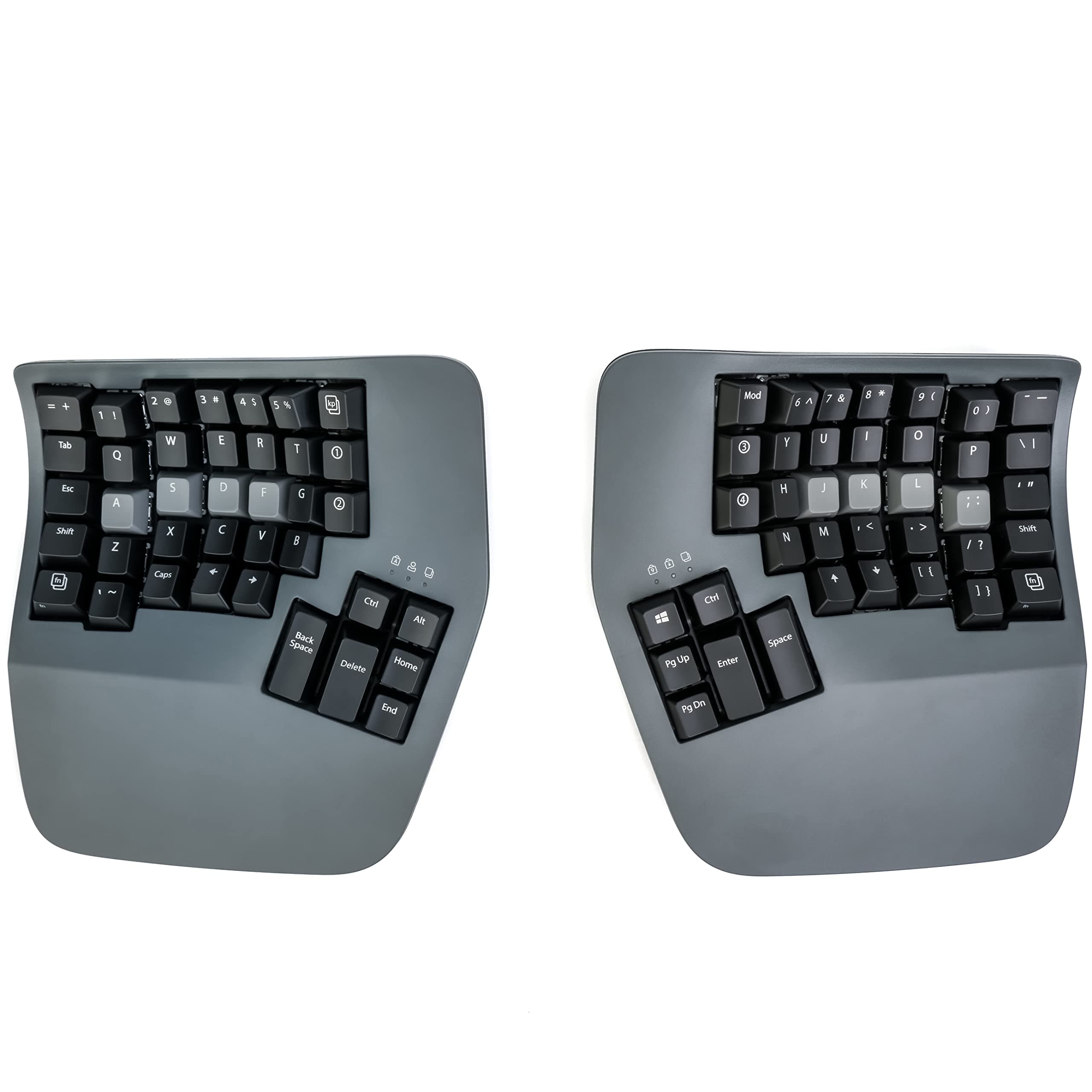


⌨️ Elevate your typing game with ergonomic precision and wireless freedom!
The Kinesis Advantage360 Professional is a Bluetooth-enabled split mechanical keyboard featuring 76 keys arranged in vertical columns within concave keywells. Its ergonomic design includes adjustable tenting, integrated palm supports, and thumb clusters to reduce hand and wrist strain during long typing sessions. Equipped with Gateron Brown tactile switches, it offers a compact footprint by omitting the numeric keypad, promoting better posture and reduced reach.


| ASIN | B0BCHMGZMD |
| Antenna Location | Long text inputs |
| Best Sellers Rank | 66,319 in Computers & Accessories ( See Top 100 in Computers & Accessories ) 1,078 in Keyboards (Computers & Accessories) |
| Box Contents | Bridge Connector, Charging Cable, Extra Keycaps, Keycap Puller |
| Brand | Kinesis |
| Brand Name | Kinesis |
| Button Quantity | 87 |
| Colour | Dark Gray |
| Compatible Devices | Laptop |
| Compatible devices | Laptop |
| Connectivity Technology | Bluetooth |
| Connectivity technology | Bluetooth |
| Customer Reviews | 4.1 out of 5 stars 177 Reviews |
| EU Spare Part Availability Duration | 3 Years |
| Enclosure Material | Plastic |
| Global Trade Identification Number | 00607998360026 |
| Hand Orientation | Ambidextrous |
| Item Dimensions L x W x H | 38.1L x 20.3W x 7.6H centimetres |
| Item Type Name | Keyboards |
| Item Weight | 3.2 Pounds |
| Keyboard Description | The Kinesis Advantage360 Keyboard is a professional split mechanical keyboard with concave key wells hollowed into a bowl shape to reduce hand and finger extension, keeping your wrists straight and perpendicular to the house row. The keys are arranged in vertical columns, better reflecting the natural movement of the fingers. The keyboard features two pronged key wells, which moderately raise the … |
| Keyboard Layout | QWERTZ |
| Keyboard description | The Kinesis Advantage360 Keyboard is a professional split mechanical keyboard with concave key wells hollowed into a bowl shape to reduce hand and finger extension, keeping your wrists straight and perpendicular to the house row. The keys are arranged in vertical columns, better reflecting the natural movement of the fingers. The keyboard features two pronged key wells, which moderately raise the side of the thumb of the hand, offering a more neutral posture and reducing stress. Built-in palm supports reduce stressful wrist flexion, while thumb clusters include frequently used keys such as Enter, Space, Backspace and Delete. The Advantage360 Professional uses the Gateron Brown stem low-force tactile key switches. Keyboard description The Kinesis Advantage360 Keyboard is a professional split mechanical keyboard with concave key wells hollowed into a bowl shape to reduce hand and finger extension, keeping your wrists straight and perpendicular to the house row. The keys are arranged in vertical columns, better reflecting the natural movement of the fingers. The keyboard features two pronged key wells, which moderately raise the side of the thumb of the hand, offering a more neutral posture and reducing stress. Built-in palm supports reduce stressful wrist flexion, while thumb clusters include frequently used keys such as Enter, Space, Backspace and Delete. The Advantage360 Professional uses the Gateron Brown stem low-force tactile key switches. See more |
| Manufacturer | Kinesis |
| Mechanical Keyboard Switch Model | Gateron Brown |
| Model Name | Kinesis |
| Model Number | KB360-PRO-GBR |
| Number of Keys | 76 |
| Number of Sections | 76 |
| Power Source | Corded Electric |
| Product Features | Ergonomic, Hotkeys and Media Keys, Split Keyset Design, Wrist Rest |
| Product Warranty | 3 year manufacturer |
| Recommended uses for product | Long text inputs |
| Series Number | 360 |
| Special feature | Ergonomic, Hotkeys and Media Keys , Split Keyset Design, Wrist Rest |
| Style Name | Bluetooth |
| Switch Type | Mechanical |
| Theme | Ergonomic design |
| UPC | 607998360026 |
| Unit Count | 1.0 Count |
| Water Resistance Level | Not Water Resistant |
I**N
Comfortable ergonomic keyboard
This keyboard is awesome! I've gone through a bunch of other keyboards over the years from cheap Dell ones, Keychron mechanical keyboards (great keyboards for normal layouts), Unicomp IBM Model M and was skeptical at first about this, primarily as I've never touch-typed.. can type fast with numerous fingers but mostly looked at the keyboard. This Kinesis has taught me to touch type too now, within a few weeks. I remapped a few of the keys due to programming needs, but it's so comfy and allows me to sit in a better position. It's not cheap, bit if you're looking for a split ergo keyboard, I'd highly recommend it!
N**E
I love this keyboard.
I have been a Kinesis user for about 13 years. I started with Kinesis Advantage over to Kinesis Advantage II and now I have Kinesis Advantage 360 pro. This is the best keyboard from Kinesis yet.
A**D
Very happy
First time using a Kinesis keyboard. The build quality is really nice. However, a few things let it down. There is no software for configuring the keyboard, you need to edit the QMK files and use GitHub this could be a big barrier for some people. There is a web configurator but is very limited in the number of features QMK features it supports Not wrist wrists rest are included. The default keycaps are very slippy. on the positive, the key well is very nice, the keys just line up with my fingers. typing on the 360 is a very nice experience.
J**D
Fastest return I've ever made
I'm a software engineer - so I have a fair idea on what I'm doing when it comes to basic connectivity. This keyboard simply refused to pair via bluetooth. I tried to overlook the quality issues: - loose power button on the left side - loose tenting mechanism - "broken" keys (the felt as if they'd been hammered) Overall, I'm incredibly disappointed in this (nearly) £700 keyboard. Would not recommend!
Trustpilot
Hace 2 días
Hace 3 días