We remain fully operational. Our teams are working around the clock to ensure your deliveries continue safely.

Descargar la aplicación


Servicios al cliente
Sobre nosotros
Copyright © 2025 Desertcart Holdings Limited
Descargar la aplicación


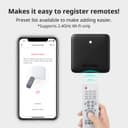

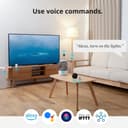
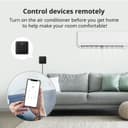
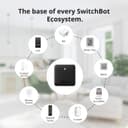
🏠 Your smart home’s mini powerhouse—control everything, anywhere, anytime!
The SwitchBot Hub Mini is a compact, USB-powered universal IR remote hub that connects your infrared devices and SwitchBot ecosystem to 2.4GHz Wi-Fi. Supporting up to 18 devices, it enables seamless voice control via Alexa, Google Home, Siri, and IFTTT, while offering smart learning to replicate any remote in seconds. Lightweight and portable, it empowers remote management and energy-saving automation, making it an essential gateway for modern smart homes.


| ASIN | B0BFWH2WD8 |
| Battery Types | Lithium-Ion Polymer |
| Best Sellers Rank | 19,398 in DIY & Tools ( See Top 100 in DIY & Tools ) 8 in Home Automation Hubs & Controllers |
| Box Contents | 1 x Mini Hub, 1 x User Manual |
| Brand Name | SwitchBot |
| Button Quantity | 3 |
| Colour | Black |
| Compatible Devices | [Most] Infrared Remote Controlled Devices |
| Controller Type | Infrared, Wi-Fi |
| Country of Origin | China |
| Customer Reviews | 4.3 4.3 out of 5 stars (55,052) |
| Item Weight | 36 Grams |
| Manufacturer | Wonderlabs |
| Manufacturer Part Number | W0202200 |
| Maximum Number of Supported Devices | 18 |
| Maximum Range | 124 Feet |
| Model Name | Hub Mini |
| Model Number | W0202200 |
| Network Connectivity Technology | Infrared |
| Product Features | Universal |
| Product Warranty | 2 |
| Smart Home Compatibility | Smart Home Compatible |
| UPC | 850043739326 |
| Unit Count | 1.0 count |
T**D
Great if you have adopted the Switchbot Eco System
I recently purchased the Switchbot Curtain Rod 2 and installed this is my bedroom. They work fantastically, but it was a little frustrating having to open the app every time i wanted to open/close the curtains. The app is very well designed but it just felt like a faff to keep going into my phone every time. As a result i decided to order the swithbot button which works great. On further research i came across the hub mini which allows your switchbot devices to connect with Alexa/Google Home. Having a ton of alexas in our home i thought i would order and give it a try. The hub mini is a very small and compact device. Installation was super easy, connect to a USB power source (cable but no plug included - however i just plugged the included USB lead into a wall socket with USB power points). Connecting the hub to the app was again very simple - the app walks you through this. Within a couple of minutes i had linked the hub to the relevant switchbot Alexa skill and voila - my curtains were now Alexa controlled! Once connected to your wifi network you can also remotely control devices away from your home environment, such as opening your curtains from work or even abroad! Fantastic for security. What i was not aware of is that the hub mini also has an infrared sender, so you can set this little guy up to control your other smart devices - this includes your TV, Projectors, Sky etc. Programming the device to control my Optoma projector was a piece of cake - the app again walks you through this and inputing the manufacturer and model number of your smart device finds the relevant IR codes. You then walk through a test screen to ensure the buttons are all doing what they are suppost to do. If any of the buttons don't work properly or your device is not known then the app allows you to send your own IR codes directly by pointing your remote at the hub and pressing the relevant button. It auto learns this code and programmes the remote in the switchbot app. Overall if you have switchbot devices then the hub mini is a must! It's good value and has a ton of extra features that i didn't even know it had. I hope that you found my review helpful.
J**K
The hub to help automate the older tech in your house
With the SwitchBot hub I’m able to automate lots of annoying old tech in my house that doesn’t have a cheap smart solution yet. When someone takes a shower the extractor fan is outside the bathroom. Using the switchbot humidity sensor this turns on automatically when needed. To avoid mould build up this runs until the humidity drops to a certain level based on a simple switch bot hub scene. Previously I had to remember to go turn it off after an hour or so and something others forget to turn the extractor fan on at all, causing issues. I had to use two bots because despite lots of different positions and talking to the support team there just isn’t enough power to push and pull this one fused switch. If I was more electrically minded I’d maybe replace it but for now this works and still lets people manually press the switch it required. My coffee machine takes about 3 minutes to fire up, now with the switchbot hub I’m able to say “Alexa turn the coffee machine on” from my office upstairs and by the time I walk downstairs and pick up my cup, it’s ready to go! The possibilities are endless, if I didn’t already have a harmony I’d use the bot for IR commands. My only wish was that there was better HomeKit integration but the helpful switchbot team told me recently they are working on homebridge integration so that should help towards that little request. For now the IFTTT integration and Alexa integration along with Scenes in the Hub is providing me with plenty of value. Purist HA may not love the BLE vs. Zigbee/Zwave element of this solution but until everything is much cheaper and accessible this solution is working well for me and am always finding new things to automate around the home. EDIT: the homebridge plugin is available now and it’s great when paired with a raspberry pi, I can access my switchbot curtains, SwitchBots and temperature and humidity sensors within the Apple HomeKit app now and using eve with conditional rules have been able to make some pretty complex automations
A**R
Easy to use and can be integrated with other platforms
I thoroughly enjoy playing with home automation, and have been using the SmartThings platform for quite a while - but for all the devices out there that can easily be integrated, there are still loads of modern devices that can't. Enter the SwitchBot Mini! This small little box can be used to learn the control signals from most remote controls, allowing them to be integrated into your smart home. The reason I purchased the little SwitchBot Mini hub was to try and integrate a Dyson desktop fan - It doesn't have any smarts of its own, but using the SwitchBot mini to learn the remote control buttons, I was able to integrate the fan with the rest of my automations :) The SwitchBot is small and tidy, the setup process was easy (though, be sure to manually type your wifi password, don't copy and paste), and although there's an option to "automatically learn your device from the remote", this didn't work for my fan. Not that it matters though, it was really easy to manually add each button on the remote by putting the SwitchBot in learn mode and just pressing the button on the remote. As the device just blasts out IR signals, it won't give you any feedback for the status of devices that you're controlling, but it's been reliable every time it's triggered so far :) It's simple and effective. If you have some not-so-smart appliances that use IR remote controls that you'd like to integrate with your smart ecosystem, the SwitchBot Mini Hub is an elegant solution that I'd be happy to recommend.”
A**A
Amazing box! I wished I knew about this technology and bought this sooner!
Quick and easy to set up and worked perfectly! I can now control my mum’s TV from anywhere in the world just using my iPhone. Highly recommend this if you are a remote carer or have a loved one or kids at home to look after when you’re out. But you will need a wifi camera, so you can see the TV otherwise you won’t know what buttons to press on the app/remote control! ❤️
P**S
Funciona excelente te con Alexa controlando el York, aún en los ajustes secundarios.
A**S
The device was advertised as supporting 8 matter devices (still not a lot), but in fact it only supports 4. Switchbot has since then changed the description to mention the 4 device limit. I've returned the Hub Mini Matter and Switchbot has generously send me a free Hub 2 Matter, which supports 8 matter devices.
C**N
Le hub est facilement configurable. Pour les thermomètres, il faut stocker les données dans le Cloud pour pouvoir y accèder depuis l'extérieur. Cela fonctionne très bien. Le plus de ce mini hub est qu'il est capable de dupliquer les télécommandes infra rouge de vos appareils. J'ai fait le test sur un lampadaire qui fonctionne avec une ampoule infrarouge et avec la télévision. Cela fonctionne correctement une fois les touches apprises. Vous pouvez donc contrôler d'autres appareils avec ce hub. Investissement qui vaut le coup !
F**S
Mijn bedoeling was, om mijn Samsung tv en topbox( Kpn tv ontvanger) met mijn Google Nest(Google Home), aan en uit te zetten en het liefst beide, met 1 spraakcommando. Dit is gelukt na wat puzzelen. Mijn tv heeft een aparte knop voor aanzetten en aparte knop voor uit zetten. Uitvoering: 1. Aanmaken aparte afstandbediening voor tv aan te zetten. Genoemd Tv-aan en belangrijk dat de aanknop op de virtuele afstandbediening wordt ingeleerd met de aanknop van je fysieke afstandbediening. Eventueel kan je andere knoppen ook inleren naar wens. 2. Aanmaken aparte afstandbediening voor tv uit te zetten. Genoemd Tv-uit en belangrijk dat de uitknop op de virtuele afstandbediening wordt ingeleerd met de uitknop van je fysieke afstandbediening. Eventueel kan je andere knoppen ook inleren naar wens. 3. Aanmaken aparte afstandbediening voor Topbox aan te zetten. Genoemd Topbox en belangrijk dat de aanknop op de virtuele afstandbediening wordt ingeleerd met de aanknop van je fysieke afstandbediening. Eventueel kan je andere knoppen ook inleren naar wens. Opm.: aan en uit knop is dezelfde knop op de fysieke afstandbediening. 4. In Google Home een Service toevoegen, waarbij je jouw "SmartBot" account en ww moet ingeven. Hierna zie je de virtuele afstandbedieningen bij de Google Home apparaten staan. 5. In Google Home automatiseringen toevoegen. "Televisie aan" met als starter: Hey Google televisie aan Acties: Tv-aan Topbox Beide op "aanzetten" 6. In Google Home automatiseringen toevoegen. "Televisie uit" met als starter: Hey Google televisie uit Acties: Tv-uit Topbox Beide op "uitzetten". That's all.
R**N
SwitchBot製品はもちろんですが、リモコン付きの家電なら大体のものは操作できました。 私の場合、リビングの照明のリモコンが壊れていたのですが、このハブミニでまた操作できるようになり大変助かりました!
Trustpilot
Hace 1 mes
Hace 2 meses