We remain fully operational. Our teams are working around the clock to ensure your deliveries continue safely.

Descargar la aplicación


Servicios al cliente
Sobre nosotros
Copyright © 2025 Desertcart Holdings Limited
Descargar la aplicación
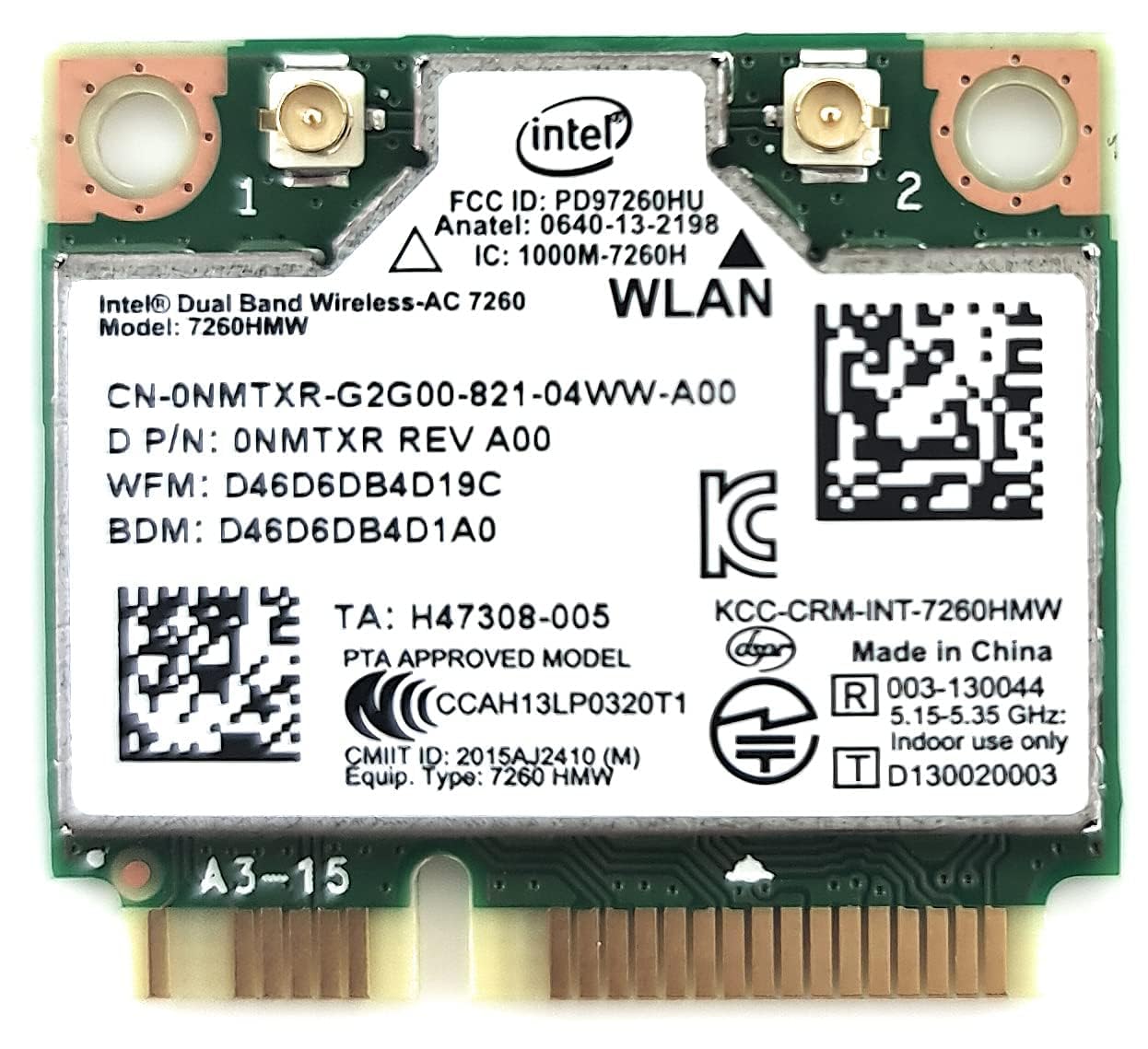


🚀 Upgrade your connection, upgrade your life!
The Intel Wireless-N 7260 (7260HMW AN) is a compact PCIe Mini Card Half network adapter delivering dual-band 802.11ac Wi-Fi speeds up to 867 Mbps alongside Bluetooth 4.0 LE. Designed for professionals seeking reliable, high-speed wireless connectivity, it enhances range, stability, and battery life, making it an ideal upgrade for laptops and compatible desktops. Plug-and-play installation and broad compatibility ensure a hassle-free boost to your wireless experience.
| ASIN | B00N7474CS |
| Are Batteries Included | No |
| Best Sellers Rank | 274,316 in Computers & Accessories ( See Top 100 in Computers & Accessories ) 1,195 in Network Cards 2,227 in Graphics Cards |
| Brand | Intel |
| Colour | green |
| Computer Memory Type | Unknown |
| Customer Reviews | 4.2 4.2 out of 5 stars (2,443) |
| Date First Available | 26 July 2014 |
| Form Factor | Network Interface Controller |
| Graphics Chipset Brand | Intel |
| Guaranteed software updates until | unknown |
| Item Weight | 9.07 g |
| Item model number | 7260HMW AN |
| Manufacturer | Intel |
| Operating System | Linux |
| Processor Count | 1 |
| Product Dimensions | 6.99 x 6.1 x 0.05 cm; 9.07 g |
| Series | 7260HMW |
| Wireless Type | 5.8 GHz Radio Frequency |
I**U
Tiny little MONSTA!
Definitely, A MONSTAAA!!! I decided to buy this little monster in order to replace my old crappy laptop's wireless adapter and I did the best thing I could do for my old, but still strong ASUS (X54HY-SX030D). At first, I was a bit reluctant as I'd done some research and I found out that it could be incompatible with some laptops. But I took the risk and now I'm among one of the happiest tech geeks - so, now, guys for those of you who still have an old K54 or X54 laptop, it works flawlessly. The Wi-Fi's signal has improved by a little edge - the most important factor here is the router/access point, the speeds went through the roof, but most importantly the connection is A LOT more stable than it used to be - no drops, more constant speed and reduced latency. In addition to all of these super benefits, you get Bluetooth 4.0 LE which is a lovely pleasure to use in combination with an excellent pair of wireless headphones - mine is Ausdom M05. Now, I can walk around my room with my headphones on without having to worry about an annoying wire hanging around
C**S
An easy upgrade - but check you want a half-card first!
First, note that this is a half minicard: one or two reviewers mention buying without realising this. If in doubt, check your motherboard! (You can by an adapter, however...) I've now bought two of these - one to replace the slow single band card in my laptop - Asus N550JV - and the other for a desktop Dell XPS 8300. (Most desktops have a full size card - the Dell XPS doesn't.) On both machines and only using 2.4GHz there was a significant increase in speed, reliability and crucially for me range. The laptop now picks up the network from the bottom of our garden, and the connection speed when playing Star Wars the Old Republic is better. 5GHz is of course even faster, but the range is much shorter. Both were comparatively easy to install. After taking the ten screws (!) out to remove the back of the Asus, the existing card was easy to remove and the replacement popped into the slot and the two existing antennae clipped on without fuss. On powering up, the laptop recognised the card and installed the drivers automatically - although I did check that the most recent drivers both for Bluetooth and for wi-fi had been installed. The back of the Dell opens easily with one screw. The card is harder to get out, as the motherboard is quite cramped, but I managed it by using a plastic ballpoint pen to open one clip and my finger for the other. The Dell did not automatically install the drivers, so I downloaded them onto a pen drive and manually installed them through Device Manager. So if you only have one computer in the house, download the drivers from the Intel site first - you need of course to know the version of Windows you are using and whether it is 32 or 64-bit. So, an easy upgrade for me. Five stars
D**A
Absolute improvement even for a ethernet connection. Great price!
I upgraded the wireless card of my Asus ROG G750JX laptop, which used to have a standard (boring and slow) 802.11b/c/n card. Having done that and having previously installed the drivers and utility from the Intel website, the card was immediately recognised and started to work like charm. When I saw that 5 GHz connection I couldn't contain my tears of joy. :') The speeds are quite impressive, even faster than the wired connection I've got using a PowerLine PassThrough adapter (from TP-Link). I just got rid of that ethernet connection and I'm connected to my EE Brightbox 2 modem just using this little poppy and I can't find any flaws. My first plan was to buy an USB 3.0 adapter from Asus or Netgear, but the price tag for those was a deal breaker. £20 for this little card, despite the disassembling 'struggle' worth the effort. I've been told about some incompatibility issues and the famous pin 51 fix trick, yada yada, but in my case that wasn't necessary, as aforementioned. Just go for it, you won't regret it!
B**E
Great little card however it is important to note...
I thought I would leave a review on this card as a good honest opinion for purchasers... 1. Please be advised that this card does not work in every laptop, some older laptops have a card whitelist buried in the BIOS and as such when you install the card it will not work as the WIFI card needs to be switched on with a switch on the laptop or the FN+F key, only whitelisted cards will work. I can confirm that the Toshiba Satellite C660 is one of them. Please google your particular laptop for compatibility with this card before purchase. (Note, there is a way around this and you have to tape over pin #20 for wireless switch bypass and on some laptops pin #51 for Bluetooth on this card but I am by no means endorsing this and it's not recommended. Please search at your own risk for ways to do this) 2. I will be honest with speeds. You are not likely to get the 866.7Mbps Wireless ac speeds all the time as this is an 'upto' connection speed and many factors can slow the speeds down: distance from router, power management, house materials and walls, drivers and router setup. So please don't be disappointed if you do not get the speeds advertised from this card. 3. Always make sure you are running the latest PROSet/Wireless Drivers/Software and also the Bluetooth software for this card. All of which can be found on the Intel website. 4. Also note if you have a full length PCI Express slot in your laptop you will need to purchase a half mini to full PCI Express bracket as this is a Half Mini PCI Express card. All in all aside from the above important notes, this is a great card and although not the best on the market, it is great for a 2x2 802.11ac card and one that only requires 2 Wireless antenna making it great for older laptops as an upgrade. It works very well when coupled with the PROSet/Wireless Enterprise software and drivers and Bluetooth connectivity is great. Card was sent in a jiffy bag in an Intel OEM plastic case and arrived within 2 working days via Royal Mail. I hope this review helps purchasers make a decision on this card.
D**V
The Intel Dual Band Wireless-AC 7260 Network + Bluetooth Adapter (7260.HMWWB.R) has completely transformed my connectivity experience, offering seamless Wi-Fi and Bluetooth capabilities. This 2x2 adapter combines exceptional performance with reliable Bluetooth connectivity, making it a versatile and essential addition to my devices. I am thrilled to provide a five-star review for this remarkable network adapter. Fast and Reliable Wi-Fi: One of the standout features of this network adapter is its fast and reliable Wi-Fi connectivity. It ensures that I have a strong and stable internet connection for all my online activities. Dual Band Support: The dual band support allows me to choose between 2.4 GHz and 5 GHz frequencies, optimizing my Wi-Fi connection for various tasks. Seamless Bluetooth Connectivity: The built-in Bluetooth adapter is seamless and reliable, providing a convenient way to connect my devices and peripherals. Exceptional Performance: The adapter's 2x2 design and Intel's high-quality engineering guarantee exceptional performance, reducing latency and enhancing data speeds. Compact Design: The compact design of this adapter ensures it can easily fit into various devices, making it a versatile choice for upgrading or adding wireless capabilities. In conclusion, the Intel Dual Band Wireless-AC 7260 Network + Bluetooth Adapter is a five-star solution for individuals seeking seamless connectivity and exceptional performance. With fast and reliable Wi-Fi, dual band support, seamless Bluetooth connectivity, and a compact design, this adapter offers everything you need to stay connected and efficient. Whether you're upgrading your laptop or adding Bluetooth capabilities to your desktop, this network adapter is a top-tier choice. I wholeheartedly recommend it to anyone in need of reliable and high-performance connectivity.
R**A
Ho comprato la Intel 7260 AC per sostituire la Ralink RT3290 presente sul mio HP Envy 15j-100el, la quale mi stava dando problemi da diverse settimane. Che dire, il pacco è arrivato con un ritardo di un giorno, ma per ragioni non dipendenti da Amazon, bensì dal corriere; e questa è l'unica nota negativa che devo fare. Per il resto ho installato la scheda in pochi minuti e funziona alla grande; rispetto alla vecchia Ralink, la scheda Intel ha una ricezione maggiore e il segnale è molto stabile. Non ci sono sostanziali guadagni di velocità, ma in compenso ci sono molte funzioni da poter personalizzare nella gestione dispositivi di Windows: consiglio agli utenti meno esperti di lasciare le impostazioni di default. Sebbene appena avviato il PC dopo la sostituzione, Windows avesse rilevato già la scheda e installato i driver generici della Microsoft, ho preferito farmi trovare preparato scaricando i driver appositi Intel dal loro sito. Basta cercare il modello della scheda e scaricare il pacchetto "driver only", in quanto ci viene offerto anche un software per la gestione della connettività, che a mio avviso è abbastanza inutile. Non dimenticate di scaricare anche i driver bluetooth! Installate entrambi i pacchetti in pochi click e riavviate per sicurezza il sistema; a me non è stato chiesto il riavvio ma ho preferito farlo per controllare che i cambiamenti risultassero effettivi. In definitiva, vale la pena spendere una trentina di euro (questo il prezzo a cui l'ho acquistata io) per sostituire una scheda di bassa qualità o difettosa; sui computer di fascia alta la sostituzione si può effettuare tranquillamente da soli aprendo il vano posteriore. Ci si impiega veramente due minuti e i risultati sono immediati; sicuramente è una soluzione migliore che non lasciare il computer in assistenza per chissà quanto tempo ed eventualmente sborsare una cifra molto più elevata. Vorrei dare un ultimo consiglio a chi sta pensando all'acquisto: prima di comprare questo o un altro modello di scheda per il vostro computer, verificate se il vostro produttore ha preimpostato una "whitelist" nel BIOS; molti produttori programmano il BIOS per impedire l'avvio del computer se rilevano una scheda wi-fi diversa da una di quelle presenti nella lista. Per controllare è sufficiente andare sul sito del produttore e cercare la guida alla manutenzione relativa alla vostra serie di computer; nel mio caso, ho trovato una guida valida per tutti i modelli HP Envy in cui, alla voce "WLAN Module" era presente un elenco ristretto di schede. Non era specificato esplicitamente che essa fosse una "whitelist" vincolante, ma ho preferito attenermi ad esso per evitare problemi, e la Intel 7260 AC era in elenco. Se non trovate la guida alla manutenzione, potete usare anche la sezione driver del sito del produttore; nel mio caso, alla sezione driver WLAN della HP per il modello del mio PC, ho potuto constatare che si potessero scaricare driver per diversi produttori, fra cui Intel. Ho scaricato il driver Intel e controllato nel file Readme l'elenco dei dispositivi supportati, nel quale figurava proprio la 7260 AC. È incredibile come sostituendo una piccolissima scheda possa cambiare l'esperienza di navigazione e download in modo così netto!
A**.
Bought this to replace an old Wi-Fi/BT chip that would overheat and stop working. My laptop is a HP Pavilion G6-2248CA from 2013 that we previously upgraded to Windows 10. The end result: computer now is operating amazing with full dual band AC WI-FI and Bluetooth 4 (old card was BT3 & single band N wifi and slow - when it used to work) when combined with fresh reinstall of Windows 10. Can't speak to the longevity but performed 2 days of heavy use with no malfunctioning of the card. Tips: Apparently there is a whitelist of cards (this wasn't listed as one of them) for older HP machines. I did a BIOS update (available on HP website) before installing the chip and perhaps that's what allowed this chip to work (or maybe it works anyway). Be sure to delete the drivers of the old card before swapping cards or be prepared to install a fresh copy of Windows 10. Card worked without deleting old drivers until I restarted computer and got a fatal error(could have been one of many factors though-i read somewhere that you should delete). I had already reinstalled Windows so doing so a second time wasnt a huge deal and now it works great. Installed newest drivers from Intel's website for good measure since the ones windows auto installs are about 5 years old. Easy install - 2 screws total in my case (one for plastic cover one for card) and just had to plug in antennae.
R**M
Se compro para un equipo lenovo G50-45. Pero no la reconocio, tuve que actualizar con un bios personalizado el cual incluia una lista blanca de tarjetas de red. El equipo opera de maravilla en ambientes donde se dispone de doble banda ya que en la banda de 5ghz hay menos saturacion y ruido, lo que le proporciona un internet muy estable y rapido.
A**O
J'ai mis à jour mon vénérable ordinateur portable Sony Vaio VPC SE 2C5E (2 ans) Intel Core i7, SSD 1TB, TPM, HD, etc. Cet ordinateur portable est passé de Windows 7 Pro à W10 Pro. Cette migration a fonctionné sans problème alors que je redoutais des problèmes de pilote pour les composants, Sony ayant arrêté la fabrication (cf. dégâts collatéraux Fukushima) et le support efficace pour ces excellents portables, le support étant sous-traité en Chine. J'étais donc inquiet de ne pas pouvoir utiliser ce composant. En fait, j'ai pu facilement utiliser le logiciel de mise à niveau des pilotes Intel - fourni par intel en ligne - qui analyse tous les périphériques Intel (pas seulement cette carte) et met à niveau chacun des pilotes lorsque cela est nécessaire ou utile. Travail extrêmement très facile (15 minutes pour le matériel, 15 minutes pour la mise à jour des pilotes sur internet). La carte est très facilement accessible et facile à changer, même pour un débutant complet. Il faut juste enlever l'accumulateur et dévisser les quelques vis du dos de mémoire. ATTENTION: il faut faire très attention aux connexions d'antennes. Prendre un très bon éclairage, une bonne loupe (pièces minuscules), et enlever et remettre les connecteurs avec grande douceur sans quoi on casse les attaches des câbles d'antenne (ça m'est déjà arrivé, ne pas être pressé et être sûr de ses gestes, mouvements dans l'axe du connecteur d'antenne et pas de pressions latérales, sinon ça casse et il faut une nouvelle carte!). Maintenant, j'accède à mon excellent routeur WiFi Asus RT-AC66U utilisé comme point d'accès en 5GHz à 90Mbs sur internet chez moi dans mon salon ou ailleurs quand ces vitesses ou vitesses supérieures sont disponibles. Génial. Pas trop cher et une différence de vitesse et de portée impressionnantes entre les normes Wi-Fi 802.11N (carte Intel installée d'origine) & la Wi-Fi 802.11AC fournie par cette carte. A ma connaissance, cette carte Intel AC-7260 est la carte la plus performante fabriquée dans ce format (les formats actuels sont plus petits donc non compatibles, attention). Qualité Intel au rendez-vous.
Trustpilot
Hace 2 meses
Hace 1 mes