We remain fully operational. Our teams are working around the clock to ensure your deliveries continue safely.

Descargar la aplicación


Servicios al cliente
Sobre nosotros
Copyright © 2025 Desertcart Holdings Limited
Descargar la aplicación

🚀 Elevate your home network with the ultimate VDSL2 modem—speed, stability, and simplicity in one sleek package!
The DrayTek Vigor 130 is a BT SIN 498 MCT approved VDSL2/ADSL2+ modem designed for FTTC/BT Infinity connections. Featuring gigabit Ethernet, dual IPv4/IPv6 support, and bridge mode, it seamlessly integrates with modern WiFi 6 routers lacking built-in modems. Praised for its plug-and-play ease, stable performance, and advanced configuration options, it’s the go-to choice for UK professionals seeking reliable, high-speed internet connectivity.



| ASIN | B00F9E5LQA |
| Are Batteries Included | No |
| Best Sellers Rank | 49,747 in Computers & Accessories ( See Top 100 in Computers & Accessories ) 17 in Modems |
| Brand | DrayTek |
| Customer Reviews | 4.4 4.4 out of 5 stars (931) |
| Date First Available | 17 Sept. 2013 |
| Guaranteed software updates until | unknown |
| Item Weight | 798 g |
| Item model number | v130-B |
| Manufacturer | Draytek |
| Number of Ethernet Ports | 3 |
| Power Source | Plug Type G (UK) |
| Product Dimensions | 9.5 x 32 x 18 cm; 798.32 g |
| Voltage | 12 Volts |
| Wattage | 13.2 watts |
| Wireless Type | Bluetooth |
S**Y
Wow, wow, wow. THE simple solution to all those WiFi 6 Routers with no integrated modem
This is a brilliant piece of kit. Simple instructions and dead easy to set up. If you are with a mainstream ISP in the UK, it is plug and play, no configuration to use this as a simple modem. Connect and power it up first, then connect to your router, it passes the internet signal via an Ethernet cable straight into your router WAN port for the router to use and distribute with no messing about required. An absolute breeze and does what it says on the tin. I haven’t explored it, but it also has a more advanced configuration user interface if you wish to access it via your PC, that’s one for the real techies. For me, I just wanted a solid reliable and separate modem to work with my new WiFi 6 router. This is THE solid simple solution to all those WiFi 6 Routers with no integrated DSL modem - all the new WiFi 6 routers I’ve seen are routers only, with no integrated modem. Been up and running now 24 hours, no drop outs just a great internet connection. UPDATE: July 2020: been running flawlessly now for nearly 2 months. Great plug and play modem if you are with a mainstream UK ISP.
M**R
excellent replacement for the bt openreach modem.
I bought the DrayTek Vigor 130 modem as I needed to replace my ageing and outdated BT OpenReach modem. I have this modem rigged up to my Asus RT-AC68U router (with merlin firmware). I have a TalkTalk fibre connection (FTTC, Fibre-to-the-Cabinet), I had to put it into bridge mode to work with TalkTalk. Draytek has a FAQ section where you can find the instructions on how to setup with TalkTalk, Sky etc. You have to register and login to view the Draytek support guides etc. It's a few second simple process, nothing complex. Majority buying this will likely have a good understanding of networking anyhow. The majority will not need to do anything other than plug it in and turn on, you should however update to the latest firmware and check regularly for new firmware updates, I didn't get any speed improvements but i am maxed out on my line anyway so wasn't expecting to. I am also accessing the modem web gui without having to connect my laptop to the vigor 130 via ethernet. I followed a simple guide on the snbforums for achieving this, it's great as now i can access the modem web gui and vdsl stats wirelessly from my laptop. I unlocked my BT OpenReach modem with custom firmware but the custom firmware has not been updated in a few years now. I can't think of a better replacement for the BT OpenReach modem other than the Draytek Vigor 130 modem. Only owned for a few days but so far rock solid stable performance. A bit pricey but you get what you pay for in this case. Highly recommend. For accessing Vigor 130 modem web gui without ethernet cable: (instructions are what i followed and works very well) from snbforums using asus-wrt merlin firmware and asus router. -------------------------------------------------------------------------------------------------------------------------------------- If you are using Merlin's firmware, here is a definitely working way of accessing modem interface through the router: 1. Give your modem an IP that is outside the router's ip range. (Your IP numbers 192.168.0.1 for modem and 192.168.1.1 for router are ok). 2. Enable jffs partition. 3. You need to add two scripts to the /jffs/scripts directory, namely wan-start and nat-start scripts. wan-start script : #!/bin/sh ifconfig `nvram get wan0_ifname`:0 192.168.0.2 netmask 255.255.255.0 Note : the IP number shown in bold must be one more than your modem's IP. If your modem's ip is 192.168.0.1 then it must be written as 192.168.0.2. nat-start script : #!/bin/sh iptables -t nat -I POSTROUTING -o `nvram get wan0_ifname` -j MASQUERADE Before adding scripts, you can check if this works for you easily. Just SSH to your router and enter the commands in the scripts (you can use copy-paste). Then open a browser session to your modem (192.168.0.1 in your case) and there is your modem interface. Adding scripts just makes sure that the commands are run on router startup. --------------------------------------------------------------------------------------------------------------------------------------
O**H
This is JUST a modem and that is EXACTLY what I wanted!
I bought the DrayTek Vigor as I needed a modem to replace the "toy" router that my ISP sent me. Already owning a perfectly good router, I did not need another and using the "toy" in bridge mode was not good enough. Originally I was going to buy a BT OpenReach VDSL modem via eBay. However, BT have officially stopped supplying them and by the end of the year are going to stop supporting them when they fail. Therefore, I needed to find an alternative bridge-only modem that was BT approved and VDSL compatible. This was a harder task than I thought, until I found the DrayTek Vigor 130. This little guy works in exactly the same way as the BT OpenReach VDSL modem and as an added bonus, only has one LAN port that both gives you your modem bridge AND can be used to access the modem GUI to retrieve line stats etc. If you are buying this you already need a router, and thanks to this handy setup you can use the same port for pppoe to the internet and as a LAN connection into the modem to get line stats. Diving in deeper, there was a small issue after I connected the LAN GUI to my router - the modem does not have a way to set it's local networking into DHCP mode (that I have found anyway) which means you either have to statically configure the IP in your IP range, or as I did, leave it set how it is and then add a route to the modem back to your router. To this end, the DrayTek modem has a well documented CLI. Overall, I am extremely happy with this modem, so happy that I now own two of them and to anyone who needs a modem only, or would like to replace the EOL BT OpenReach VDSL modem I could not think of a better replacement.
G**W
Solid VDSL with minimal setup
I wanted to use cable router on a FTTC line so needed a dedicated modem. I'm not with BT and found their modem was flaky anyway so bought this based on reviews. Setup on Zen Internet was a doddle. Literally plug in. Unfortunately the instructions are poor (and a little arrogant). What it should say is that the unit passes through the DSL providers requirement for username/password entry to the router. So basically you don't enter these details until you connect your chosen router. Once I'd figured this out I found I had really low latency and a solid connection. Happy with unit - crap instructions
F**E
Il prodotto è arrivato puntuale e funziona perfettamente e corrispondente alla descrizione del fornitore. Quattro stelle perché il firmware è in tedesco e non era stato segnalato nella descrizione
D**N
Me parece se calidad pero no llego el libro en español solo en alemán. Aparte de eso no consigo entrar en la página de la configuración del router lo voy a devolver ya que no puedo darle uso.
R**I
Fonctionne en VDSL2 avec Orange. Il suffit de tagger le VLAN 835 à la place du 101 d'origine et on peut se connecter via PPPoE sans soucis. J'ai un léger gain de débit par rapport à une Livebox. Seul détail: le modem est livré avec un transformateur avec une fiche anglaise ! J'ai donc dû acheté un adaptateur !
A**X
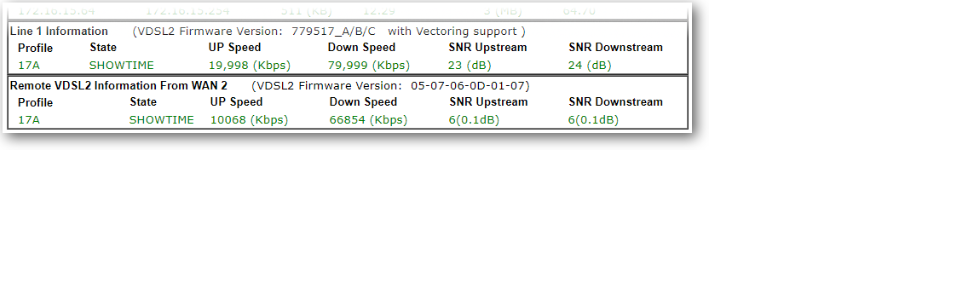
Grund für die Suche war für den Umstieg auf VDSL100 (Vectoring) einen Ersatzrouter zu finden, welches Vectoring tauglich ist und noch als reines Modem betrieben werden kann. Der Speedport W921V macht zwar auch seinen Dienst sollte aber als Ersatzmodem dienen. Nach vielem Suchen in diversen Foren war der Vigor 130 von Draytek ins Auge gefallen. Ich kannte die Draytek's noch von damals und auch da waren sie immer positiv aufgefallen. Kurz noch im Netz eine Anleitung gesucht wie man das Modem für VDSL100 konfiguriert und schon war er auch bestellt. Zum Glück gab es schon ein Firmware Update (3.7.8.1) die schon diverse Bugs bereinigt hatte. Jetzt muss man allerdings wissen, das es hier verschiedenen Firmwaremodemversionen gibt. Diese gehen von 1 -7 und noch Standard. Jede Modemversion ist für bestimmte ADSL/VDSL Anschlüsse optimiert. Dies geht aus der Release.pdf hervor die man sich durchlesen sollte. Für mich war dann schnell klar das Modem7 für VDSL (G.vectoring) das richtige sein muss. Also Firmware heruntergeladen und über die Weboberfläche das Update durchgeführt. Ich will nicht verschweigen das das Draytek-Menü gewöhnungsbedürftig ist. Wenn man vorher Fitzbox-Menüs gewohnt ist, wird man hier erstmal große Augen bekommen. Ist aber alles halb so wild. Etwas Basiswissen sollte man allerdings schon mitbringen sonst wird länger dauern ;-) Das Einrichten als Modem dauerte nach Anleitung grade mal 5 min. Link kann ich gerne mal posten wenn gewünscht aber wenn man Vigor130 und PPOE eingibt kommt man auch schnell zum Ziel. Das gute ist, dass er auch VLAN-Tagging beherrscht. Grade bei Telekom und VDSL ist das ein Muss. Da ich kein Entertain habe reichte bei mir VLAN 7. Nachdem alles fertig war syncte das Modem und war nach knapp 1ner Minute fertig. Ich muss dazu sagen, dass ich hier 19db Dämpfung und eine SNR von 6db habe. Daher dauert es etwas länger. Aber das Resultat war erstaunlich. 71,6 Mbps Down und 26,7 Mbps UP und das stabil. Im Gegensatz zur Fritz und dem Speedport 67,7 Down und 27,3 UP hier hat sich der Down-Wert erheblich um gut 4Mbps erhöht. Sind zwar nur Peanuts aber immerhin. Das Modem hängt beim mir hinter einer Fortigate 60D von daher werden alle Firewalltechnischen Sachen hier erledigt. Zu erwähnen sei noch das der Vigor über Telnet zu konfigurieren ist. Hier kann man Statuswerte und auch alle anderen Sache die man sonst über die Weboberfläche einstellt auf Telnet-Ebene bearbeiten. Syslog und SNMP beherrscht er auch. Die Mibs für SNMP findet man auf der Draytek-Seite. Für diejenigen die es als Einwahlrouter benutzen wollen bietet der Vigor auch eine sehr große Konfigurationsvielfalt, die man sich bei anderen Anbietern nur wünschen kann. Allerdings und das muss man nicht unerwähnt lassen unterstützt er kein VOIP direkt. Damit mein ich man kann dort kein Telefon direkt anschließen. Das ist grade bei Telekom und auch anderen Anbietern ja mittlerweile unumgänglich wenn man auf ALL-IP umgestellt wurde. Ich habe es gelöst indem ich dies dann einer Fritzbox überlassen habe. Hier muss man Voip dann Firewalltechnisch speziell zu der Box routen. Wie gesagt es geht und man muss es auch jeden Fall im Hinterkopf behalten, bevor man sich wundert das Internet geht aber kein Telefon ;-) Abschließend sei zu sagen das ich den Kauf nicht bereut habe. Der Vigor 130 ist nun jetzt gut 3 Monate im Einsatz und habe vor 3 Tagen noch die FW 3.7.8.2 eingespielt und er rennt und rennt. In dem SInne noch viel Spass damit
C**N
Attention le modèle V130B (Vigor 130 Annex B) n'est pas compatible en connexion ADSL. Il faut a priori prendre le modèle Annex A. A vérifier si le modèle Annex B fonctionne en VDSL
Trustpilot
Hace 3 semanas
Hace 4 días