We remain fully operational. Our teams are working around the clock to ensure your deliveries continue safely.

Descargar la aplicación


Servicios al cliente
Sobre nosotros
Copyright © 2025 Desertcart Holdings Limited
Descargar la aplicación


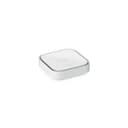
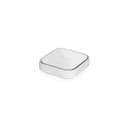

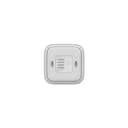
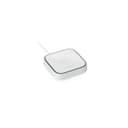

🚀 Stay connected, no matter what—your failproof LTE lifeline!
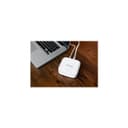
The NETGEAR LM1200 4G LTE Broadband Modem delivers reliable internet via LTE with download speeds up to 150Mbps. Certified for major US carriers (AT&T, T-Mobile, Verizon), it supports automatic failover to LTE for uninterrupted WiFi. Featuring two Gigabit Ethernet ports and easy Ethernet-based setup, it’s ideal as a primary or backup internet solution for homes and remote work environments.


| ASIN | B08R813HLW |
| Antenna Location | Home |
| Best Sellers Rank | 110,219 in Computers & Accessories ( See Top 100 in Computers & Accessories ) 822 in Routers |
| Box Contents | Ethernet cable, LM1200 4G LTE Modem, Quick start guide, USB Type-C cable, USB power adapter |
| Brand Name | NETGEAR |
| Colour | White |
| Compatible Devices | Laptop |
| Connectivity Protocol | 4G LTE |
| Connectivity Technology | Ethernet, Wi-Fi |
| Coverage | AT&T, T-Mobile, and Verizon networks in the US |
| Customer Reviews | 4.1 4.1 out of 5 stars (1,141) |
| Data Transfer Rate | 150 Megabits Per Second |
| Frequency | 2.4 GHz |
| Frequency Band Class | Single-Band |
| Is Modem Compatible | Yes |
| Item Weight | 177 Grams |
| LAN Port Bandwidth | 150000000 bits_per_second |
| Manufacturer | Netgear |
| Manufacturer Part Number | LM1200-100NAS |
| Maximum Upstream Data Transfer Rate | 150 Megabits Per Second |
| Model Name | LM1200-100NAS |
| Model Number | LM1200-100NAS |
| Number of Ports | 2 |
| Operating System | NETGEAR OS |
| Other Special Features of the Product | Automatic Failover, Multi-Carrier Support, USB Connectivity, Ethernet Ports, Simple Installation |
| Security Protocol | WPA2-PSK |
| UPC | 606449152166 |
| Unit Count | 1.0 Count |
| Voltage | 100240 Volts |
| Wi-Fi Generation | Wi-Fi 5 |
| Wireless Compability | 802.11ac |
R**V
Es una porquería, la publicidad es engañosa te hace creer que este producto genera una red wifi para conectar tus dispositivos inalámbricos pero no, sólo ofrece un puerto ethernet. Es un modem 4G yo lo uso en México con un chip de axios y si funcionó, sólo tuve que añadir el APN del proveedor y funciona muy bien. Lo malo es que tienes que pagar por otro dispositivo router que genere la red WIFI y puedas conectar todos tus dispositivos de forma inalámbrica. Este modelo LM1200 no trae batería ni botón de apagado/encendido tienes que dejarlo conectado siempre a la corriente eléctrica, no lo recomiendo.
C**S
Seeing a lot of reviews saying this didn't meet expectations and people returning the LM1200, such as not broadcasting Wi-Fi or not working with this and that carrier. I'm about half and half on that, I can see why some would be frustrated but I also feel like this is a product that before you sink money in to you need to do your homework first, and know exactly what you are wanting to do with it. My use case is utilizing the failover feature on my Tp-link ER605 handled by my Omada controller. The LM1200 does have built in failover but I'd rather have my gateway handle that, and my ISP has me set on a public static IP so I wouldn't be able to get an address through DHCP like many consumer Internet lines anyway. For this it works perfectly if my primary fiber WAN goes down - averaging around 25 - 30 seconds, I'm back up with Internet no problem. Once the ER605 is utilizing the LM1200, my LAN equipment (switch, access points) continue on like nothing happened. Phones, computers and servers just plug away. At first I had some issues with using a Verizon SIM pre-pay card in bridge mode, spent half a day trying to figure out why that wasn't working until finding documentation that Verizon does this intentionally with that mode, allowing one endpoint only and killing the connection any time another device is introduced. However on the LM1200, there is a router mode. Turning this on, turning off DHCP and telling my gateway to utilize the next WAN at so-and-so address when fiber dies, everything works as expected. Bridge mode can differ from other carriers, such at a T-Mobile card I tried worked just fine in bridge mode. Sadly, one objective I wanted to accomplish was utilizing Dynamic DNS to my purchased domain name, and having my VPN available from outside to connect in to my network if fiber went down. Indeed VPN works as expected on fiber, but in order to make bridge OR router mode work the LM1200 introduces Double NAT and even though there is a built in port forward, DMZ feature etc. it seems like connecting in is not possible. At least with my Verizon card that is the case. I've heard you can start a business, provide Verizon with a tax ID and pay $500 for a static WAN IP, but I think I'm good on that end. I also tested this with T-Mobile as well specifically in bridge mode, but still could not connect in. You can take a chance if you are a business and are willing to pay for a static IP, but at that point carriers likely have a sales rep that want to sell you their gear and will plug their ears before you can say the word "Netgear". I could go buy the best, most expensive LTE modem and still run in to this issue, so I'll stick with the LM1200. Plugging in a $20 antenna set and setting them near my window, I get full bars on Verizon. This device is 4G sure, but I'm still pulling speeds around 50 - 60 Mbps which is great considering this is a pre-pay SIM and I'm not on some crazy post-pay plan. I intentionally tested failing over during a work Zoom meeting, about a second of people talking sounding "glitchy" and the LTE kicked in just fine, conversation carried on as normal. I could see this being a God send for mobile / remote users. Grab a SIM with the best frequency in your area or cost per GB, get a proper antenna and go to town. In the city I have choices with carriers and Verizon happens to be my best one here, and this gives me peace of mind that in an emergency or my fiber line going out I can continue working from home as needed.
S**A
A superb, tiny box. I was originally concerned it had no external antennas but on actual use the signal reception was excellent despite being placed in the basement. I did try adding external antennas to the available TS9 ports but the antennas added nothing, if anything, they made the signal worse. My ISP is Fizz on a nano SIM. I inserted it and powered on. Waited about 30 secs and i was connected to the net. Oddly i didnt have to do any APN setup but then for no reason 3 days later when accessing a web page i was redirected to the modem's web ui. Apparently now i had to enter Fizz's APN details. In my case it was a single line: APN: mobile.bm
J**R
So first I'm fully off grid out here, the nearest utility is a mile or more down the road and that's just power and a phone line. Everything I have comes through an larger/upgraded antenna whether it be TV, FM, LTE, ham radio. So I know an thing or too about how to get the most out of the signals in the air around you. Pros: Price Wall mountable(86mm hole spacing) Small Easy web interface Easy setup External ant ports if needed Cons: -Uses USB C as a power source. (Needs a wall adapter vice a normal 12volt source like most routers and my booster, ideally I would wire it directly to my campers 12 volt system which remains powered if ACpower to the camper is lost.) -Internal antenna doesn't do well in low signal environments. -you must connect directly to it via Ethernet to view the settings menu on a computer. Can't connect from PC>router>lm1200. Has to be PC>LM1200 It just happened that I was on a hill that can just about get decent service from band 13 LTE on a tower 5km away from me even know the cell tower antenna barely faces my direction. So I got a booster that can boost that band. All good. Great useable speed from my phones hotspot buuuttt I needed a wired connection, I wanted Ethernet for some equipment I have so enter the lm1200 Netgear cell booster. Very cheap at 110 dollars. Picked it up from an Amazon locker in town and walked right into Verizon store without even taking it out of the box. They scanned the IMEI number and confirmed that they could probably set up a SIM card even though he had no idea what I had in my hand and had never done it before. Probably 5 minutes later we were powering up the unit with a new SIM card and it was online 2 minutes later after initializing a connection. I ran home and powered it back up and bam, connected to cell tower(via my booster) and I ran a temp line directly to my PC and it worked perfect. Pings range from 40-100ms for me so you ain't gonna game on this bad boy but anything else not time sensitive will do fine. So in my video you see I run it into a normal wifi router, this allows me to have multiple ethernet ports for multiple things and it allows me to have both a 2.4 and 5.0 Wi-Fi band like a standard household would, which allows visitors without cell service to still connect to something. The same thing that you would do if you went to a friend's house and you didn't have cell phone service. So my first impression is that the internal antenna of the LM 1200 is fairly terrible because I can only get up to around 10 megabytes per second when testing(in my signal environment), I thought about getting a splitter and connecting the TS9 ports on the back of this directly to the same antenna that my cell phone booster uses, but I'm willing to try the $7 whip antennas you can buy for this that just plug right into the back and I'll update this and let you know how much speed I get just by adding those two little whip antennas. If those don't work, they sell a coax type f to ts-9 splitter that I can use to connect this lm1200 directly to my cell phone booster antenna you see in my video. So the data for the nerdy people: -I can get near full bars which means -70db signal on my pixel 6 when located at the same spot as this product and this product gets 70 db(viewed on the web portal) - With my cell booster OFF, I get about -115db on my phone and -115 on this device. -So the cheap Amazon booster works great when set up properly even with stock antennas. That translated to about 20-30 down and 5-10 up on my phone using the boosted LTE. -BUT when doing speed test on my computer when using this product I only get around 6 down and 2-5 up at the time of testing These speeds change with network/tower traffic of course but I think its interesting that the speeds can be so different from 2 devices that are using the same carrier and cell band and have about the same signal strength so I'm going to call my carrier and present this data as i suspect they are messing with my speeds. Other details, 70 bucks added on my bill for this extra "line" and 150gb of data...
N**R
This 4G modem works surprisingly well and is affordable. I use it for remotely monitoring a camera system and basic home automation. The area has poor reception and this thing manages to get a usable signal even with the built in antenna. It provides decent performance even at low reception (2-3 bars). It works well enough for viewing camera feeds and PTZ controls.
Trustpilot
Hace 3 semanas
Hace 1 mes