We remain fully operational. Our teams are working around the clock to ensure your deliveries continue safely.

Descargar la aplicación


Servicios al cliente
Sobre nosotros
Copyright © 2025 Desertcart Holdings Limited
Descargar la aplicación








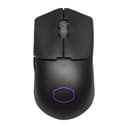


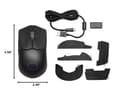
🔥 Elevate your game with the MM712 – where ultra-light meets ultra-precise!
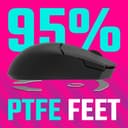
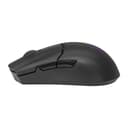
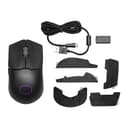
The Cooler Master MM712 Wireless Gaming Mouse redefines lightweight performance with a seamless 59g chassis, hybrid wireless connectivity (2.4GHz & Bluetooth 5.1), and an adjustable 19,000 DPI pro-grade sensor. Engineered for precision and endurance, it features ultraweave cables to prevent drag, pure PTFE feet for superior glide, and optical micro switches rated for 70 million clicks, making it the ultimate tool for competitive gamers and multitasking pros alike.


| ASIN | B0BGYB8DBC |
| Additional Features | Lightweight |
| Antenna Location | Gaming |
| Are Batteries Included | No |
| Are Batteries Required | No |
| Best Sellers Rank | #11,292 in Video Games ( See Top 100 in Video Games ) #476 in PC Gaming Mice |
| Brand | Cooler Master |
| Built-In Media | Information Not Available |
| Button Quantity | 5 |
| Color | Black Wireless |
| Compatible Devices | Gaming Console, Personal Computer |
| Connectivity Technology | Bluetooth |
| Customer Reviews | 4.1 out of 5 stars 243 Reviews |
| Enclosure Material | Plastic |
| Global Trade Identification Number | 00884102092688 |
| Hand Orientation | Ambidextrous |
| Hardware Platform | PC |
| Item Dimensions L x W | 4.6"L x 2.5"W |
| Item Weight | 63 Grams |
| Manufacturer | Cooler Master |
| Model Name | MM712 |
| Model Number | MM712 |
| Mouse Maximum Sensitivity | 19000 Dots per Inch |
| Movement Detection | Optical |
| Movement Detection Technology | Optical |
| Number of Buttons | 5 |
| Operating System | Android, Mac OS, Windows 8, iOS |
| Power Source | Batteries/Cable |
| Range | 10.0 meters |
| Special Feature | Lightweight |
| Style Name | MM712 Wireless Black |
| Theme | Video Game |
| Unit Count | 1.0 Count |
| Warranty Description | 2 Years |
A**X
Amazing and lightweight
I watched a good bit of reviews on this mouse and I am stunned , all the reviews were good so I thought I’d give it a try and they were not lying about the weight . The mouse is really light and a bit compact so for larger hands if you don’t use claw I wouldn’t fully recommend personally but for medium to smaller hands you can utilize any type of grip comfortably. The buttons feel great definitely for the price and the tracking is amazing and quick with the sensor being higher it responded to your wrist better ( more angle ). So for gaming it is also a plus , I’ve played multiple games such as halo infinite , Valorant and Even other games like Chained together and it worked perfectly . It feels durable and is high quality so I highly recommend . Is only 1KHz pulling rate !
T**T
Battery life is incredible
I've been using this mouse daily for over 6 months, and I've only had to charge it maybe 4 times. I have the LED turned off, so your mileage may vary if you have it on. I use the mouse for 8-12 hours a day, so the battery life is very impressive to me. However, the masterplus software is abyssmally bad. It's slow and laggy and all around pain to use. Fortunately, for a mouse, you won't have to use it again once you configure it initially. I like the hard plastic shell over softer or rubbery ones because it's easier to clean (very important for white hardware) and it doesn't disintegrate over time. I use both Bluetooth and 2.4ghz modes, and both work very well. I have the 2.4ghz dongle plugged into one computer and paired via bluetooth to another. When switching between devices using the slider on the bottom, it connects almost instantly. Feel (clickiness/mushiness, traction, etc) is entirely up to preference, but it seems pretty standard for me - no complaints.
R**N
Overall a great little mouse, but hidden screws SUCK!
I have been looking for a good mouse literally for decades. Like choosing a keyboard, choosing the right mouse is very subjective. With a few exceptions, the vast majority of mice produced in the past 20 years have been marketed as a “Gaming Mouse.” Usually this means they are manufactured as lightweight as possible, using molds that use as little plastic as possible. Usually this means most mice are less than 70 grams. Far to light for my hands. I need something that has some weight to it. Modern mice are also designed with buttons that have very light activation force which causes a hair trigger response that will false click if you just look at them wrong, and of course they are covered in LED’s! It is impossible to actually rest your fingers on the mouse buttons without clicking them. Most also try and incorporate as many extra buttons as possible, and the positioning of these extra buttons leaves no space to rest my fingers without causing false clicks. These features are apparently designed for “E-Sports” gaming, as they supposedly improve speed and accuracy. I have been a gamer for well over 40 years and these “features” do the exact opposite for me! For me, this also makes most of these mice very difficult to use in other software. I have been through numerous varieties of Logitech, SteelSeries, Corsair, Razor, Microsoft and several other brands, all have been a disappointment for one reason or another. The Cooler Master MM310 is as good a mouse as I have found in years, though it does have several of the features mentioned above. I learned how to type on a TRS-80, and stepped up to a IBM Model M a few years later, so my fingers require feedback when I do anything on a computer. One of my biggest issues with mice, especially over the past decade has been switch response and feel. The switches under the buttons on this mouse are Kailh GM 4.0 (60 M), they are still to light for my preference, but they give much better feedback than anything else I have felt for years on a mouse. The mouse wheel encoder is mechanical and gives a good click feedback response. It is acceptable, but again, my personal preference would be for a more solid click feedback. The rubberized coating on the wheel feels quite good. Hopefully that will hold up better than the rubber coating on my previous mouse, a BenQ Zowie S2, that started to degrade after a couple of years and I had to completely replace the mouse wheel using an older Cooler Master mouse as a donor. The optical sensor is nothing special, but preforms quite well with good accuracy. I do also really like the cloth mouse cord, it doesn’t interfere with mouse movement at all. The side buttons on this mouse are well designed and leave plenty of space for my thumb to rest comfortably without accidentally causing an unintended click. I have only had the mouse a few days, so I can’t really speak to build quality, but so far everything seems to be well designed, with one major exception! There are 3 screws that hold the mouse shells together, the first two are easy to find as they are hidden under the back two glides. There is no screw under the front glide, so don’t bother taking that one off! The third is much more tricky to find and I came close to destroying the mouse just trying to take it apart! The third screw is located between the glides at the very back of the mouse under the paper label that covers the holes for the weight reduction on the bottom of the mouse! You can not feel it with your fingers as the holes disguise it. Why manufactures insist on hiding screws is really quite beyond me. I do understand their reasons behind it, I simply disagree with their reasoning completely! There are multiple reasons why mice shells need to be easily disassembled. Dust and debris will still build up inside a mouse and it does need to be cleaned from time to time. The scroll wheel is especially susceptible to this! In my case, I have a set of weights that I saved from an old mouse and I hot glued those into the body to add weight to the mouse. Because I had to remove the glides and punch a screw driver through the paper label, I had to replace the glides and remove the torn parts of the label to make the mouse actually usable for me. I knocked a star off of the review for this inconvenience! If you are looking for a good cheap mouse, it is tough to do better than $18 for this one!
T**Y
Great mouse, comes with extra feet
my go to mouse and it feels really solid. been using it for the past year and its held up good and the original feet still glide smooth. i always forget to charge it but it takes a week + of active use for the battery to die. good for fast paced shooters and never looses tracking ability. the software isn't bloated at all and the white isn't yellowing yet so id say its worth it
E**N
Great on paper, disappointing in person
- Fingertip grip, 90% wrist aimer - DPI around 1800-2200 depending on mouse - Lenovo Legion mouse pad - Current mouse: MM710, gloss black coating Despite it’s bad build quality, my MM710 is easily my favorite mouse of all time, so the idea of getting a wireless version of that mouse with optical switches made me very excited. Unfortunately, Cooler Master has made a product that appears to be an across the board upgrade on paper, but in hand is actually worse in almost every way. Positives - The build quality is a MASSIVE leap over the MM710 and easily competes with the likes of Logitech or Razer while costing much less. - The weight balance of the mouse feels great. Doesn’t feel front or back heavy at all to me. - When waking from sleep, the mouse connects almost instantly. Some wireless mice have issues with this and I appreciate that this one doesn’t. - USB C connection. I know it’s becoming the standard, but it’s always nice to see. - The main clicks aren’t as mushy as the MM710. They’re much more solid and snappy. Negatives - The coating is not nearly as grippy as the glossy coating on my MM710. It’s difficult for me to maintain a solid grip on the mouse, which means I’m constantly having to adjust my fingers in order to keep control. - While most people are praising the removal of holes, I actually used the holes on the sides of the mouse to help anchor my fingers, especially my pinky. This meant that I didn’t have to exert a lot of force on my fingers to keep them in place. With the solid sides, however, I have to use more force, which causes pain in my wrist in shoulders. - Every button on the mouse is harder to click than on the MM710. It’s especially bad with the side buttons and the middle mouse click. The MM710 allows me to essentially “roll” my finger or thumb over these buttons to press them, which makes it easy to quickly use them while maintaining a solid grip. The buttons on the MM712 require so much more force that I have to take my finger off the mouse and solidly press the button. This often results in an uncomfortable shift in my grip that forces me to readjust. - The RGB is pointless and only adds weight to the mouse without any real benefit to the user. Overall, I’m disappointed in the mouse and will be returning it immediately.
J**S
Could've been a four or five star, wound up a one.
Mouse is a decent size for my hand. Upgraded from a Razer Viper Mini. It's a bit larger with a bit less maneuverability, but it's wireless and it's very light. The grip tape is nice. Would be a top tier mouse if it weren't for one major problem: the buttons are too loose. If you hit the mouse on your mousepad, the mouse will misfire and cause missed shots when sniping. This happens to me all the time. Makes the mouse not suitable for being competitive. That makes it a one star. Would've been great otherwise. I bought it like new for under $40 so I'll still be using it until I find another mouse so it's not unusable. But that one major flaw makes it a fail. I guess it'll work as a temporary.
F**Y
don't use the rgb, that's what causes the bad battery. Otherwise, best budget mouse I've ever used
I've used dozens of mice, and used to play competitively at a high level on mouse+keryboard shooters, and I've played against and with many well-known people like surefour and xqc (yes, like 10 years ago now). This mouse has absolutely the best shape I've ever used (For my preference/hand size, which are slightly small). I've bought the white one a couple times and the sakura one twice, and they are both the same. The sakura one is really cute so I like it more. Unfortunately, the amazing shape makes its underwhelming clicks and miserable scroll wheel much more noticeable at times, and less at others. Things I did to improve the experience of using this despite those issues: 1. do not use the RGB Leds, they are the reason that the battery dies super fast!! otherwise, it lasts days 2. Take the rubber stuff off the scroll wheel. It's a little worse to use, but it doesn't catch or start double-scrolling anymore if you do that. I think sweat and hair causes that issue. There's not much you can do besides that If they just spent a little more time improving this version of the mouse from the last one (a huge improvement either way) and fixed the scroll wheel and the not-that-impressive optical mouse switches (it's a gimmick tbh), they'd have a mouse they could sell for twice the price (not that they should!)
D**O
Poor QC
Shape, GREAT. Clicks however, feel hollow with little to no travel, which feels quite weird. Left click had pre travel issues after a month of use though. Battery life is great with great performance. I prefer the high sensor position. Cooler master also fired all of their mice people though, so I don't expect it to be great contacting them.
Trustpilot
Hace 2 meses
Hace 5 días