We remain fully operational. Our teams are working around the clock to ensure your deliveries continue safely.

Descargar la aplicación


Servicios al cliente
Sobre nosotros
Copyright © 2025 Desertcart Holdings Limited
Descargar la aplicación

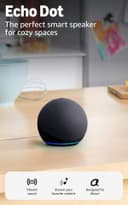






🎶 Elevate your space with sound that speaks smart.
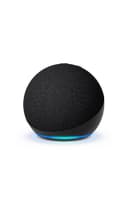
The Echo Dot (5th Gen, 2022) is a compact smart speaker featuring a 1.6” full-range driver delivering clear, vibrant sound. It supports dual-band Wi-Fi and Bluetooth for versatile streaming and smart home connectivity. Equipped with built-in motion and temperature sensors, it enables automated routines for enhanced comfort. Alexa voice assistant offers hands-free control for music, timers, and smart devices, while robust privacy features ensure your data stays protected. Designed to seamlessly integrate with other Echo devices, Fire TV, and eero routers, it transforms any room into a connected, intelligent environment.
| Size | 3.9” x 3.9” x 3.5” (100mm x 100mm x 89 mm) |
| Weight | 10.7 oz (304g) Actual size and weight may vary by manufacturing process |
| Audio Bandwidth | 62 Hz - 19 kHz (volume 6) |
| Loudspeaker Driver Dimensions | 1.6” full range driver |
| Playback Channels | Mono |
| Audio Signal Processing Technology | N/A |
| Wifi connectivity | Dual-band Wi-Fi supports 802.11a/b/g/n/ac (2.4 and 5 GHz) networks. Does not support connecting to ad-hoc (or peer-to-peer) wifi networks. |
| Amazon Sidewalk | Sidewalk uses Echo and Ring devices to securely keep other devices connected and help find lost items by reporting their approximate location to the owner. Sidewalk can enable supported devices to remain connected even when wifi is lost or the supported devices are outside the range of their home wifi. Sidewalk uses a small portion of your internet bandwidth and the approximate location of your devices to provide these benefits to you and your neighbors. Sidewalk is turned on for your device unless you have previously turned it off. You can turn off Sidewalk at any time. Learn more about Amazon Sidewalk. |
| Smart Home Device Compatibility | WiFi, Bluetooth Low Energy Mesh, and Matter |
| Bluetooth connectivity | Advanced Audio Distribution Profile (A2DP) support for audio streaming from your mobile device to Echo Dot or from Echo Dot to your Bluetooth speaker. Audio/Video Remote Control Profile (AVRCP) for voice control of connected mobile devices. Hands-free voice control is not supported for Mac OS X devices. Bluetooth speakers requiring PIN codes are not supported. |
| eero Built-in | Your wifi network must use a compatible eero router and your Echo device must stay in range of a compatible eero device. You will need to link your eero and Amazon accounts and manage eero Built-in from the eero mobile application to use this feature. eero Built-in compatible Echo devices support up to 1,000 sq. ft. of additional coverage, speeds up to 100 Mbps, and 10 or fewer connected devices in the 5 GHz band. Actual performance can vary and certain eero, Echo, or Alexa features may be incompatible with eero Built-in. Learn more about eero Built-in performance, availability and compatibility. Use of eero and eero-related products and services, including eero Built-in, requires creation of an eero account and agreement to eero’s Terms of Service. Review eero’s Privacy Notice. |
| System requirements | Echo Dot comes ready to connect to your wifi. The Alexa app is compatible with Fire OS, Android, and iOS devices and also accessible via your web browser. Supported operating systems. Certain skills and services may require subscription or other fees. |
| Setup technology | Amazon Wi-Fi simple setup enables customers to connect smart devices to their wifi network in a few easy steps. Wi-Fi simple setup is another way Alexa is always getting smarter. Learn more about Wi-Fi simple setup. |
| Warranty and service | 90-day limited warranty and service. Optional 1-year, 2-year, and 3-year extended warranty available for U.S. customers sold separately. Use of Echo Dot is subject to these terms. |
| Accessibility features | To enable features that personalize Alexa to your abilities, go to Settings → Accessibility in the Alexa App. • Adaptive Listening provides customers more time to finish speaking before Alexa responds. • Preferred Speaking Rate allows customers to control how fast or slow Alexa speaks. To enable, say “Alexa, speak slower” or “Alexa, speak faster.” • Request Sound will play an audible tone in addition to the visual indicator when you speak to Alexa. To enable, say “Alexa, turn on Start of Request Sound.” • Kindle Read Aloud will have Alexa read your Kindle books aloud. • Notify When Nearby will play notification sounds when you’re detected near your Echo device. • Alexa Accessibility features also include several other settings for customers with accessibility needs related to vision, hearing, mobility, and speech. |
| Included in the box | Echo Dot, glacier white power adapter (15W), and Quick Start Guide. |
| Generation | Echo Dot (5th Gen) - 2022 release |
| Privacy features | Wake word technology, streaming indicators, microphone off button, the ability to view and delete your voice recordings, and more. Visit the Alexa Privacy Hub to explore how Alexa and Echo devices are designed to protect your privacy. |
| Language | Alexa speaks English and Spanish |
| Alexa Skills & Features | Alexa makes your life easier, more meaningful, and more fun by letting you voice control your world. Alexa can help you get more out of the things you already love and discover new possibilities you've never imagined. Discover and learn what Alexa can do. |
| Software Security Updates | Learn more about these software security updates. If you already own an Amazon Echo, visit Manage Your Content and Devices for information specific to your device. |
C**T
I love that Amazon to pre-configures the device for you before it even arrives at the door
I deliberately stayed with this Echo Dot model for a reason. I’ve had the Show, and while it’s nice to see pictures or who is at the door, I noticed it simply didn't last as long as my original Echo that I’ve had for years and still functions today. I ended up replacing my Show with this one because I prioritize the long-term functionality. I like the size and the charcoal color, but the real upgrades are in the sound—it's much clearer than my original one. The simplicity of the setup is where Amazon really gets it right. I love that they allow you to pre-configure the device before it even arrives at your door; it was basically a plug-and-play situation. As soon as I hooked it to my Wi-Fi, it already knew my name. It’s a simple, reliable upgrade that actually works for the long haul
D**T
Great speaker but a bit overpriced
This smart helper does everything it's supposed to. Music sounds good, Alexa responds fast, and the smart home integration works perfectly with my lights and thermostat. The Alexa Plus features are honestly amazing - the motion sensor and temperature stuff actually come in handy. I set it to turn my fan on when it gets too warm and it just works. Sound quality is decent but not blown away for what they charge. I've heard cheaper Bluetooth speakers that sound about the same. It's fine for background music or podcasts but don't expect audiophile quality. The tap to snooze thing is surprisingly useful in the morning when I'm half asleep. Overall it's a solid device and I use it every day. Just feels like it should cost about $20 less for what you get. Still happy with it though.
J**S
Title: The perfect gift! Amazing sound and very helpful
I bought the newest Amazon Echo Dot as a gift, and it turned out to be an excellent choice. It’s exactly what they needed. Despite its compact size, the speaker delivers a surprisingly vibrant and clear sound, making it great for listening to music, podcasts, or even just setting timers and alarms. The design is sleek and fits perfectly in any room, but the real value is in how well it integrates with Alexa. It does exactly what it’s supposed to do: it’s responsive, easy to set up, and incredibly helpful for daily tasks. Whether it's controlling smart lights, checking the weather, or answering quick questions, it has become an essential part of their routine. If you are looking for a reliable, high-quality smart speaker to give to someone (or even for yourself), this model is a win. It’s a powerful little device that offers great performance for the price. They use it every day and couldn't be happier with it!
R**Y
Small Speaker, Big Sound
Really solid little speaker. The sound is clear and louder than I expected for its size, and it looks nice on my desk. Easy to set up and great for everyday use definitely worth it.
M**T
Sounds Great — But I Miss the Audio Jack
I’ve owned several Echo Dots over the years, and the newest model definitely sounds better than the older ones. The audio is fuller, clearer, and surprisingly punchy for such a small speaker. For casual music, podcasts, and general Alexa use, it does exactly what it’s supposed to do. Setup is simple, Alexa responsiveness is solid, and it integrates easily into a smart home setup. As a compact speaker for a bedroom, office, or kitchen, it’s a nice upgrade in sound quality compared to earlier generations. That said — I really hate that Amazon removed the 3.5mm audio jack on the latest models. That was a genuinely useful feature. Being able to hardwire it into better speakers or an amp gave you flexibility. Now you’re locked into Bluetooth or the internal speaker, which feels like a step backward for people who actually use their equipment beyond basic voice commands. If you just want a standalone smart speaker with better sound than older Dots, it’s a solid choice. But if you relied on the audio-out jack like I did, be aware it’s gone — and that’s disappointing.
L**S
Great quality fun for the whole family, you can't go wrong with this item.
I ordered this one to replace my echo dot the 3rd generation . Alexa + works really great meant to order the blue one but ordered the black one looks really great. Will buy again. Easy to set up took just a minute to set up great quality has voice recognition fun for the whole family.
W**S
Another great smart home purchase, to say the least.
My previous Echo Dot, purchased back in 2018, was a third-generation. It was a white shuffleboard stone covered in cloth and it is amazing. I'll never say it's not; in fact it's so amazing that I passed it on to my mom and she enjoys it a great deal. So, my main motivation for purchasing this, the fifth generation issued in 2022 – aside from familiarity with the brand – was I needed a Matter hub so my then-incoming Nanoleaf smart lightbulbs could work with my voice. But of course it is so much more. First thing I see is that the Echo Dot is no longer a white shuffleboard stone but is a smaller, navy blue sphere. Aside from being my favorite color, and thus very pleasing to look at, I find it that it is not practical any longer to mount on my wall because of its increased focus on the forward firing speaker; if I had mounted it, it would not be effective in spreading out to my entire room – the top of the speaker is reserved for the buttons which were present on the third-generation: volume up, volume down, action/wake and mute microphone, which leave no room for a speaker in that area. So it sits pretty on my side table facing the rest of my room, and does fine. First thing I hear is the sound quality is so much better than the third-generation Dot. The third-generation was okay in that regard, but it tended to sound a little overexposed when the volume was up high. Now, I don't find myself connecting via Bluetooth to my sound bar nearly as much because the speaker quality is just that good. The quiet parts of music are quiet and calming the way they should be, but the bass thumps quite effectively, surprisingly for such a small and lightweight speaker. So after I'd established the smart speaker in my room for about a month, I felt the time was right to go ahead and get my Nanoleaf Essentials bulbs, to upgrade the ones that I had no longer been able to use for a year since they had stopped working with any voices assistants, to facilitate compatibility with the then upcoming network standard: Matter. I am very happy to say that Matter compatibility is there and it is wonderful. I can't speak for the internal workings because I'm not an engineer; I will say – though I may be wrong about this – that I believe it would be more rocky if I did not have a Thread Border Router already in the form of my Nanoleaf shapes controller; I have the shapes arrangement atop my desk called Dragon, and it has worked wonderfully for me since around last September, and only – at this point anyway – required regular firmware updates to be compatible with ongoing technology. Now, I'll tell you the procedure for adding the Nanoleaf Essentials bulbs to Alexa via Matter – I would assume by extension any Matter device, providing you have a thread border router like I mentioned before. After adding the bulbs to the iOS Nanoleaf app as normal – also updating the firmware for each bulb via said app! I have a feeling that was very important – add them also to Alexa via the Add Device flow, one at a time. There was a menu item that showed itself at the top telling me that it had detected each new bulb on my network and I only had to select that item to add it, scan the QR code on the sticker that came with the bulbs (I applied the sticker to a sheet of paper and labeled it according to the positions of the bulbs) and wait just a bit for it to be connected and it just works! Another new feature which the third-generation did not have is a temperature sensor! After a short period of calibration after plugging the device in, Alexa will be able to tell you the temperature of the room that it is situated in! I ask her for this often when I'm trying to determine how best to cool my room during these hot summer months. When my door's closed during the day, my room can get up to mid 80s, which is horrible, but with the door open to allow a draft and breeze, the temperature's equalized with the rest of the house and I get mid to upper 70s which is much better. There is an ultrasound presence sensor, which sounds not unlike sonar, which I have not had a use for yet, but I imagine routines can be enabled or suppressed with its use. One borderline negative thing I will say about it which I'm okay with because, again, I have Bluetooth connections – they eliminated the 3.5 mm jack to save internal space inside the device, so you will no longer be able to directly connect external speakers, as I did at one point before I had to change that arrangement. Once again, Amazon comes through with flying colors with their products, helping make our homes smarter and more amazing and just better to live in! Get this speaker if you are looking to build a smart home, and for best results, get more than one so you can use the awesome "drop-in" intercom system, and truly awaken the potential of the smart home!
C**Y
Multi-Music Player mystery solved, how to select more than one echo if you cannot
Alexa Echo Speakers Multi-room Music issues I found a solution to not being able to get more than one speaker to work at a time, paired, or set up a “Multi-Room Music” in the Alexa app. This solution also fixed my inability to get Apple enabled devices connected into HomeKit, or even Google Nest Hubs to set up, period. Quick answer: Deselect “Enable Wireless Isolation” when activating your 2.4 Wi-Fi broadcast on your router. I also took all speakers off guest wifi. But I’ll try to put them back to see if that is necessary now. Back story: Months of issues with HomeKit, (only weeks with Echo Multi-Room Music), I gave up trying and decided to try Alexa and Google to replace my Apple smart home efforts. I spent way too much time. After the fix, I’ll live a blended tech life. I’ll give a quick answer, followed by my backstory: Last week I was at my wits end in utter frustration over three major roadblocks. I acquiesced and decided to try Alexa because I couldn’t get almost any of my Apple HomeKit enabled devices into HomeKit, except for new Apple products. I knew it had to be something small I was missing. Alexa was sooooo easy and quick to connect to everything, before I figured out the fix. (I dislike the echo show advertising, their echo speakers are better.) While they seemed a breeze to connect everything, for some reason I couldn’t get more than one echo speaker to work at a time. I was continually blocked from setting up Multi-Room Music or even connect a pair to play together. Hundreds of tries. I deleted, reset, rebooted, spent over 4 hours with Comcast yesterday (thankfully a Boston native who did not put me on hold every minute like certain countries) getting my internet working again. I had rebooted my modem and router so many times, my computer got molasses slow and I feared I went too far In interest I also decided to try a few Google nest hub speakers. Black Friday had great sales on all this stuff. Trying to set up googles hub 7 was impossible. It wouldn’t stay connected to the internet for more than a split second before “Something went wrong” message. Probably over 70 tries. (Google is better than Echo Show. Apple HomePod mini sounds crisper and better than Amazon echo 4 and mini 5’s. But Alexa is way friendlier to interact with verbally, and price point, well...) Frustration. Thursday, I broke down and bought my first Apple Homepod Mini to see if I can get that working and see if it works better than the Apple TV 4k Ethernet connection. The HomePod mini gave me a hint how to solve all these l connection and internet blocks. The HomePod mini kept telling me that I don’t have “peer-to-peer connection” allowed on my network. Now, I’m a little techy, but it took three days (ehem, months) to finally take a chance on a for granted setting I always enable on my netgear router. It’s the blasted first Wireless page when enabling a wifi broadcast. I had to deselect “Enable Wireless Isolation.” That was it. It solved every issue I have come across with smart home tech for the last 4 months, ..year. For the months that I could not solve these problems, Amazons Multi-Player Music issue made me dig deeper. I did not find anyone suggesting this particular router setting, so I thought I’d share with ppl. Tonight, I finally am able to simultaneously play music on all of my Echo speakers, connect my HomeKit enabled and Google nest hubs. I’m not sure what this will do for my/your internet security. But I’m going with it for now. And I’ll try to put all devices back onto guest Wi-Fi. I’ll never really leave Apple, but after interacting with other smart speakers, it’s probably not going to be my main go to for speaker or answers to questions. Or I’ll just get too creeped out by Google and Amazon invasiveness and acquiesce with Apple instead. Echo Dot 5 (this is such a sprite, great speaker!) Echo 4 are my favorite for Amazon Echo Echo Studio seems the least smart, most deaf, quiet, combative, difficult to interact with, of the three speakers. Hopefully the Multi-Room music fix will improve my experience with it Echo Show 8 Meh. Far too much and annoying advertising of non-solicited or wanted advertisements. Least user friendly screen to work with. It sits unplugged for the most part. I mostly got this for a friend who visits who wants a YouTube fireplace playing on the tv. SIDE NOTE on other Smart Home Amazon (online, or physical store) products, related to this topic: I have been pleased with Smartbot plugs, switches and app, the Levoit 600s air purifiers and app (app goes by VeSync), and Lutron Caséta Light Switches and Dimmers, and hub. Lutron has the most stable and reliable app out there. I was fine running their apps separately. They are very nice, better than the big 3 apps. Well, back to listening to music throughout my house instead of one or two rooms. Joy!
Trustpilot
Hace 1 mes
Hace 2 meses