We remain fully operational. Our teams are working around the clock to ensure your deliveries continue safely.

Descargar la aplicación


Servicios al cliente
Sobre nosotros
Copyright © 2025 Desertcart Holdings Limited
Descargar la aplicación



🎉 Elevate Your Artistry with the Q11K - Where Innovation Meets Imagination!
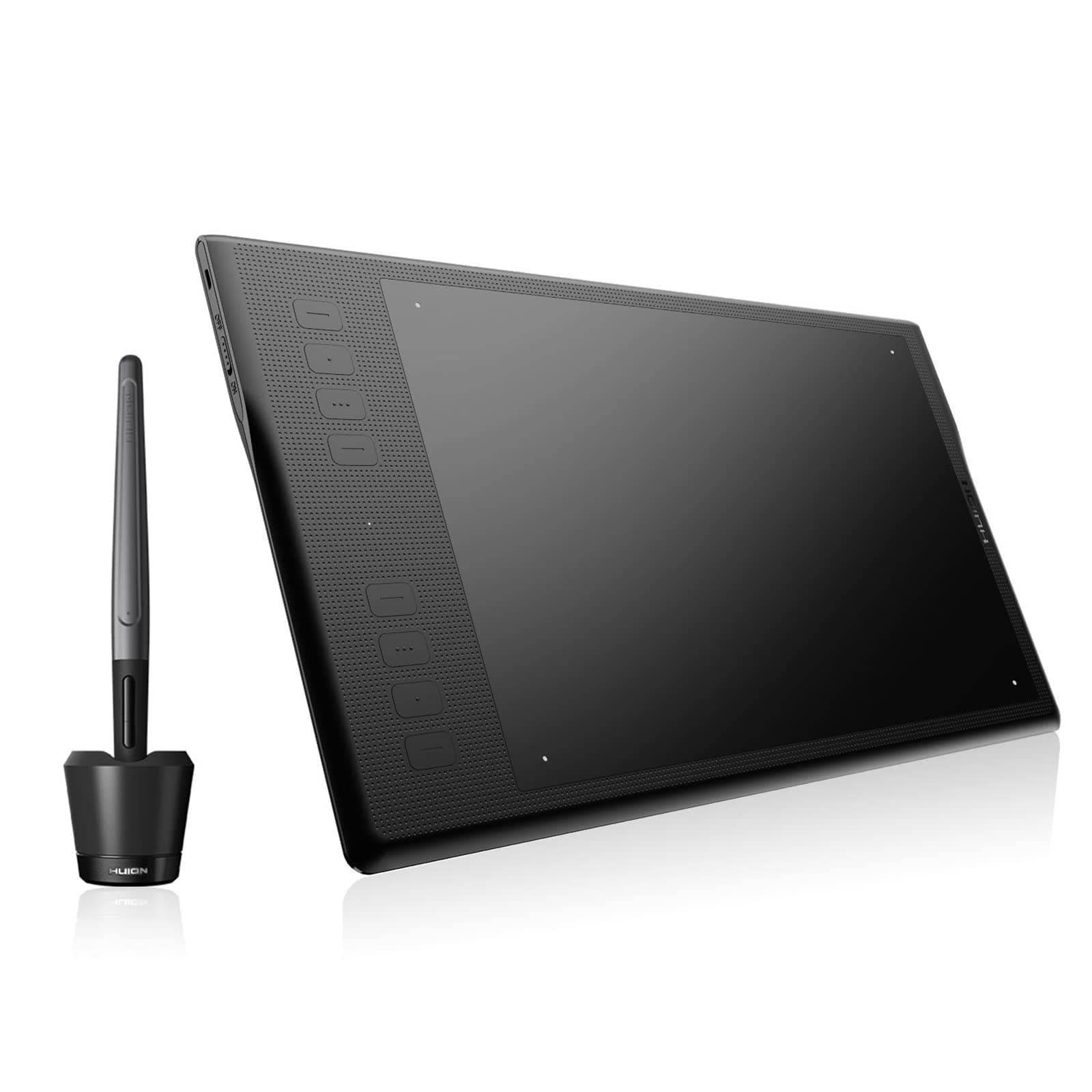
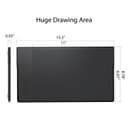
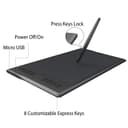
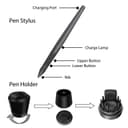
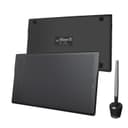
The HUION Inspiroy Q11K is a wireless graphic drawing tablet featuring 8192 levels of pen pressure sensitivity, an expansive 11 x 6.87-inch active area, and 8 customizable shortcut keys. Designed for both Mac and Windows, it boasts a high-capacity battery for over 40 hours of use, ensuring a seamless and ergonomic drawing experience.





| ASIN | B071JN86L3 |
| Active Surface Area | 11 square inches |
| Additional Features | Pen |
| Brand | HUION |
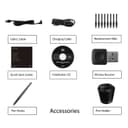
| Built-In Media | Huion Inspiroy Q11K Graphics Tablet, Quick Start Guide, Installation CD, Rechargeable Pen PF150, Wireless Receiver, 8 Pen tips, Pen Stand, Micro USB Cable, Pen Charging Cable |
| Color | Black |
| Compatible Devices | Personal Computer |
| Connectivity Technology | 2.4 GHz Wireless |
| Customer Reviews | 4.3 out of 5 stars 1,061 Reviews |
| Item Dimensions L x W | 6.87"L x 11"W |
| Item Weight | 1 Pounds |
| Manufacturer | Shenzhen Huion Animation Technology Co.,LTD |
| Model Name | pf150 |
| Model Number | Q11K |
| Native Resolution | 5080LPI |
| Operating System | Windows 7/8/8.1/10 , Mac OS 10.11 or later |
| Pressure Sensitivity | 8192 Levels |
| Screen Size | 11 Inches |
| Special Feature | Pen |
| Specific Uses For Product | Drawing |
| Target Audience | Student, Teacher |
| UPC | 612592162969 |
J**E
Tablet for the professional on a budget and on the go.
Huion has established itself as a good drawing tablet manufacturer over the years. It has a good list of options for beginners and professionals alike. They've made few good steps recently and have gained momentum in the tablet market and I don't see them stopping anytime soon. With that said, I'd like to introduce you to the Inspiroy Q11K. One of huion's wireless graphics tablet. Let's see if it's worth getting. Design: The tablet is sleek, lightweight and the build quality is good enough for a drawing tablet and for its price. It is made out of black, hard plastic and this dotted texture to distinguish the work area from its bezels. It has for 4 rubber feet to make the tablet not slip all over your desk while you're working. The Q11k has 8 function keys that you can map to whatever you want through the driver. It comes with a stylus, a stand that looks similar to the Intuos 4 and 5's cup stand, and it has 8 extra nibs included. Specs: The tablet measures at 15.35 inches length, 8.78 inches width, and 0.43 height. The work area measures at 11 inches length and 6.87 width. Its definitely a portable thin and light tablet. It has 8192 levels of pressure so those who are use to a lighter initial activation force will love this. It is also a wireless device. If you don't want your tablet to be tethered to a cable, you can use the USB receiver that's also included with the device. Setting up: The setup is relatively easy nowadays as drivers for both Mac and Windows has improved as far as the drawing tablet is concerned. I am not so sure about pen displays at the moment. If you have a CD/DVD/BR Drive on your computer, you can just install using the driver through the provided disc. It is also best practice to check for the latest driver through their website. Once you install the driver software, you'll be able to configure your tablet their. You can also rotate the orientation if you want the function keys on the left or right side of the tablet. Working: I have used the tablet for almost 2 weeks and the more I use it, the more comfortable I become working with it. When I got it first, I thought it was too smooth and too slow for my taste. I have an intuos 5 pro and the work area is only 8" length and 6" wide so a wider area isn't really comfortable for me. The driver helped me by adjusting the size of the active work area and everything felt great and fast. I use wireless most of the time just to see if the tablet has a noticeable lag from input to display, and so far, I haven't seen anything at all. It works smooth and as intended and I can move my pen tablet anywhere I want. As long as it's within range of the receiver. The texture isnt as gritty as what Wacom has, it's actually smooth. I don't mind it but it could be a reason to buy or not to buy for some customers. I use the tablet for vector work and some drawings. I've used it to animate as well, so it is pretty much a versatile product. I haven't fully used up the battery as Huion mentions that it's rated at approximately 40 hrs. The stylus has a battery and needs to be occasionally charged but that depends on how much you'll use it. It also does not support tilt, which is a bummer but I hope Huion is working on new models that will support tilt soon. Final Thoughts: If you are looking just for a simple pen tablet to draw on, this is your device. There's really no big thing that can deter you from this tablet except for huion’s other available tablet options. Some are a little more expensive, some are cheaper. This tablet in particular is $109 - $119 on Amazon right now and the price of the closest wacom competing tablet is on sale and priced at $299($399 normally) on their website. So it really boils down to the brand and size preference. If you have the cash, might as well get something that you know is reliable. But if you're on a tight budget, you might want to reconsider the W and consider Huion. It's cheap, reliable and they have good customer service as well. ( at least from the US and from my experience.) As for me, I've replaced my Wacom Intuos and will keep it as back up and for now, this Q11k will be my permanent portable pen tablet solution.
J**Y
Overrall, an extremely well made product
This tablet was a genuine suprise as it seems to genuinely offer more quality than it's competitors for a significantly more reasonable price. So far I've not encountered alot of issues with this one, besides getting used to the massive amount if drawing room it provides. It functions extremely well, maybe even better than it's competitors, as I've not encountered any driver issues that are usually common in other brands. It is sleek and simple, making it an aesthetically appealing tablet, and seems that no functionality was sacrificed either. At the current moment the only thing I'd consider a con in my time using it has been the feel and texture of the pen, which has no grip, which lead me to frequently readjusting my fingers and getting hand cramps from time to time. The tendency for the big to push into the pen pretty far while drawing also feels a little strange as it makes drawing strokes feel unnaturally soft, which is a little distracting. Other than those two complaints though, I think if you're looking to buy a tablet that doesn't cost too much but functions just well as Wacom and other competitors, this is definitely the one.
A**K
Excellent graphics tablet...with some tiny quirks.
This device has upped my retouching in Photoshop game tremendously. Sure, it took some getting used to, but now I can't use any other input device in photoshop. I love the customizable board, but I wish that it would change depending on which program I'm in. The responsiveness is great and I can make minimal or maximum adjustments depending on how hard I press. That being said, it does have a few quirks. Occasionally, it will not respond in photoshop when you first start the program. A quick flip of the switch on the side of the tablet fixes that. Another interesting thing is that while it works great in photoshop, it's a little less responsive in Lightroom. Sliders in Lightroom don't respond to the dragging motion until you're about -/+ 50, then they kick in and work alright. I'm ok with switching back to my mouse in LR though because my tablet and photoshop already took care of most of my work. All in all, this is my first tablet and I love this tablet. Great product, Huion.
J**D
A Great Tablet for a Great Price!
This is a fantastic tablet for the price. The drawing area is the size of a sheet of copy paper. Personally, I really enjoy the pressure sensitivity. I upgraded from a tiny Wacom Bamboo, and this tablet is like a breath of fresh air with the large drawing surface. It's a lot easier to get the drivers set up. The bluetooth connection is also really handy and clears up cord clutter. The charge overall lasts about a month, though the tablet battery (on bluetooth connection) may drain quicker if you leave it on and let it time out by itself. The pen dock is really handy for those who tend to lose their tablet pens easily (speaking from experience). It's also nice to have an abundance of pen nibs, and it takes a lot to wear them out. This tablet is really good for people who want to start or keep doing digital art with a pretty decent setup.
I**.
Huion tablet issue in Photosop CC and CS6 - Windows Ink interference.
I am sad to say, that my tablet did not work out. It is unfortunate, because I really liked it. I was excited, when it arrived, and everything worked perfectly. I had no issues with buttons, connectivity - the stuff, most reviewers complained about. I was a happy with it... until I needed to do some heavy retouching in Photoshop. I worked in Lightroom CC with no issues and before that I just tested the pen in Photoshop CC on white canvas without zooming in, and this is exactly when my problems started. I used a clone stamp in Photoshop, and after zooming in, the clone stamp started acting like a hand tool - grabbing the canvas and moving it around. I zoomed out to "fit the screen" resolution - everything back to normal. Zoomed in - same issue. Mostly when I was doing vertical strokes. Horizontal strokes were hit or miss. I then downloaded Photoshop CS6 just to test it in previous version, and it was even worse. Every tool worked as an eraser tool. I tried to call the Skype number on Huion website, called the number on the "Thank You" card, that came with the tablet, but I did not get to talk to anybody - they just kept ringing and ringing. So I returned the tablet, got the new one a few days later, and went straight to the test. Turns out, the tablet itself was not defective. It looks like a driver or Photoshop interface issue, but it makes little difference to me - I can't do, what I need with this tablet. And this is sad, because I really liked it. For now I'm going back to my 11 year old Wacom Intuos, that they stopped supporting years ago, so I have very limited functions and compared to this Huion, it has pen sensitivity of a hammer. I really wanted this to work for me, and it was budget friendly as well. Now I have to wait until I can budget the Intuos Pro Medium because the price on large is just ridiculous. Update: Finally fixed my old Wacom Intuos 2 grip pen, and made it work. The results turnd out to be interesting - it was doing exactly the same thing, as Huion Q11K - grabbing the canvas in brush mode. So it is not Huion issue. It looks like Photoshop or my system problem, that renders all pen tablets useless until I find the cause of it. And to be honest, I have no idea, how to isolate the cause. So far - nothing. Google search didn't bring any results with this particular problem, however there are other issues linked to Windows 10 updates and tablet performance. Update: solution found. Create a text file PSUserConfig.txt, Type in the following lines: Use WinTab UseSystemStylus 0 Save file in C:\Users[User Name]\AppData\Roaming\Adobe\Adobe Photoshop [your version]\Adobe Photoshop [your version] Settings\ This solution is brought to you by Reddit user Sabotage00. It solves a lot of problems, connected to "Windows Ink", which was interfering with tablet functions in Ps.
G**D
Good product
This is three times the size, $125 dollars cheaper and more compatible with my older programs than the comparable Wacom product that is not wireless like the Huion is. Also, the pen pressure works on this product where the Wacom only functioned with Adobe CC PhotoShop pay per month online program did. All the buttons work well in each of my older drawing programs that I use. (I have PhotoShop 7, Paint tool Sai and Corel Painter Essentials 5). Each I use for different features to create illustrations. I will never buy another overpriced, underpowered, feature won't communicate, and zero support for replacement Wacom Product ever again. The Huion is also cordless so the connection to the computer is in zero danger of being severed or disrupted by a broken microwire!
S**.
Great value compared to Wacom
I ordered this to replace my trusty old Intuos 3. I'm using it as a professional retoucher. I was hesitant at first because of the very low price, but read some favorable reviews - and I'm glad I took the plunge. Very impressed. It has a good build quality. Both tablet and stylus came fully charged. Wireless functionality is great. The settings (strength of click, tracking speed, etc) right out of the box were almost perfect. The only two things that annoy me so far are 1) you need to manually switch it off/on after not using it for 15 minutes, and 2) I can't find a way to disable the long click / right mouse button functionality. These are, of course very minor things. That's why I'm still giving it 5 stars. UPDATE: Revising this review to 3 stars. Although I got a lot of use out of this tablet, after only 10 months it's become so unreliable that I can't use it anymore.
A**R
Everything was great for 2 days then the express keys stopped working.
To start: I love the tablet. The size is amazing, the active space is better than other brands and similar dimensions. The pen and pressure sensitivity is great. The express keys were super convenient. Notice, "WERE" super convenient. After only 2 days of use, they stopped working. I tried everything from reinstalling the driver, switching between the wireless adapter and the USB cord, trying different programs to see if it was an issue with specific software, and finally trying a different computer. None of these worked. The express keys were just not responsive. I then spent roughly 30 minutes on a live chat with an Amazon Technician walking through all the steps they have. The tech determined that the tablet was defective. In order to give the tablet a fair shot, I have ordered another one with the premise that the first one was a fluke. If the 2nd tablet performs better and doesn't have something break quickly, then I will update the review. Again, size, weight, pen all are great and I really like those aspects of the tablet. If there were no express keys as a component of the tablet, I would have given it 4 or 5 stars. Here's to hoping I can update the review for the positive.
Trustpilot
Hace 2 semanas
Hace 3 semanas