We remain fully operational. Our teams are working around the clock to ensure your deliveries continue safely.

Descargar la aplicación


Servicios al cliente
Sobre nosotros
Copyright © 2025 Desertcart Holdings Limited
Descargar la aplicación

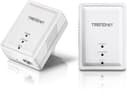
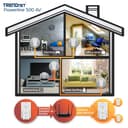


⚡ Power your network instantly—no wires, no hassle, just pure speed.
The TRENDnet Powerline 500 AV Nano Adapter Kit (TPL-406E2K) delivers reliable 500 Mbps wired network connections through your home’s electrical wiring. Featuring a compact design, plug-and-play setup, and compatibility with multiple Powerline standards, it’s perfect for expanding your network without new cables. Backed by a 3-year warranty and secure pre-encrypted signals, it’s a trusted solution for seamless, high-speed connectivity across multiple rooms.


| ASIN | B008F537KC |
| Best Sellers Rank | #31 in Powerline Network Adapters |
| Brand | TRENDnet |
| Built-In Media | 2 x Network cable (1. |
| Color | White |
| Compatible Devices | Backward compatible with all Powerline 600, 500, and 200 adapters |
| Customer Reviews | 4.3 out of 5 stars 1,801 Reviews |
| Data Link Protocol | Ethernet |
| Data Transfer Rate | 500 Megabits Per Second |
| External Testing Certification | CE, FCC |
| Global Trade Identification Number | 00710931506587 |
| Hardware Interface | Ethernet |
| Item Length | 2.7 Inches |
| Item Weight | 0.11 Pounds |
| Item Width | 2.2 Inches |
| Manufacturer | TRENDnet |
| Mfr Part Number | TPL-406E2K |
| Model Number | TPL-406E2K |
| UPC | 782386486042 631058208416 513871253319 734911114180 001910299317 072090541718 041114202706 710931506587 069991937351 710931506594 163120425068 731215283529 036506628608 021111987370 |
| Warranty Description | 3-year limited warranty |
N**S
Plug-n-Play and work great BUT, you might consider coax
Plug these in and you got an instant ethernet connection. I was able to get between 5MB/sec and 15MB/sec depending on a number of factors. That being said, this was in a condo building with a lot of electrical signal noise so your results may vary. In any case, these tended to be much, much, much more reliable than wifi in our situation. They are very easy to setup and would be FAR easier than trying to get wifi to work in a larger building or perhaps if you live in an apartment or condo where there's TONS of radio interference from other routers. Also good for putting a wifi access point on another floor of your house. BIG THING TO NOTE: You MUST put these on the same "phase" in your electrical box as I believe I read someone else say. This means that to get any decent performance, you want the outlets to be on breakers that are on the same side of the box. Most boxes have two rows of breakers, so if say your outlets are on the left side, you're golden. If the outlets are controlled by breakers on the left and right side - you might have zero to severely degraded performance. YMMV. In my experiments, I did speed tests in the same room (outlet to outlet on the same circuit) and got the same results as living room to office (two different circuits, but same phase). ALL THAT BEING SAID: - YOU MIGHT WANT TO CONSIDER COAX adapters. These are adapters that like these, plug into an existing wiring system in your house (cable lines) and are generally faster and less finicky. They are a little more money though. So if you are looking for REALLY good speed on your local area network (say for media streaming from server in your office to the living room), then maybe coax is worth the extra coin. IF you're just expanding internet access or something, then these are good enough. As far as bandwidth, if your internet connection is slower than 50MBit (as advertised) then this will not add any speed penalty for you. Anything higher, it will. Most residences only have 1.5-30Mbit so you'll probably be just fine.
G**I
Works well and easy to set up.
Bought these to replace my tp link power line adapters due to possible hacker activity news. These were very easy to set up and work really well with my asus wifi7 router which was also used to replace my old tp link router. One of these was used with a smart plug for my Canon laser jet since it isn't used often. The problem that I had with the tp link adapter is when powering up the adapter and the printer, the printer would fail to receive an ip address from my router which would lead to fiddling with the smart plug and tp link adapter. But with these new ones it locks in the ip address immediately and I have access to my printer and its scan function. Very happy with these. Also use another one of these for my solar PV communication and haven't had problems with that either. Highly recommend. I've been able to get speedtest rates of 200-300 mb/sec speeds. More than I need for what I use them for.
J**S
They work great!
**5 month update!** These are still working great and I have good news! I was able to use my existing desktop (an iMac) to send my internet connection to the first adapter in my office which is much closer to the breaker and I now have no loss in speed. So morally of the story is to try different outlets if possible if you are seeing a drop in speed like I was. I am even more pleased with these, especially since they are still the cheapest powerline adapters. So let me explain a few things before the review. I live out in the country with a decent internet speed that works well for streaming HD videos on YouTube and Netflix. With the wifi I get about 17Mbps all over my house. Not the fastest but for being pretty far out of town I'll take it. I recently got a garage built right next to my house with a walk way in between the house and the garage and the room with the router is probably 8 feet away but the garage is a metal building so wifi and cell service do not go through the walls into the garage. I like to have parties and such in the garage but with no wifi or decent cell service, streaming music and such takes a planned downloaded playlist. So you can't just decide on a different song or two with out it being a hassle. So I went on the hunt for a solution that wasn’t getting an ethernet line installed into the garage and found powerline adapters. I was a little skeptical with the signal having to go from one end of the house to the breaker box and then all the way back to the garage. I tested the adapters in the house and the speed dropped from 17 Mbps to about 7Mbps. I took them out to the garage and used the closest outlet to the breaker box with an old router I had sitting around to get wifi in the garage and it got me about 7Mbps as well. While the speed did drop it works well and I honestly am happy with it. These were the cheapest adapters I could find and they work well for what I need even though the speed did drop. Streaming music works just fine. Even a video or two works great. Happy I found a solution!
C**S
Provides a stable wired connection for video streaming
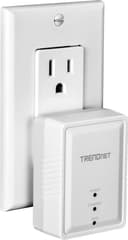
I bought this to fix a problem I had with Netflix streaming, and, after installation, Netflix works "perfectly." I pay Time-Warner for a "Standard Internet" cable connection, advertised as 15 Mbps. And, indeed, speedtest.net always measures 14.5-15.2 Mbps. The cable modem is on the second floor (where my office is) and connects to a Belkin F9K1001 WAP/router, a relatively inexpensive ($40-$50) and, hence, low-powered model. But until recently the wireless (802.11) signal was adequate for laptops on the main floor and in the basement. Our old, non-smart HD TV on the main floor is connected to the HDMI output jack of a laptop which streamed Netflix to the TV. In the last few weeks, the Netflix buffering became "unbearable" so I did a few measurements. I pinged the Belkin 100 times. The result was a huge variance in ping times: an average of 62 ms with a huge variance, a low of 1 ms and a high of 298 ms. In addition there was 3% packet loss. When I connected the laptop directly to the Belkin using a wired (Ethernet) connection, the result was no variance, an average of 0.3 ms, and 0% packet loss. So one solution seemed to be to connect the laptop to a wired, rather than wireless, connection. In my old, non-smart house, installing an Ethernet cable from the second to the first floors would have cost $300-$500. Enter the TRENDnet. I installed it as others have suggested, directly to a two-outlet wall outlet (rather than, say, a power strip). Its profile allows full three-prong usage of the remaining outlet. It worked out of the box. I didn't even need to press the sync button. Now the laptop on the main floor has a 3 ms ping to the Belkin with little variance and 0% packet loss. speedtest.net measures 15.1 Mbps. Netflix (and other video streaming) now work flawlessly. Having one TRENDnet wired to the Belkin upstairs opens other possibilities. TRENDnet claims that up to 7 such wired Ethernet ports can be created, wherever you have an electrical outlet. I may, in the future, connect a more powerful $100 WAP/router (e.g. with external antennas) to the TRENDnet on the main floor to create a 2-WAP/router home LAN and boost the wireless signal throughout the house. Of course, another solution might have been simply to install that more powerful WAP/router on the second floor but that solution would have been three times as expensive. A different solution might have been to use the coaxial cable that Time-Warner had already installed but I didn't pursue that either as I believe it's also more expensive. Right now, I couldn't be happier with the TRENDnet and recommend it as a solution to flaky wireless streaming.
K**G
Works great... buy it!
Review: TRENDnet500 Mbps Compact Powerline Ethernet AV Adaptor Kit (TPL-406E2K) First off, this product is a 10 star! Now my story if you care to know why I feel that way. I wanted to connect a desktop computer to my modem / router via Ethernet cable (was tired of the wireless hassles). With that hope, I ordered the TRENDnet 500 adapter kit. When I received the adapters, I first synced them together. Next, using the software on the shipped CD I created a network password for each. Lastly, I plugged one adapter to my modem / router and the other adapter to my desktop computer, both via Ethernet cable. From the start they worked! Was able to get onto Internet without any issues. And Ookla speed test showed 54Mbps DL and 12 UL (ISP provides 50 DL and 10 UL). Just as Trendnet claims... the adapters connect your devices to your router as though they were plugged together with nothing between. And because of the better than expected results, after about a month I ordered another adapter kit. This time, I connected the adapters to a Roku box and a Sony 3D Blue Ray Player. Again... everything working perfect! This time I synced each new adapter to the adapter that was plugged into the modem / router (rather than to each other). For context, my house was built in 2009 (age of house may impact product results) and my ISP is Xfinity Comcast (cable... not DSL). In addition, the distance from my modem / router to each device is approximately (again, distance across power lines may impact results)... Roku Box 35 feet Desktop Computer 20 feet 3D Blue Ray Player 15 feet I have had all four adapters now for only about three months. But in that short time, I have not lost Internet connection one time. And the speed tests on my desktop range from 45-55 Mbps DL and 8-12 Mbps UL. And all streaming on Roku Box and Sony 3D Blue Ray Player is in HD (Netflix, Hulu, Amazon). Lastly, because of the negative reviews I did an unscientific test to stress the adapters. Simultaneously, I steamed HD content on the Roku and Sony 3D Blue Ray Player and turned on the vacuum and hair dryer... then went to my desktop to run a speed test. Ookla results were 45Mbps DL and 10Mbps UL! Case closed... for me these adapters are worth twice their price. They have made me and my entire family happy campers (no more fighting about bandwidth / wireless connectivity issues). With the desktop and streaming devices all hardwired, our tablets and phones can now connect wirelessly without any hassles. Thank you Trendnet!
J**M
Zero security, but simple to use
First off: these create a huge security vulnerability. These automatically connect with each other, so if you have an outlet outside or live in a multi-unit complex, if someone else had one they are instantly on your network. I would have rather at least had a pairing button that had a short-lived window of time. Now that the lack of security portion is out of the way, and you still really don't care about security of your network, these things are very simple to use. The units are interchangeable between being a client or source from your router. You plug them in and connect an internet cable and they start working out of the box. Speed doesn't seem super great, but better than spotty Wi-Fi, which is why I have 4 of them for non-essential devices, like a solar inverter monitor, Roku tv, and a controller, with the 4th connected to a firewall router. Yes, it's possible to steal internet from me, but at least it's not on the same network as my computer and they would have to be physical on my property.
V**N
Easy to setup. Even comes with ethernet cables. Very pleased with results but needed to get creative to privatize.
Easy to setup up. I live in apartment complex with at least 40 WiFi networks within range competing for 2.4 GHZ band. I couldn't stream any video content due to traffic congestion. I installed PowerLine adapter so my Blu-Ray player is now hardwired via ethernet and electrical wiring in my apartment. No more hiccups, interference or problems because I am not using WiFi at all. I have dual band WiFi router and use the 5 GHz band with my Samsung Galaxy S4 cellphone and 10.1 Tablet 2014 edition. So I longer need the 2.4 band unless a guest comes with an IPhone or IPad. They only run on 2.4 band so too bad. They have to deal with traffic. To make your Powerline network private, you have to manually hold reset button on bottom of adapter for 3 seconds and then you have 2 minutes to do the same on all other adapters on network. This generates a random encrypted password for your PowerLine network. However, actually accomplishing this task is close to impossible. It must be done with adapters plugged into wall. It is very difficult to locate the reset button on the bottom blindly with the adapter just 6-8 inches above the floor. I just could not blindly find the tiny reset buttton. Maybe with a mirror underneath it would make it possible. I opted to change password using the TRENDnet utility. You must get the DPW printed on the back of each adapter and enter it into the TRENDnet utiliy before making the change. The lettering is extremely small on back of adapter and need magnifying glass to read it. I just took a close-up photo with my cell phone and could then read the DPW easily from the photo. Once you enter the DPW for each device into utility software, you can change the encrypted password for all the devices on your private PowerLine network simultaneously using the TRENDnet utility. Took a little creativity, but I successfully privatized my PowerLine network with custom password. I am getting 181 Mbps streaming video with my hardwired Blu-Ray player on PowerLine. Much better than trying to watch anything via WiFi on 2.4 GHz band. Finally able to enjoy Amazon and Netflix movies without buffering or sudden disconnect.
T**5
FAR Superior to Repeaters/Extenders
This is what I have been looking for! My repeaters kept losing connectivity and were slow and weak because of all the twists and turns and walls and doors and other blockers in my house - royal pain. These babies just work! Strong, fast signal from one end of the house to the other. I replaced 2 repeaters that were working poorly or not at all with a pair of these and a single router and the whole house is covered nicely. Got another one for my printer that is across the room from my main router. Mindlessly easy to install. I'm not sure which I like best, the really low price or how childishly easy they are to install or how fast and reliable they are. Wow! What a win! Only thing that concerns me (not much) is if I can buy two unrelated pairs and they all work together, I guess somebody could plug another one into my exterior outlets and snoop on my network, but of course they would have to know that I have these things installed. I guess my neighbor *could* watch NetFlix on my dime without having to break into my house or hack my wifi password. Better put up my firewall shields on all devices connected to this in-home network, just on the far out chance -- but reality is I'm not terribly worried that it would really happen.
Trustpilot
Hace 2 meses
Hace 3 semanas