We remain fully operational. Our teams are working around the clock to ensure your deliveries continue safely.

Descargar la aplicación


Servicios al cliente
Sobre nosotros
Copyright © 2025 Desertcart Holdings Limited
Descargar la aplicación





Buy anything from 5,000+ international stores. One checkout price. No surprise fees. Join 2M+ shoppers on Desertcart.
Desertcart purchases this item on your behalf and handles shipping, customs, and support to Ecuador.
🎮 Level up your gaming setup with the ultimate universal adapter!
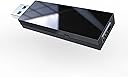
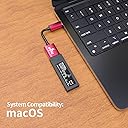
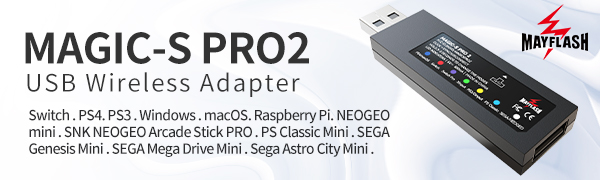
The MAYFLASH MAGIC-S PRO 2 is a cutting-edge wireless Bluetooth USB adapter that transforms your favorite controllers—including Xbox Series X/S, PS5, Switch Pro, and more—into versatile, cross-platform gaming tools. Supporting both wireless and wired modes with low-latency Bluetooth 5.0, it offers 6-axis motion controls and customizable rumble feedback. Compatible with a wide range of systems from PC and macOS to Raspberry Pi and retro consoles, this sleek USB-C powered adapter is the must-have accessory for seamless, next-level gaming connectivity.



| ASIN | B09YRBZZQ3 |
| Best Sellers Rank | 2,097 in PC & Video Games ( See Top 100 in PC & Video Games ) 5 in PlayStation 4 Adapters 115 in Xbox Series X & S Accessories |
| Brand Name | MAYFLASH |
| Colour | black |
| Compatible Devices | Game Consoles, Computers |
| Connector Type | USB Type C |
| Country of Origin | China |
| Current Rating | 1.5 Amps |
| Customer Reviews | 4.4 4.4 out of 5 stars (1,115) |
| Global Trade Identification Number | 06970582690385 |
| Input Voltage | 5 Volts |
| Item Dimensions | 7.3 x 2.1 x 0.9 centimetres |
| Item Weight | 0.04 Kilograms |
| Manufacturer | MAYFLASH |
| Manufacturer Part Number | RH204RH |
| Model Number | RH204RH |
| Number of Items | 1 |
| Number of Ports | 1 |
| Package Quantity | 1 |
| Power Plug Type | No Plug |
| Product Finish Type | Matte |
| Specific Uses For Product | gaming, computer usage |
| Unit Count | 1.0 count |
| Warranty Type | Limited |
A**Y
Great replacement for old PS3 pads
I've had issues with my PS3 pads failing for years. The flexi boards fail and buttons don't work, and the thumbsticks wear out and the replacement ones are never as good. I've bought two of these adapters instead and am currently using some DS4 pads and they're working perfectly. No issues syncing and as far as the games are concerned they're real PS3 pads.
M**A
Works like a treat but you have to manually switch on the ps4
This works perfectly well with almost no input lag. The only issue I’d say with it is the fact that you can’t switch on the ps4 by simply clicking the button on the controller. You’ll have to manually switch it on and then click the button on the controller to connect it. Once it’s connected, you won’t face any other issues. Also note that the mute button on the ps5 controller doesn’t work with this. You’ll have to manually mute your headset which in my case is okay as it’s a simple button on my headphones. Overall highly recommended given it’s purpose.
R**A
Great after knowing how to use it
Works brilliantly for getting my Razer Wolverine V3 Pro working on the Nintendo Switch 2. Steps for success: Update Firmware: Plug the Mayflash into a PC while holding the side button. Download the latest firmware from the Mayflash site to ensure compatibility. Console Settings: On your Switch, go to System Settings > Controllers and Sensors and turn ON 'Pro Controller Wired Communication.' Connect Adapter: Plug the Mayflash into the dock (or use the included red USB-C extension for handheld). Set Mode: Hold the side button for 3-5 seconds until the LED is solid Purple (Switch Pro mode). Plug in the Dongle: Now plug your Razer HyperSpeed dongle into the back of the Mayflash. It should just work! Note: If A-B or X-Y are swapped, you can remap them in the Switch settings or use the Mayflash shortcuts (Start + B for 3 seconds).
R**E
Does the job
But cheap feeling but does the job
D**S
usb adapter
this usb adapter is great. alot of value for your money and this is very versatile as you can connect to a wide range of devices . its very easy to set up and use right away and the connectivity is quick
T**P
Excellent
It's easy to use as just plug it in and it will match the console automatically (make sure you update its driver) and compatible with all the modern devices including Switch2 wireless connections mode have delay and I don't know what is happening but take me some effort to make the switch screen shot work as the touch pad on ps. if you get a 2 meters data wire(A decent one) , you will get a wired controller with no delay I've not try it's turbo yet as my control have it in default it also include a usb a to usb c conversion wire, how nice worth the money as it prevents you from buying a new controller just for one specific device while giving you a free usb A to C conversion
R**S
Didn’t work for me
I have a PS4 but hate the PS4 controllers (the usb charging to completely unreliable) I thought that I’d get this dongle and a PS5 controller since I’ll probably buy the PS5 Slim once it’s out. Tried to connect the PS5 controller to the dongle and it doesn’t work, I had to turn off my TV and get an old non Bluetooth one out from the attic as the ps5 controller was trying to connect to the TV, so I know the problem wasn’t with the controller, frustratingly even with every concevable Bluetooth device turned off in my house the controller won’t connect to the Magic-s pro, I even tried on all the settings, the blue light is supposed to be for ps4 I tried all the other as well. At least the return p&p is paid for.
S**P
Worked perfectly
Promptly delivered and worked just as was expected one happy son on his birthday.
B**N
Worked perfect out of the box, for years I wished for a way to use my old ps3 diva gamepad on newer systems and just never came across this product, plugged it into my switch 2 and without any extra steps aside from enabling a wired pro controller setting it worked instantly and without any noticeable input lag (mabey biased) just because you can calibrate lag in most rythem game settings but it seems to work just fine for all other functions in games, all buttons are mapped to their console equivalent automatically and I've hand no issues to speak of. Honestly surprised, a great pick up if you want to use your old controllers for comfort, or you have old gamepads and I'm assuming fight sticks that are no longer compatible and quite frankly the market for modern gamepads/fight sticks is quite pricey, that old stick you bought 10 years ago still works good. Great buy
B**E
Funziona alla grande per il mio caso d'uso: Controller PS3 e PS4 su PS3 e su PS4. Attenzione: un solo controller può essere collegato al dispositivo (uno alla volta). Se vi serve collegare due joystick alla console di servono due adattatori. Il controller PS3 e PS4 possono essere connessi sia con cavo che wireless.
R**O
Ps4 ve ps5 cihaza bir çok gamepad bağlamak için.. Ben xbox için sanmıştım.. Buna dikkat ederek alın.. Destek cihazı ve festek kollları bölümünü daha açıklayıcı yazsalat iyi olur.. Ürün sağlam kaliteli.. Yazılım desteği sitesibde güncel.. Satmayı planlıyorum.. İhtiyacı olan kullanır..
K**R
Fantastic product. Works perfectly
S**M
Lo compre para utilizar mi control de Xbox One (la versión con bluetooth) en Nintendo Switch y en Playstation 4, lo probé con ambos y funciona de verdad muy bien, no se siente nada de latencia, y además el manual que viene esta bastante bien detallado y fácil de entender. El emparejado por bluetooth es muy sencillo y funciono sin tener que actualizar el firmware, funciona a la perfección por cable si no quieres utilizar pilas, y no necesitas emparejar el control cada vez que vayas a usarlo, aun cuando cambias el adaptador entre consolas. Adelante les dejo mas detalles sobre mi experiencia con el adaptador en cada una de esas dos consolas por si los necesitan. En la Switch: Pros: - Lo detecta como un control USB y prácticamente es como jugar con un Pro Controller, incluso puedes tomar capturas presionando ambos botones (lo que seria Start y Select por apodarlos así) y el botón Xbox funciona como el botón home y según el internet si usas un control dualsense o dualshock 4 puedes usar tilt controls. - El adaptador te permite intercambiar las posiciones de los botones X-Y y A-B por si quieres que coincidan con los del control de Xbox. - Se incluye un cable adaptador USB C de bastante buena calidad para usar el adaptador sin el dock, igualmente funciona perfectamente bien al usarlo con el cable y no parece que afecte la vida de la batería de forma notable. Contras: - Solo uno, la vibración funciona pero parece que en algunos juegos tiene algunos problemas por ejemplo en FE:3H el control no deja de vibrar muy débilmente aunque no este sucediendo nada en el juego, esto es algo que pasa constantemente si tienes habilitada la vibración en el juego, parece ser algún problema que hay con algunos juegos, aun así, la vibración si se acciona cuando debería, solo con ese detalle de que no para de vibrar en algunos juegos. Playstation 4: Pros: - Con el adaptador el control de Xbox funciona exactamente igual que un control regular de PS4, incluso reconociendo el nivel de presión de los gatillos correctamente, el PS4 no marca nada en particular sobre el control, este simplemente funciona tal como debería. - La vibración en realidad si funciona en PS4, incluso cuando usas el control por bluetooth. Contras: - No es demasiado importante pero no puedes usar el puerto de audífonos como podrías con un control original aunque el control que uses lo tenga, obviamente esto aplica también en la Switch. Anímense a probar este adaptador, además de todo lo que mencione, este adaptador es compatible con un montón de consolas mini e incluso lo puedes usar como receptor inalámbrico de tu control en tu computadora, a mi me pareció una bastante buena compra para no tener que gastar en mas controles para poder utilizar todas mis consolas.
Trustpilot
Hace 1 mes
Hace 1 mes