Desert Online General Trading LLC
Dubai, United Arab Emirates
Desert Online General Trading LLC
Dubai, United Arab Emirates


🎤 Own the spotlight, wherever you present.
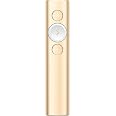
The Logitech Spotlight Presentation Remote is a sleek, gold wireless clicker designed for professional presenters. It offers advanced digital highlighting and magnifying features, dual USB-A and Bluetooth connectivity with a 30-meter range, and quick charging. Compatible with all major OS and presentation software, it also provides smart vibration alerts for timing and interactive cursor control to elevate any presentation experience.


H**R
Wireless Wizardry: A Closer Look at the Logitech Spotlight Remote
When it comes to presentations, finding the right tools can truly make a difference. Enter the Logitech Spotlight Remote—a game-changer that's transformed how I handle my presentations. After putting it to the test, here's what I've discovered. This is by far the best presentation remote I have ever used. In fact I lost the receiver and I purchased another remote!The Logitech Spotlight Remote is all about simplifying presentations. With a range of up to 100 feet, I can navigate slides and interact with on-screen content effortlessly. It's like having complete control from anywhere in the room. The customizable timer is a standout feature for me. Vibration alerts sent directly to my hand keep me on track without disrupting the flow.But the real magic lies in the advanced pointer system. It allows me to highlight and magnify areas of focus with pixel-perfect precision. You can also easily blackout the screen with a tap. This level of detail is essential when delivering impactful presentations. What's more, the remote offers gesture-commanded scrolling, panning, and volume control, giving me all the tools I need to crush every presentation.One of the impressive aspects is its long-lasting battery life. A full charge lasts up to three months, which is a relief during back-to-back presentations. The remote is plug-and-play on most devices and platforms, which makes setup hassle-free. The Logitech Presentation App is a great companion that unlocks additional capabilities.In summary, the Logitech Spotlight Remote has truly elevated my presentation game. Its range, customizable timer, advanced pointer system, and additional features offer a comprehensive package for presenters. If you're seeking a remote that simplifies and empowers your presentations, the Logitech Spotlight Remote is definitely worth considering.
D**I
My new Gold Standard for clickers
Setting this one up straight out of the box took under 10 minutes and that’s because I wanted all of the fancy features. The signal strength is excellent. With my other clickers if I went back stage with them planning on walking on with the clicker in my hand, all of the lights and mics would break the signal and they would not work unless I did a lot of power off, unplugging etc. in front of the audience :(This clicker even worked from back stage when my laptop was on stage. The spotlight feature is a game changer. Brilliant idea whoever came up with it. The sticker price might seem to be a bit high until you actually use it. Then the price makes complete sense.This clicker in my opinion gets an A++
W**.
The New Gold Standard
I've used several other presentation controllers over the years, and this one wins in a walk-off! It's completely intuitive, charges quickly and holds its charge, and is feather-light, easy to hold and, and easy manipulate unobtrusively. Works seamlessly with MS PowerPoint and, when used in PPT's "presenter view", displays a great count-down timer and haptic alert when halfway through your presentation time limit. Installation is a no-brainer - just plug the USB dongle into your laptop and you're good to go (unless you want to set up advanced features like the timer and highlight/magnifier features, which is a breeze to do).It doesn't have a laser pointer, but the highlight/magnifier is better, IMHO, although it does take a bit of getting used to. It comes without a charging brick, but by now you probably have more than enough of them, in addition to the USB ports on your laptop. The charging cable is USB-A to USB-C, so your spare USB mini and micro cables won't work. But the plus side is that the USB-C can be plugged into the Spotlight in either horizontal orientation - no squinting at the port and plug to sort out up or down. It charges almost instantly, and no batteries to fuss with. At a bit under 6", the supplied charging cable risks getting lost, so I keep my cable plugged into a charger at home, and give the Spotlight a fresh charge (a minute or so) while I'm packing my kit to take on the road.Everything else is there - a way to manually emphasize areas of a slide that is much more effective than a laser dot, a simple way to blank and restore the screen, no-brainer slide advance and back, and all of this in a slim, 3-button stick. If you do much presenting, this is the new gold standard, and well worth the price.
D**L
Simply one of the best pointers for presentations
I've used this type of pointer for over 4 years. One of the biggest challenges with pointers while delivering presentations is that you don't know what your viewer's eyeballs are looking at. You want to connect to your viewers, but when you project slides - you want to make sure they are looking at what you are talking about. The pointer makes it extremely simple to blank the screen, so your viewers are looking at you when you want to be connecting to them. Then when you project - this pointer has a "spotlight" function which dims the slide and allows you to highlight exactly what you want them to be looking at.It takes a USB charge quickly (approx 2 min to give you a full presentation of battery life. It's small. 3 buttons which can be reprogrammed. The newer unit supports a Bluetooth connection. Supports Mac and PC. The manufacturer has produced high quality peripherals for decades.
Trustpilot
Hace 2 meses
Hace 1 mes