
🎮 Dominate every click with precision and speed – the Evga X17 is your ultimate edge!
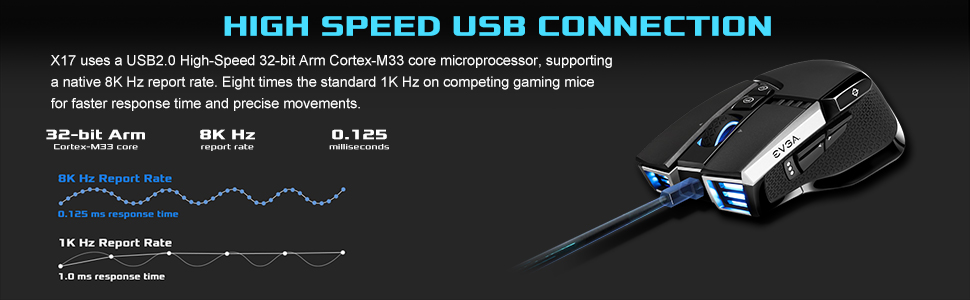
The Evga X17 Gaming Mouse is a wired, black, ergonomically designed powerhouse featuring the world’s first triple sensor system, including dual LOD sensors and a Pixart 3389 optical sensor. It boasts an ultra-fast 8K Hz report rate powered by a 32-bit Arm Cortex-M33 microprocessor, delivering lightning-quick responsiveness. With 16,000 DPI sensitivity, 10 programmable buttons, and 5 customizable onboard profiles, it offers unparalleled precision and customization for professional gamers and power users alike.



| ASIN | B08VTS4T4B |
| Are Batteries Included | No |
| Average Battery Life (in hours) | 12 months |
| Best Sellers Rank | #61,389 in Computers ( See Top 100 in Computers ) #1,727 in Computer Mice |
| Brand | EVGA |
| Color | Black |
| Customer Reviews | 4.0 4.0 out of 5 stars (3,930) |
| Date First Available | 3 February 2021 |
| Hardware Platform | PC |
| Item Weight | 340 g |
| Item model number | 903-W1-17BK-KR |
| Manufacturer | EVGA |
| Operating System | Linux, Windows XP |
| Power Source | Corded USB A |
| Product Dimensions | 12.27 x 7.04 x 0.25 cm; 340 g |
| Series | X17 |
た**こ
みなさんが書かれているように、大きすぎて持ちにくい、設定アプリが分かりづらい、などはその通りですが、これらに関しては慣れればなんとかなるとは思います。ただ私としてはKVMを使ってPCを切り替えると設定が初期化される点だけは許せないです。KVMを使わずたくさんのボタンが欲しい人にはよい製品だと思います。
C**S
First off, dislikes. The scroll wheel stopped working on one of the three I've bought. This is apparently a known issue, but it's only happened on one of my mice, and I honestly usually disable scroll wheel bindings [in game] anyway. It has a tendency to misfire if I use the scroll click button or left or right on the scroll wheel. This is true of any mouse that I bind things to those buttons on and is not unique to this mouse. You can RMA it back to EVGA if this happens. I'm waiting on a replacement for that mouse to arrive as of this post. I bought three because I wanted a backup and one for a laptop that I rarely use. 9 and 10 buttons are awkward to use, but useful for rarely used hotkeys, or system buttons like enter. It has a learning curve if you're coming from a 3x4 MMO mouse or new to MMO mice in general. So why such a high rating? Positives outweigh the negatives by a lot. It has 20 buttons, and that's nothing to scoff at. Most MMO mice aside from the Logitec G600 have fewer. There's no button where your thumb rests on the center, meaning it is easy to avoid accidentally pressing buttons when you use the top buttons due to squeezing the mouse. This is especially a thing if I use the ring finger button. A couple of the eight buttons I have to bend my thumb to reach, but this is true of the top and bottom of the back row of 3x4 mice as well. It's not unique to this mouse. There are five top facing buttons intended for bindings, right and left on the scroll wheel, and pressing the scroll wheel in, plus you can program the DPI buttons to be bound to something else. I never change my DPI in game, so that's a useful feature. Plus, you can put that elsewhere if you need it and still want those buttons to be bound another way. The 9 and 10 buttons are a good place for it. That's ten different inputs for hotkeys on the top side of the mouse. I don't know of any other mouse that has that. It pretty much means I only have to worry about movement keys on the keyboard. WASD, Shift, and Ctrl. Along with a few odd menu keys for stuff like weapon wheels, map, and inventory. Plus, you've got eight easily accessed hotkey buttons on the side, and two that you have to stretch a bit to reach. [9 and 10]. There's also a switch on the bottom that disables the ring finger button. I usually set that to V which is melee in most games, but it's nice to be able to disable it for some games. The mode switch feature is neat, but I don't personally use it. They call it "shift" and it allows for the bindings to be different if you hold down a particular button. The software is fine, not great, but does the job. I've had no issues with it. It has updated at least once since I bought it. The mouse does sometimes not enable bindings, but this only happens when I boot my system, and very rarely. It's never an issue when I'm using it, and I can tell when it happens because the RGB doesn't come on. The fix is just to unplug and plug it back in. You can also disable RGB entirely, which is normal for mice like this. Overall, it's the best gaming mouse I've had. There are small things I'd improve, but the overall functionality outdoes other mice I've tried, including the G600, due to the amount of inputs on the top of the mouse.
J**N
Original look and a great alternative to logitech g 600 mouse. The tertiary button give an edge in game
D**O
This mouse has pluses that most mice can't claim: -Bluetooth -Wireless 2.4GHz via USB Dongle -Wired for use and charging while being used -Customizable DPI Switch -Lots of RGB, Macro, and Custom Options via Unleash RGB Software -3-Year Warranty -EVGA support has always been great (for me,) based in Cali -Customizable side DPI Shift switch -Mouse Wheel can Scroll Side to Side While I've never specifically looked for a mouse that can work via wired, 2.4GHz w/ USB Dongle, or Bluetooth, I've purchased A Lot of mice in my 20+ years of gaming and building PCs, I don't remember seeing one that could do all 3. Best Potential con I can think of is, when using it via 2.4GHz or Bluetooth it switches itself off pretty quickly, regardless of your power settings for USB. I guess it's a power saving feature when being used wirelessly. Not a con for me, it always wakes with a quick shake or click. I've now purchased a Lot of these, and usually get a couple when they go on sale. I've been using one of the original 3 I bought since Sept. 2023 without issue. Right now they're my default option for a mouse. I currently use this mouse for gaming, I leave the USB wire plugged into my gaming PC, then disconnect it when I'm on the go and use the Bluetooth connection on a notebook PC. It's a better gaming mouse than one I paid around $100 for. I've included a pic of the detachable bottom where you can stow the USB dongle, a feature I haven't seen mentioned yet. The mouse has multiple sensors and is even accurate with a mild liftoff. With all the available features the X20 provides the biggest overall bang for the buck in a mouse that I've ever seen. I've not encountered any of the issues in some of the negative reviews. Like I mentioned, it does shut off rather quickly when being used wirelessly, but always wakes for me, and I would never use a wireless... anything when I'm gaming. I strongly suggest to all my friends and clients to use wired devices for stationary use, and only suggest wireless for people that I know will need a mobile solution. The X20 checks all those options. It is definitely all some type of plastic, with lightly textured areas along the sides for grip. Mine has been dropped, on carpet, and knocked down a few times by a kitty, pretty sure on purpose, and mine still works fine. But when looking at the price point it's usually offered at, and the great price when on sale, I don't expect titanium :)
R**Y
I have both x17 wired and x20 Wireless Evga mice. I'd take the x17 over the wireless x20. x17 has more features, x and y dpi able to go over 1000hz up to 8000hz. Slightly lighter. but x20 isn't bad either.
Trustpilot
Hace 1 día
Hace 1 semana



