We remain fully operational. Our teams are working around the clock to ensure your deliveries continue safely.

Descargar la aplicación


Servicios al cliente
Sobre nosotros
Copyright © 2025 Desertcart Holdings Limited
Descargar la aplicación


⚡ Power your network smarter, not harder.
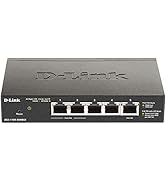
The D-Link DGS-1100-05PDV2 is a compact 5-port Gigabit smart managed switch featuring 2 PoE ports powered by upstream PoE sources, eliminating the need for local power. It offers advanced Layer 2 features including VLANs, QoS, and bandwidth control, all managed via an intuitive web interface. Its fanless design ensures silent, energy-efficient operation compliant with IEEE 802.3az standards. Designed for flexible desktop or wall mounting, it comes in a durable metal case and is backed by a lifetime warranty, making it ideal for small to medium business networks seeking reliable, scalable, and easy-to-manage PoE networking solutions.




| ASIN | B08BCQZDXS |
| Best Sellers Rank | #160 in Computer Networking Switches |
| Brand | D-Link |
| Built-In Media | Power over Ethernet switch, PoE injector (not included), power cord, mounting screws, quick installation guide, warranty card |
| Case Material Type | Metal |
| Color | Black |
| Compatible Devices | Desktop |
| Current Rating | 1 Amps |
| Customer Reviews | 3.9 3.9 out of 5 stars (70) |
| Data Transfer Rate | 10 Gigabits Per Second |
| Global Trade Identification Number | 00790069453298 |
| Interface | RJ45 |
| Item Dimensions L x W x H | 10.16"L x 8.26"W x 2.79"H |
| Item Type Name | Switch |
| Item Weight | 8 ounces |
| Lower Temperature Rating | 32 Degrees Fahrenheit |
| Manufacturer | D-Link Systems, Inc. |
| Mfr Part Number | DGS-1100-05PDV2 |
| Model Number | DGS-1100-05PDV2 |
| Number of Ports | 5 |
| Platform | Not Machine Specific |
| Switch Type | Smart Managed |
| UPC | 790069453298 |
| Unit Count | 1 Count |
| Upper Temperature Rating | 104 Degrees Fahrenheit |
| Voltage | 220 Volts |
| Warranty Description | Lifetime Warranty |
H**R
D-Link 5 Port POE Switch is much more than just a Network Switch
I have worked electronic security for several decades, from legacy technology up and through the vast realms of technological breakthrough in various avenue of electronics. Installed over 500 Axis IP cameras, access control and on and on. However, given the limits of Network technology regarding distance, I have a customer that wanted cameras where no power was to be, almost 700 feet from his home in a vast yard. We installed buried CAT5e 14 years ago, in the yard to a tree. Now with items such as Veracity Longspan, POE and network activity can easily be accomplished at 700ft+, and with that delivery, items such as this Switch, are totally powered by POE, into and distributed by this D-Link switch. The POE powers this switch via Port 5, and then Port 1 and 2 can be managed to deliver that POE budget to a Wireless Access Point locally, Wireless Arlo camera communicates to this access point, and a POE splitter, powered by Port 2, provides 5vdc to keep the Arlo cameras powered continuously 700ft away. One CAT5e, delivers 54 Volts of POE and 10/100 Network function 700ft away, (Network Max typically 100 meters/ 324 ft) with NO other electrical source. Without this switch, it would not work, or be manageable via PC remotely. I have 4 of these, as they are basically priceless. If you know what you are doing, your only limited by personal limitation. Veracity, D-Link, Trend-net AP's, are amazing. Very happy customer that can keep an eye on his house and yard from Halfway around the world... 5 star indeed.
M**D
Muy buena calidad y compacto
K**K
pretty lame
this is for DGS-1100-05PD first off switch does not ship with DHCP enabled, and all are set to the same static address of 10.90.90.90 to access you need to set your computer to manual IP address or 10.90.90.9, mask 255.255.255.0 and gateway 10.90.90.1 then in your browser goto 10.90.90.90 login to switch with password admin goto system ipv4 and set to DHCP, do not power off the switch set your computer back to DHCP find the switches IP address using ip scanner or look in your routers DHCP lease table log back into the switch at its new address, then click save config at top left of web page, click apply, you can now power cycle switch and it will stay set to dhcp the POE pass through functions are also limited and don't play well with cisco switchs or work at all with POE injectors so my advise is avoid this switch, much better options are available
M**K
Great managed closet switch
Perfect for switching and VLAN tagging at the ends of my far reaching Ethernet runs. Fully managed with POE pass through. Two downstream ports can draw a several watts each, switch itself consumes 2-4 watts. Transfers to the upstream switch at full 1Gbps wirespeed.
R**N
Only one downstream PoE at a time, and other issues
This switch only powers one of the two downstream PoE ports at a time. I can't get it to power both, unlike the similar Netgear ProSAFE, which powers both downstream ports simultaneously. The device comes with generic instructions for a wide range of switches, and I can't find an accurate description of exactly what this switch is capable of. The management web UI is available by default (according to the generic docs) on a static IP address of 10.90.90.90, making it a huge PITA to configure, as you have to connect directly to it and set up a 10. network. Stupid that it doesn't use DHCP by default. Even the product website lacks information about it (if you dig you can find a data sheet, but it's not great). I would not recommend this, and if the Netgear was available (discontinued; GS105PE-10000S), I'd buy it again.
J**R
Buy this
This is one of the greatest low priced desktop switches I have seen! It is easy to set up and configure and packs a lot of functionality for a very very very low price. The fact that it runs on POE as well as providing POE pass-through,and also provides VLAN support replicates functionality of devices that are 10 times more expensive.
H**.
dont waste your money
this is not a POE switch the manual shows a grounding cable and a power cable but it does not have neither one of the on the box it says something else, waste of money
V**S
802.3at passthrough that actually works!
Cannot be beat for the price, 802.3at input and powers 2 15W devices downstream. update: after owning this for a while - it has an unfixable bug that causes it to reboot several times per day.
C**E
Only one Poe out works at a time depending on the Poe type that is connected.
E**U
Te go el switch para administrar la interconexión de toda la casa que tengo cableada, necesitaba que fuera alimentado por Poe para no hacer ninguna instalación eléctrica en el techo. Mediante un injector Poe+ lo alimento desde otra habitación y se comunica con dos switches más. Personalmente me gusta la forma de administrar estos switch de D-Link, sin ser mi campo es sencillo configurar las Vlan (mi necesidad principal), así como otras funciones que aún no tengo implementadas como SNMP para monitorización, PD Alive para comprobar si un dispositivo conectado a Poe responde o hay que reiniciar su puerto, QoS, etc. Para Poe pasthrough me ofrece después de lo que consume él mismo hasta 18w para alimentar otros dispositivos por dos de sus puertos. Tiene Vlan específica para administración con lo que se añade seguridad y funcionalidad y la verdad muy contento. El precio es el que es, ojalá fueran más asequibles, pero me evita tener un enchufe donde no puedo tenerlo y está funcionando perfectamente. Para una casa lo recomiendo sin dudar
P**P
I bought this to extend our network and add a couple of wireless access points without having to rewire any more than was necessary. The APs are power over ethernet (PoE) and there's no power in that part of the suspended ceiling, so a switch that was PoE itself and could pass that power through to whatever's plugged into it was a big help. Installing this switch was as simple as plugging it in. A moment later, the APs were visible on the network and all was well.
F**I
Eigentlich war mein Grundkonzept für meine Netzwerktopologie keine Switches zu kaskadieren. Daher liegen bei mir sehr viel Netzwerkkabel in der Wand. Aber jetzt ist es passiert, das ein Netzwerkanschluß zu wenig da ist. Daher habe ich den D-Link DGS-1100-05PDV2 Switch gekauft. Da mein "Root Switch" ein Cisco 26 Port PoE fähiger Switch ist, und ich auf Netzteile, und noch mehr Kabel verzichten wollte ist ein Switch der über PoE versorgt wird.. Der Karton des D-Link DGS-1100-05PDV2 ist recht klein, es ist ein hübscher bunter hochglanz Karton, und das obwohl der kleine Switch eher im professionelleren Bereich liegt aufgrund der Features. In der Verpackung ist der Netzwerkswitch, ein Tütchen mit 2 Schrauben und Dübeln, und 4 Gummifüssen zum ankleben. Weiterhin ist noch eine Mappe dabei, die jede Menge Papier enthält. In dieser Mappe ist ein "Erste Schritte" Faltblatt, ein Heftchen zu Garantie und Sicherheits Informationen, eine Konformitätserklärung und eine Konformitäts Erklärung der Europäischen Gemeinschaft (CE). Alle diese Papiere enthalten jeweils auch den Inhalt in deutscher Sprache. Wichtig bei diesem Switch ist, das er ausschließlich über PoE versorgt werden kann. Es gibt KEINE Möglichkeit den Switch klassisch mit einem Netzteil zu betreiben! Für mich ist das kein Problem, ich habe in meinem Cisco den entsprechenden Port PoE konfiguriert, und der Switch wurde dann auch sofort mit Energie versorgt. Ich habe die beiden Endgeräte am Switch angeschlossen, und das war es letztlich. Die Endgeräte funktionieren sofort. Aber: Die Web GUI des Switches ist nicht erreichbar. Die Default Einstellung hat die Web GUI auf die IP 10.90.90.90 gesetzt. Ich hätte mein komplettes Netzwerk umkonfigurieren müssen, um diese IP zu erreichen. Da der Switch aber nur über PoE versorgt wird, und ich keinen PoE Injektor besitze (und mir auch keinen kaufen wollte) konnte ich den Switch nicht konfigurieren, indem ich den direkt an einen PC anschließe der in keinem Netzwerk sich befindet, da der Switch dann nicht mit Energie versorgt wird. Ich habe mir das D-Link Tool "D-Link Network Assistant" heruntergeladen und installiert. Mit diesem Tool ist der Switch dann erreichbar unter der IP 10.90.90.90, und die statische IP kann auf dynamische IP umgestellt werden, oder eine IP im eigenen Subnetz geändert werden. Danach war alles ein Kinderspiel. Mein Switch hatte die aktuelle Firmware Version installiert. Es gibt aktuell nur die initiale Version. Aber ich habe mit dem Switch keine Probleme bis jetzt. Die Möglichkeiten der Einstellungen ist bei dem D-Link wirklich fast unendlich. Ich habe ein Screenshot der WebGUI mit als Bild an die Rezension angehängt. Da kann jeder interessierte dann schauen was so alles konfigurierbar ist. Fazit: Ich habe an dem Switch absolut nichts zu meckern. Es funktioniert alles so wie gewünscht. Der Preis ist soweit in Ordnung. Die Erstkonfiguration benötigte eine Software für die Erstkonfiguration, weil mein Netzwerk im Bereich 192.168.x.x war und nicht 10.x.x.x. Der Switch ist aber trotz dem eine gute Wahl, und er bekommt trotz dem 5 Sterne, denn ich kann diesen Switch empfehlen falls man eine einfache Erweiterung im Netzwerk benötigt, und einen PoE versorgten Switch sucht!
D**B
Check the manual before buying (or see picture attached). Although it's marketed as 18 Watts max with an 802.3at supply, you cannot connect two class 3 devices, even if they draw less than a combined 18 Watts - and you can't work around this by setting it to class 1/2 either as it'll then likely overload and power off that port if one of them goes over 7 Watts. The Web config portal is also extremely dated and difficult to navigate. Aside from that it's a decent quality switch Be aware when buying a refurbished unit it may not be factory reset and have the previous users passwords locking it.
Trustpilot
Hace 1 mes
Hace 2 meses