We remain fully operational. Our teams are working around the clock to ensure your deliveries continue safely.

Descargar la aplicación


Servicios al cliente
Sobre nosotros
Copyright © 2025 Desertcart Holdings Limited
Descargar la aplicación


⚡ Power Your Productivity with Smart, Silent, and Seamless Networking
The NETGEAR GS305EP is a compact 5-port Gigabit Ethernet switch featuring 4 PoE+ ports with a total 63W power budget, ideal for powering and managing business-critical devices like IP phones and cameras. It offers easy-to-use smart management tools, flexible desktop or wall mounting, silent operation, and a 3-year warranty, making it a reliable and efficient choice for modern professional networks.


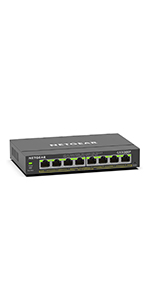


| ASIN | B08LR18SC4 |
| Best Sellers Rank | #5 in Computer Networking Switches |
| Brand | NETGEAR |
| Built-In Media | 5-port Gigabit Ethernet PoE+ Smart Managed Plus Switch (GS305EP), 2V, 0. |
| Case Material Type | Plastic |
| Color | black |
| Compatible Devices | Desktop |
| Customer Reviews | 4.5 4.5 out of 5 stars (363) |
| Data Transfer Rate | 1000 Megabits Per Second |
| Interface | PoE |
| Item Dimensions L x W x H | 6.2"L x 4"W x 1.1"H |
| Item Weight | 1 Kilograms |
| Manufacturer | Netgear |
| Mfr Part Number | GS305EP-100NAS |
| Model Number | GS305EP-100NAS |
| Number of Ports | 5 |
| Platform | Not Machine Specific |
| Switch Type | Limit Switch |
| UPC | 606449153125 |
| Unit Count | 1 Count |
| Upper Temperature Rating | 60 Degrees Celsius |
| Warranty Description | 5 year limited |
D**H
Works exactly as intended
This is a great little 5-port (4 available after connecting the uplink) switch. It does all the things other switches do, but thanks to its 48-volt power supply this one also provides up to 60w of power (PoE+ / 802.11at), so that's 2 simultaneous Type-2 PoE+ devices (multi-radio AP's, some cameras) or 4 if you have some regular Type-1 (low wattage) PoE devices in there like a desk phone. As with most other desk switches, this one's plug and play. Ports 1-4 are PoE ports. Port 5 is intended for uplink (to your router or to another switch). Simply feed port 5 to your existing LAN connection, and that's it. Feed your devices to any of the other 4 ports and watch them light up.
E**P
Stable and Strong Performance…
I needed a small switch with reliable PoE, and this took me the whole way. It’s fast, has a strong feel and industrial integrity, and the PoE works as advertised, and remains stable. No excess heat. Power cord has a big block transformer, which is a drag, but is also a sign that it was properly designed. Well done. Good value!
R**Z
Great easy install
Used it to add 3 ip cameras to my nvr using a wifi bridge. Workes great!
G**Y
5 port switch
Easy to use, reliable and well priced 5 port switch. Great for expansion of your home hard wired network.
R**S
Plug and play
Super easy to use. Plug and play. Sits easily on top of my pc with no issues.
T**O
Works with Raspberry Pi 4
I purchased another Netgear model on eBay (a few months ago) that was a POE switch with firmware for POE+ that didn't have enough power for this application. This model does the job as I found out the red led lights on the POE+ hats now light up for proper wattage (the red LED light that Raspberry Pi didn't cover in the documentation). I ended up switching to the 120watt EPP model. When I went to 4 Raspberry Pi's, undercurrent was going on. If the 4th port is dim on the power, you will know it's time to upgrade
E**A
Good switch
So far it has done what I expected from it. While the switch is a little expensive compared to the rest of the available switches, it make sense considering the built quality is far better from what I saw in other switches (mainly others being built from plastic)
A**.
Setup is stupid
You can’t possibly expect people to have to unhook their internet and change network settings just to access your switch. How stupid. No one is going to like your product when you make it this hard to set up.
J**Y
Worked really well. Set it and forget it kind of item. Rock solid.
B**M
Great for powering a security camera using POE. Netgear are very reliable switches in my experience.
M**T
Easy to install and use for Lorex security cameras
A**R
I got this switch to control up and download speed of one of my WiFi routers. First of all, it's very hard to find it on the network (wireless or wired). The discovery tool does work but only if you follow a long and specific sequence of steps. There's a second issue - power up and give it a day, the signal feed will start to slow down, another day and you have no Internet at all. Reset is the last resort which seldom works. My third complaint is its inability to feed more than one port at a time. Probably will have to throw out this device and come up with another solution...$100 wasted.
Trustpilot
Hace 1 mes
Hace 1 mes