We remain fully operational. Our teams are working around the clock to ensure your deliveries continue safely.

Descargar la aplicación


Servicios al cliente
Sobre nosotros
Copyright © 2025 Desertcart Holdings Limited
Descargar la aplicación
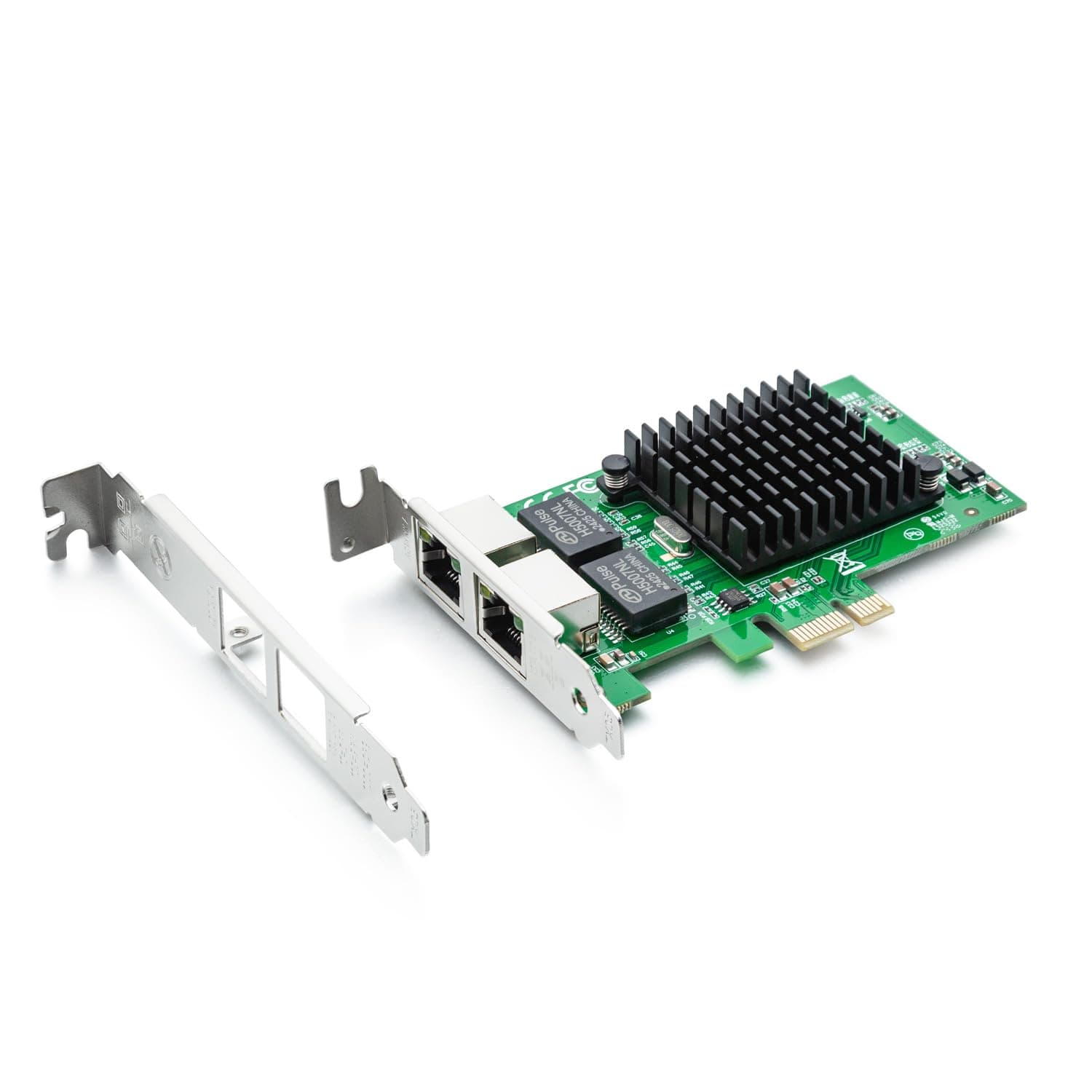
🚀 Elevate your network game with Intel-grade reliability and dual-port power!
The 10Gtek Intel 82576-based 1.25G Gigabit Ethernet NIC delivers stable, high-performance dual-port connectivity via PCIe 2.0 x1 interface. Compatible with multiple OS platforms and designed for data center-grade reliability, it supports Cat5 copper cables up to 100m and comes with flexible installation brackets and robust warranty coverage.


| ASIN | B01LXTF48X |
| Brand | 10Gtek |
| Color | X1 |
| Compatible Devices | Desktop |
| Customer Reviews | 4.4 4.4 out of 5 stars (310) |
| Data Link Protocol | Gigabit Ethernet |
| Data Transfer Rate | 1000 Megabytes Per Second |
| Hardware Interface | PCIE x 1 |
| Item Weight | 0.19 Kilograms |
| Manufacturer | 10Gtek |
| Mfr Part Number | 82576-2T-X1(E1G42ET)-(Intel-1pc) |
| Model Number | 8541588131 |
A**A
La tajerta funciona tiene 2 puertos independientes, pero no importa si usas linux o windows, la tajeta dice que puede funcionar a 1gigabit, pero jamas enlaza a 1gbit, enlaza a 100mbit, ahi mismo donde otras tarjetas funcionan bien a 1gbit, esta no.
S**G
Use it for pfsense and work right out of the box
A**H
I have purchased 3 of these at this point. Works like a charm!
B**.
Very good product and working fine with pfsense and good performance with suricata IPS inline mode. pciconf -lcv #Output of pciconf command on freebsd. igb2@pci0:3:0:0: class=0x020000 card=0xa03c8086 chip=0x10c98086 rev=0x01 hdr=0x00 vendor = 'Intel Corporation' device = '82576 Gigabit Network Connection' class = network subclass = ethernet cap 01[40] = powerspec 3 supports D0 D3 current D0 cap 05[50] = MSI supports 1 message, 64 bit, vector masks cap 11[70] = MSI-X supports 10 messages, enabled Table in map 0x1c[0x0], PBA in map 0x1c[0x2000] cap 10[a0] = PCI-Express 2 endpoint max data 128(512) FLR link x1(x4) speed 2.5(2.5) ASPM disabled(L0s/L1) ecap 0001[100] = AER 1 0 fatal 0 non-fatal 1 corrected ecap 0003[140] = Serial 1 6cb311ffff1b17c0 ecap 000e[150] = ARI 1 ecap 0010[160] = SR-IOV 1 IOV disabled, Memory Space disabled, ARI disabled 0 VFs configured out of 8 supported First VF RID Offset 0x0180, VF RID Stride 0x0002 VF Device ID 0x10ca Page Sizes: 4096 (enabled), 8192, 65536, 262144, 1048576, 4194304 igb3@pci0:3:0:1: class=0x020000 card=0xa03c8086 chip=0x10c98086 rev=0x01 hdr=0x00 vendor = 'Intel Corporation' device = '82576 Gigabit Network Connection' class = network subclass = ethernet cap 01[40] = powerspec 3 supports D0 D3 current D0 cap 05[50] = MSI supports 1 message, 64 bit, vector masks cap 11[70] = MSI-X supports 10 messages, enabled Table in map 0x1c[0x0], PBA in map 0x1c[0x2000] cap 10[a0] = PCI-Express 2 endpoint max data 128(512) FLR link x1(x4) speed 2.5(2.5) ASPM disabled(L0s/L1) ecap 0001[100] = AER 1 0 fatal 0 non-fatal 1 corrected ecap 0003[140] = Serial 1 6cb311ffff1b17c0 ecap 000e[150] = ARI 1 ecap 0010[160] = SR-IOV 1 IOV disabled, Memory Space disabled, ARI disabled 0 VFs configured out of 8 supported First VF RID Offset 0x0180, VF RID Stride 0x0002 VF Device ID 0x10ca Page Sizes: 4096 (enabled), 8192, 65536, 262144, 1048576, 4194304
J**E
In my homelab, I have a pretty robust server based around Proxmox 7.1, an AMD 5950X and 128GB of RAM. It's a sweet little playground. I wanted to play around with virtualized firewalls, particularly PFSense. The cheapest way I could find to do it was by adding NIC's to my existing server. I selected this dual NIC primarily because it used an x1 PCIe interface. My mainboard has two of these slots. The 4 port version is an x4 PCIe and my mainboard has none of these, meaning I'd have to use the x16 slot. I generally prefer to reserve my higher end x16 PCI slots for more capable hardware, not a basic 1G multi-NIC. Install was standard PCIe, about as simple as it gets. I read the reviews indicating compatibility with Proxmox and I can attest that it works well in my 7.1 build. I had the typical issue where Linux's dynamic network interface monitoring feature jacked up my interface name and bridge configuration. Easily fixed with a trip to /etc/network/interfaces though. (And to be sure, this is a Linux issue, not a hardware one.) I've had my setup going for a few months now with no troubles. I don't know much about this network card, such as who makes it or where to get drivers that I didn't need in Proxmox. That hasn't seemed to matter. Oh, and if you're interested in virtualized firewalls, I'd encourage you to explore it. I've had a lot of fun with PFSense so far.
Trustpilot
Hace 2 días
Hace 1 mes