We remain fully operational. Our teams are working around the clock to ensure your deliveries continue safely.

Descargar la aplicación


Servicios al cliente
Sobre nosotros
Copyright © 2025 Desertcart Holdings Limited
Descargar la aplicación
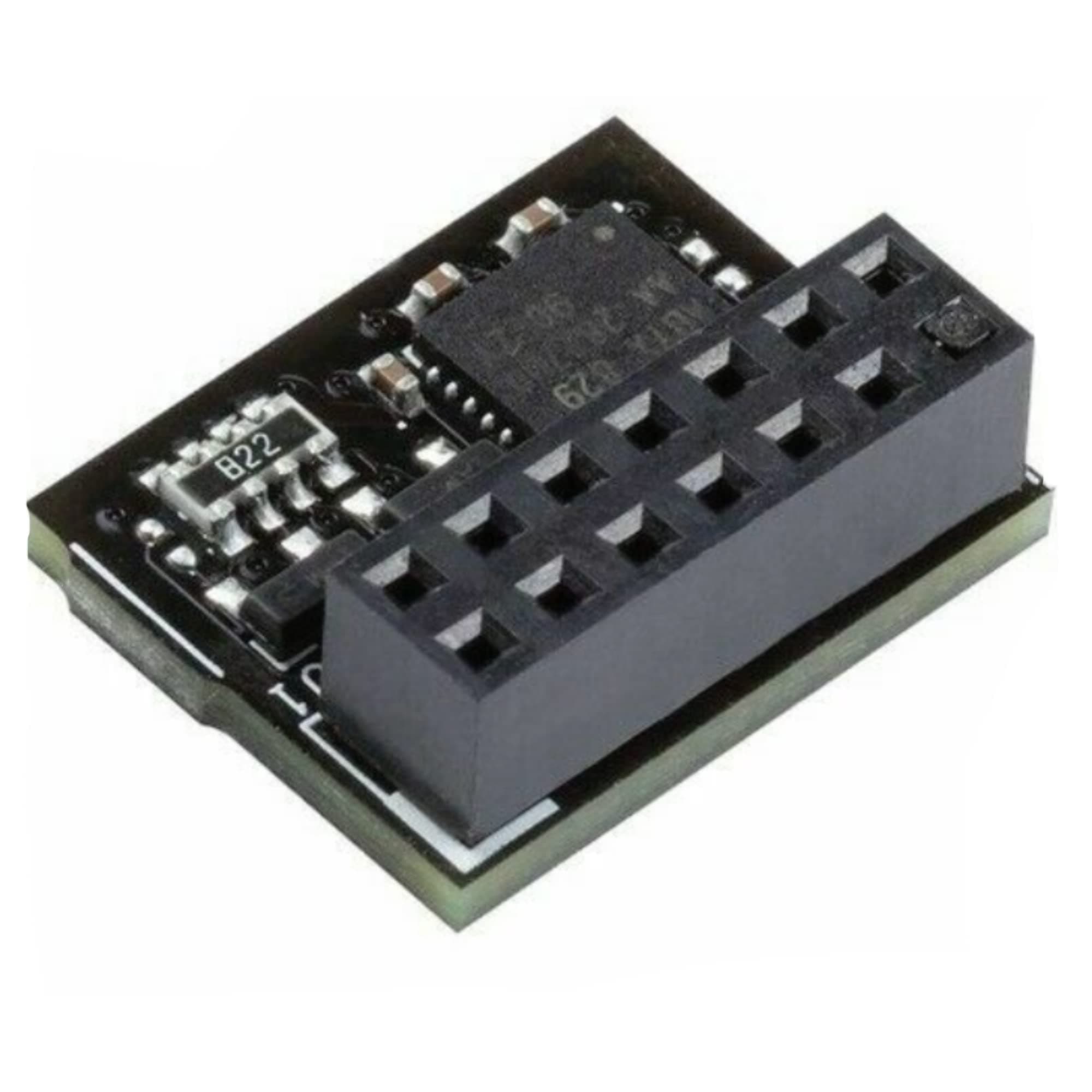
🔒 Elevate your PC’s security game with ASUS TPM-SPI — because your data deserves elite protection.
The ASUS TPM-SPI Trusted Platform Module is a compact, black security chip featuring the Nuvoton NPCT750 TPM 2.0 standard. It connects via a 14-1 pin SPI interface, ensuring compatibility with modern motherboards and Windows 10/UEFI systems. Certified with EAL4+ and FIPS 140-2, it securely stores cryptographic keys and digital credentials, enhancing platform integrity and enabling Windows 11 upgrades. Environmentally compliant and precision-engineered in Vietnam, this module is a must-have for professionals demanding robust, future-ready PC security.
| ASIN | B08836SG1X |
| Best Sellers Rank | #94 in Computer Motherboards |
| Brand | ASUS |
| CPU Socket | LGA 1151 |
| Chipset Type | Nuvoton NPCT750 |
| Compatible Devices | Personal Computer |
| Compatible Processors | [Most modern CPUs] |
| Customer Reviews | 4.4 out of 5 stars 772 Reviews |
| Graphics Card Interface | Integrated, PCI |
| Item Dimensions L x W x H | 0.6"L x 0.6"W x 0.4"H |
| Main Power Connector Type | 24-Pin |
| Manufacturer | Asus |
| Memory Clock Speed | 2666 MHz |
| Memory Slots Available | 1 |
| Memory Storage Capacity | 8 GB |
| Model Name | TPM-SPI |
| Model Number | TPM-SPI |
| Platform | Windows |
| Processor Socket | LGA 1151 |
| RAM Memory Technology | DDR4 |
| Ram Memory Maximum Size | 8 GB |
| System Bus Standard Supported | SATA 1 |
| Total Usb Ports | 1 |
| UPC | 192876210284 |
| USB 2.0 | 2 |
C**E
Happy two time customer
It works with both ASUS ProArt Z690 and ASUS Prime Z590-P mobos. If your intent is to use this to augment a pre-Windows 11 motherboard and upgrade to that version of Windows, please note: when the current OS is running on an MBR formatted disk, then an upgrade isn't possible. You will receive a "secure boot state unsupported" error. Windows 11 can only be installed on a GPT formatted disk. If this is the case, you will need to do a clean install from disc or flash drive media.
S**T
Check your pin configuration against motherboard header. Works with X570-PLUS just fine
Worked as hoped. Made sure my ASUS TUF GAMING X570-PLUS motherboard TPM header had the correct 14 pin layout before ordering, and it fit perfectly. Item shipped quickly and arrived on time. Had to setup the BIOS for discrete TPM instead of FW, and once that was done, it showed up in Win10 just fine after running tpm.msc. Correcting another reviewer's reference to the CVE, which helped me make this purchase, it is CVE-2020-25082 with a low base score of 3.8. "An attacker with physical access to Nuvoton Trusted Platform Module (NPCT75x 7.2.x before 7.2.2.0) could extract an Elliptic Curve Cryptography (ECC) private key via a side-channel attack against ECDSA, because of an Observable Timing Discrepancy." This module came with 7.2.2.0, although that vuln requires physical access to the TPM module to exploit.
C**G
Works as expected
This is the 2nd discrete TPM I've purchased and unlike the 1st one I bought locally in South Africa, this one works perfectly on my Asus ROG Strix X570 motherboard. It's extremely unfortunate that discrete TPM devices have different pin outs instead of being standardized as that only leads to confusion to the end user. Hopefully in the future every manufacturer sticks to the same connector pin out in the future. Nonetheless, I installed this onto my motherboard extremely easily, went into the UEFI settings and changed my TPM from the AMD Firmware option to Discrete instead and then rebooted. Everything worked just as expected and the TPM is immediately picked up in Windows 11 without any issue. The TPM was packaged well enough for such a tiny device and despite travelling halfway around the planet, arrived with no damage and perfectly intact. Overall, I wish manufacturers just included these in the box by default, but that aside this worked perfectly, so 5 stars from me.
J**E
Able to upgrade my pc from Win 10 to Win 11
Product compatible with my strix asus motherboard. Was able to upgrade my os from windows 10 to windows 11. Plugged it to my motherboard, rebooted my pc and it recognized it right away.
T**N
Was not compatible with my Asus motherboard
Didn't work for me. Couldn't plug it into my motherboard. Motherboard has a 14-1 connector with the -1 pin in the middle of the connector. The module has the -1 pin on the corner of the connector. The module is not compatible with my motherboard contrary to what the Asus website says. I'm sure it works great with the correct motherboard, but unfortunately that isn't what I have.
L**8
Does what it needs to
My Asus TUF X570 wasnt letting me use the AMD fTMP on my 5800X3D to complete Windows 11 validation. Researched and found that Asus boards dont come with this module either, at least not with this generation. Install was as simple as finding the pins on the board and dropping it in. Needed to flash to the latest BIOS to enable. BIOS update still wouldnt let me use fTPM on the CPU , but this chip module worked like a charm. Windows Updater finally showed my board as ready for Win11. Dont want Win11, but at least my board is finally complete for when Im forced to switch over.
M**G
not a TPM 2.0 module
not a TPM 2.0 module
T**.
A bit hard to install, but seems to work fine in Windows 10 on X570 STRIX motherboard
The piece is very small, and the manual for the ASUS motherboard (X570 STRIX in my case) shows a diagram where it needs to be plugged in to some pin headers, just adjacent to the CPU and graphics card slot. The only issue is that the spot is going to be below the graphics card (in my case a 2080ti). So needing to pull the graphics card out, and then finding a way to press this small board down on a header that is somewhat underneath the CPU cooler.... you can't get your hand/fingers in there. My solution seemed to work well - get some poster tack / blue tack, and a pencil with a squared off eraser (or a dowel or a pen with a flat end). Apply the tack to the squared of end of the pencil, then stick the top side to that tack. This puts the tiny board on the end of a stick held on by the tack. Now you can carefully maneuver it down and over the pin header under the CPU cooler. Press it down carefully (be sure to align the keyed pin correctly), and it slides on easily enough. Twist the pencil and the blue tack off and bobs your uncle. Reinstall graphic card, put the rest of the tower back together, boot up and enter the BIOS/UEFI and go to the security/advanced section to make sure the TPM is enabled and selected (and not the CPU based software TPM). Booting into Windows and checking by running TMP.msc to verify its up and found.. and it was. Good to go. Now the only thing standing between going to Windows 11 is deciding if I want to enable UEFI in place of BIOS, with the recovery boot nightmare that can cause... so for now I'm staying BIOS and Windows 10.
Trustpilot
Hace 2 semanas
Hace 1 mes