
Descargar la aplicación


Servicios al cliente
Sobre nosotros
Copyright © 2025 Desertcart Holdings Limited
Descargar la aplicación

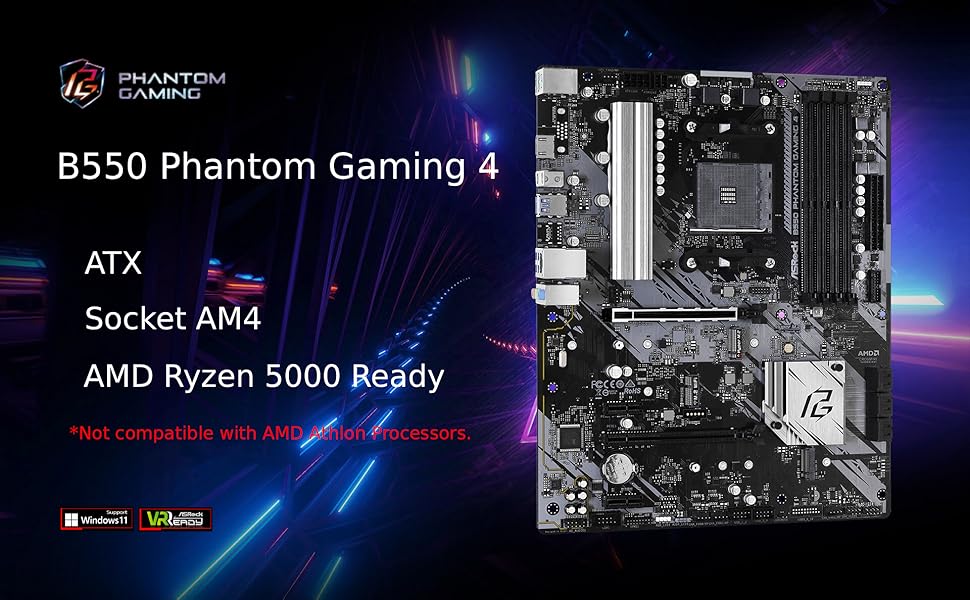
🎮 Power Your Next-Level Build with ASRock Phantom Gaming 4 – Where Performance Meets Precision!
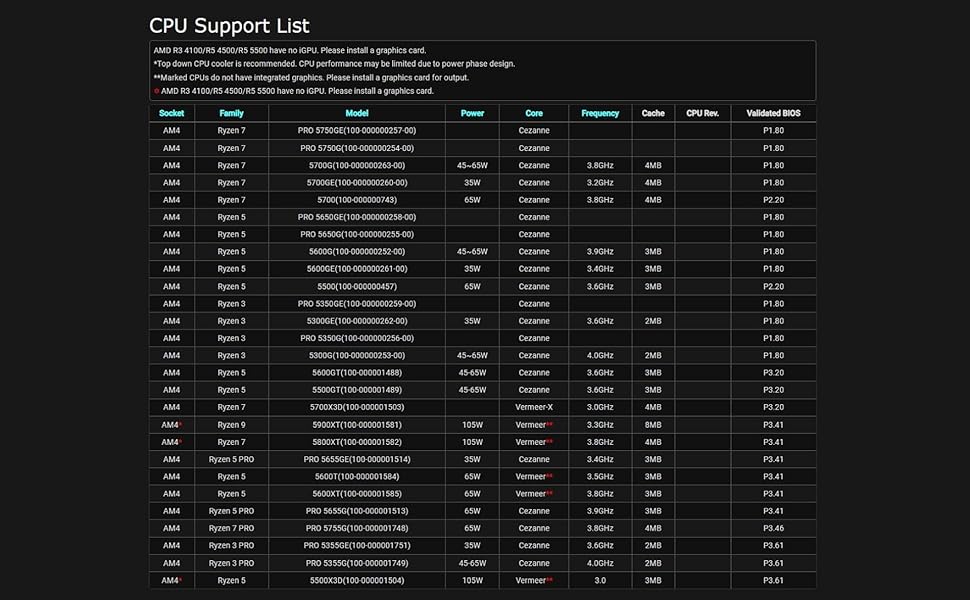
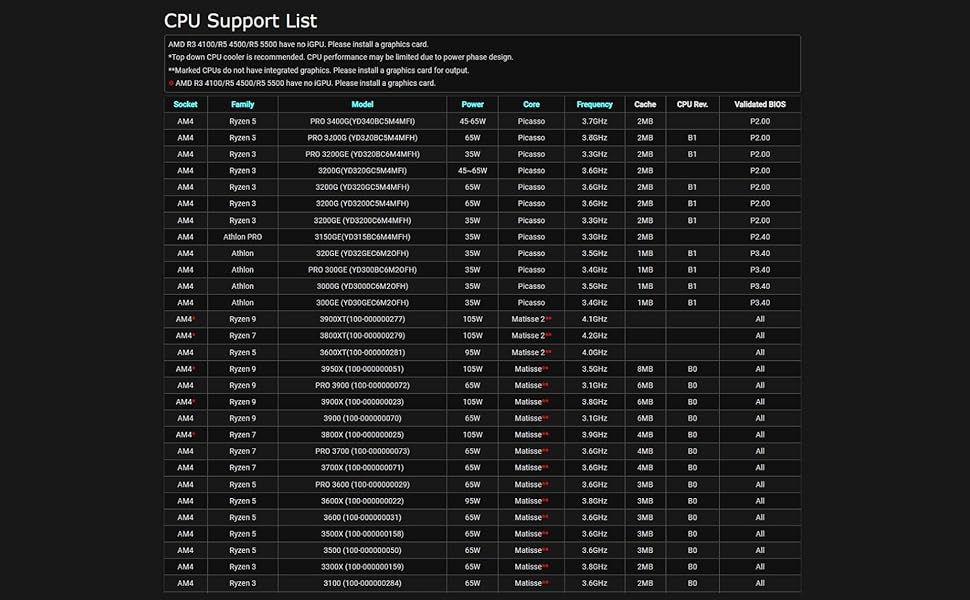
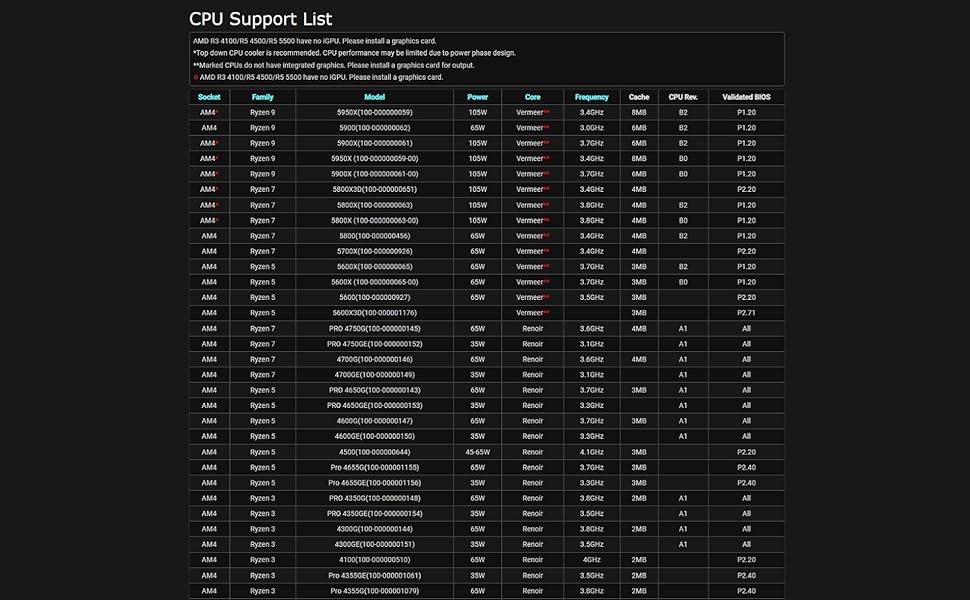
The ASRock B550 Phantom Gaming 4 motherboard supports AMD AM4 socket Ryzen 3000 to 5000 series processors, featuring an 8-phase power design, DDR4 memory overclocking up to 4733+ MHz, and PCIe 4.0 x16 slot for high-speed graphics. It offers robust compatibility with Windows 10 and 11, multiple USB 3.2 ports, M.2 Key E for WiFi, and a compact micro ATX form factor, making it an ideal choice for budget-conscious gamers and professionals seeking reliable, high-performance builds.
| ASIN | B089VTZ83Q |
| Batteries | 1 CR2032 batteries required. |
| Best Sellers Rank | #39 in Computer Motherboards |
| Brand | ASRock |
| Color | Black |
| Computer Memory Type | DDR4 SDRAM |
| Customer Reviews | 4.4 4.4 out of 5 stars (1,888) |
| Date First Available | June 16, 2020 |
| Is Discontinued By Manufacturer | No |
| Item Dimensions LxWxH | 13.5 x 10.5 x 2.5 inches |
| Item Weight | 2.64 pounds |
| Item model number | B550 PHANTOM GAMING 4 |
| Language | English |
| Manufacturer | ASRock |
| Memory Speed | 2400 MHz |
| Number of USB 2.0 Ports | 2 |
| Operating System | - Microsoft Windows 10 64-bit / 11 64-bit |
| Processor | athlon |
| Product Dimensions | 13.5 x 10.5 x 2.5 inches |
| RAM | DDR4 |
| Series | B550 PHANTOM GAMING 4 |
| Wireless Type | 801.11ac |
S**E
High quality board at a great price for a budget build!
Great boards for am4 processors, keep in mind only two ram slots so factor that in for your build. Very high quality board that's easy to build and well labeled. The speed of build is very quick with these micro at boards. USB and all pins labeled well and easy to nav. Bios is easy to update. the board looks really cool and high quality. I've had no issues with stability and the computer runs crisp and clean. If your looking to build a nice budget build on a am4 processor this is a perfect board for that, priced well and a good quality board. Start to finish the build takes about 30-40 mins and is easy as the micro at platform gives you plenty of room even in a smaller case and just makes for a easy and quick build. A great budget build for basic gaming is this board, 2x 16gb sticks of ram, ryzen 5 5600x and a 1660 super and a 550w psu. You can build that for a fairly low price (ram is crazy expensive now) and have a stabile computer that is capable of decent gaming and multi tasking and is plenty fast for general use and basic gaming while maintaining good FPS. Add in a quality wifi card for wifi connection and your ready to go for a low price with a solid system on a budget and a easy first build for someone.
R**K
ASRock B550 Phantom Gaming Motherboard
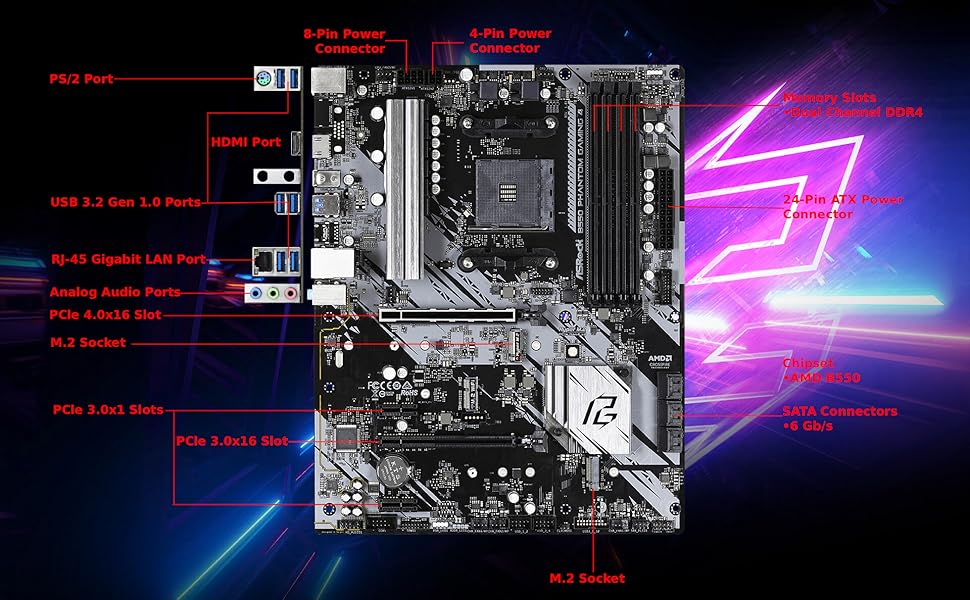
I'm not using this motherboard for gaming; I'm using it to migrate to Windows 11. I selected it because it supports TPM (pretty common these days,) has enough SATA ports for me, and supports AMD CPUs with built in graphics. Windows 10 was installed on one of the installed disks. Apparently Microsoft wants us to buy a new version of Windows in order to migrate, so my Windows activation is no longer valid. I'm guessing this will be true when a motherboard changes even if the same disks are used. Update: Windows 11 activated. The motherboard supports it, but (because of Windows issues) I was unable to update Windows 10. I had to install Windows 11 rather than upgrade. If you use Windows, you should buy your Win11 license using Groupon for about $10. The picture shows the installed motherboard. The I/O shield is on the top left, under the fan. Partially hidden under the CPU fan cable is an unused four pin 12V ATX connector next to the connected eight pin 12V ATX connector. My power supply didn't come with a four pin connector, so I didn't use it. The manual doesn't make it clear exactly why there are two 12V ATX connectors. As you can see, there's no graphics card used here. The motherboard supports (AMD) CPUs that have built in graphics, which is all that's needed when a gaming motherboard isn't going to be used for gaming. The motherboard has six SATA ports. I'm using four because three extra disks were available. You should be more careful than I was when considering which case you use. The case I used has two connectors that don't plug in anywhere on the motherboard. It doesn't have a reset button, instead using a front button to control RGB lighting. I use it as a reset button instead, so I can't control RGB lighting. The back panel has six USB 3.2 Gen 1 ports, an HDMI connector and even (although I haven't seen one in ages) a PS/2 mouse/keyboard port. There are also line in, speaker out, and microphone ports. I don't use these. I would use the speaker out but my speaker line is a couple of inches too short to connect where I can see it. The case is installed inside a desk and I'd have to do this by feel. It's not that important yet. The headphone port on the front of the case works. The motherboard supports more fans than I have, has a COM port connector (which requires a PCI card to use,) an RGB LED header and an addressable RGB LED header, two USB 2 connectors, and a TPM connector. Almost all of these connectors are extras. You don't need any extra TPM. The motherboard and CPU provide this function. I have the case LED connector plugged into the addressable RGB header. It probably should have been plugged into the plain RGB header, since my front fans don't glow at all. I'd try switching it, but glowing fans weren't important enough to bother with. The /ac model also contains wireless LAN antennas. The same I/O shield is used for both models. It has unused holes. Here's the net: This motherboard does everything I ask of it, but I'm not really stressing it. It's physically sturdy. It started off in a case that wouldn't fit where it was needed and moving it to a smaller case didn't cause any problems. Before moving it, it ran 24/7 for about two weeks and now that it's been moved it's been running 24/7 for an additional week. You should look at reviews that contain graphics cards if you're going to use one. (I think you'll need one to support multiple monitors.) Make sure your case and motherboard are going to work well (enough) together.
1**7
Looks good, cheap, stable.
Runs no issue, boots in seconds with nvme and 5800x, pc games great with 2x16GB ram and 6900Xt. Affordable with optional m2 for wireless card like a laptop would run, has holes for the antenna too! I have used Asrock for Ryzen cpus many times and never had an issue with their boards. Happy with this board and the price.
L**S
Really solid B550
Really solid B550 board that does everything you would expect it to do and does it with zeal. This board is a perfect mix of value and decent features. No, you aren't getting everything you could possibly desire, but at this price point in comparison to others you get a hell of a deal; to get these same features elsewhere it adds another 20%. That isn't a lot of money, but if you are on a tight budget with a build, it makes a difference knowing you can get a quality part at the right price point
M**A
perfect
I've been using this motherboard for about 2 years now, no complaints. Works great
K**O
La peor placa madre que he comprado en mis 20 años usando pc, no la recomiendo, no te deja aumentar la velocidad de las ram al reiniciar tu OC se desactiva, al intentar poner el modo seguro no fa imagen ni el logo de asrock asi tengas activo el sistema de compatibilidad, si usas los 2 puertos m.2 (es valido que canales sata se desconecten) lo que no es válido es que te reconozca el disco duro de respaldo pero no te permita inicializarlo, la placa madre me regula la velocidad de internet con cable ethernet y con wifi pero curiosamente con USB conectado al celular ahi si va rapido el internet que placa madre mas mala. NO LA RECOMIENDO es preferible poner 30$ mas y comprar la aorus B550
P**L
Decent board
Pretty decent board overall I was satisfied with the purchase
O**R
Schnelle Lieferung und günstiger Preis. PC läuft wie erhofft sehr stabil ohne jegliche Auffälligkeiten. 32 GB-RAM, Ryzen 5 5600G.
A**Ö
Ryzen 5 5600X ile sorunsuz çalıştı. BIOS update falan gerekmedi. P2.40 sürümü ile geldi BIOS. Anakart B550 platformu için bütçe dostu bir çözüm. mATX için bile ufak denebilecek boyutta. 2 kasa fanı, 1 cpu fanı girişi var. RGB için özel fan portu yok. 64 GB Ram destekliyor. Ram slotları 2 adet. Ufak anakartlardaki genel problem bunda da var. Büyük özel işlemci fanı takacaksanız ram slotlarından biri güme gidebilir. Ben stok fan ile düşük yükte kullanan biriyim fazla sıkıntı olmadı bana ama büyük özel fanlardan takacaklar dikkat etsinler. Ben amazon'dan aldığım Patriot Viper Steel ramleri (3200) taktım 2666 mhz'de çalıştırdı. XMP falan kurcalamadım şimdilik. Genel olarak iş görür bir ürün. Asrock sitesinden uygulamasını indirirseniz biraz ince ayar çekilebiliyor. BIOS temiz ve kullanışlı. 2000-2200 bandından fiyat/performans anakartı denebilir. Bu arada satıcı dfs bilgisayar'a da ayrıca teşekkürler. satın alma öncesi sorularımla ilgilendiler ve çok yardımcı oldular.
M**R
Does not include a usb c motherboard connector but nonetheless a great motherboard.
Z**C
Conforme à la description
J**C
コスよしですね!気になる処はメモリーの留め具が片方だけなので、そこぐらいですね。
Trustpilot
Hace 1 mes
Hace 1 mes