
Descargar la aplicación


Servicios al cliente
Sobre nosotros
Copyright © 2025 Desertcart Holdings Limited
Descargar la aplicación


🏃♂️ Elevate Your Fitness Game with WYZE Band!
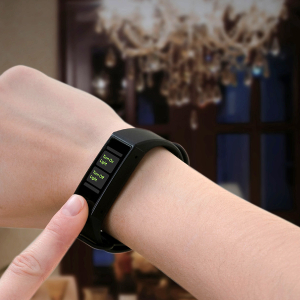
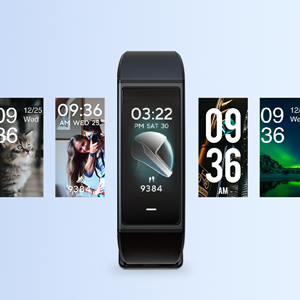
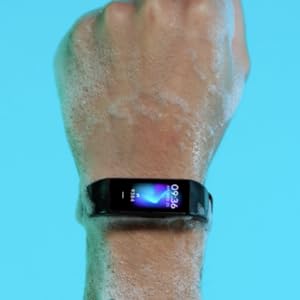
The WYZE Band Fitness Tracker is a versatile smart fitness band featuring Alexa integration, 24/7 heart rate monitoring, and a suite of practical tools. With a sleek design, customizable watch face, and impressive battery life of up to 14 days, it’s perfect for tracking your fitness journey while staying connected. Plus, its 5ATM water resistance ensures you can wear it during any activity, from swimming to running.





| ASIN | B086RDYQ56 |
| Additional Features | Alexa Built-in |
| Age Range Description | Adult |
| Band Color | Black |
| Band Length | 24 Centimeters |
| Band Material Type | Silicone |
| Battery Average Life | 10 days |
| Battery Cell Composition | Lithium |
| Battery Cell Type | Lithium |
| Best Sellers Rank | #780,292 in Sports & Outdoors ( See Top 100 in Sports & Outdoors ) #2,633 in Activity & Fitness Trackers |
| Brand | WYZE |
| Built-In Media | Wyze Band x1, USB Charger x1, Quick Start Guide x1 |
| Case Material Type | Aluminum |
| Clasp Type | Watch-style Buckle |
| Closure Type | Buckle |
| Color | Black |
| Communication Feature | [YES] |
| Compatible Devices | Smartphone |
| Compatible Phone Models | Smartphone |
| Connectivity Technology | Bluetooth, USB |
| Controller Type | Amazon Alexa |
| Customer Reviews | 4.1 out of 5 stars 7,659 Reviews |
| Display Type | AMOLED |
| EU Spare Part Availability Duration | 10 Days |
| GPS | No GPS |
| GPS Geotagging Functionality | No GPS |
| Human Interface Input | Buttons, Microphone, Touchscreen |
| Item Dimensions | 4.38 x 3.25 x 1.25 inches |
| Manufacturer | Wyze Labs, Inc. |
| Metrics Measured | Heart Rate Monitor, Sleep Duration, Distance, Step Count |
| Model Name | WWAB1 |
| Model Number | WWAB1 |
| Operating System | Wyze OS |
| Resolution | 240 x 120 pixels |
| Screen Size | 0.95 Inches |
| Shape | Rectangular |
| Special Feature | Alexa Built-in |
| Sport Type | Diving, Fitness, Running, Skiing, Swimming |
| Style Name | Modern |
| Supported Application | Camera, Multisport Tracker, Reminders |
| Supported Satellite Navigation System | GPS |
| Target Audience | Unisex Adult |
| UPC | 859696007301 |
| Warranty Type | Limited |
| Water Resistance Depth | 50 Meters |
| Water Resistance Level | Water Resistant |
| Waterproof Rating | IP68 |
| Wearable Computer Type | Activity Tracker |
| Wireless Communication Standard | Bluetooth |
| Wireless Compability | Bluetooth |
| Wireless Provider | du |
J**N
Solid Product at Great Price
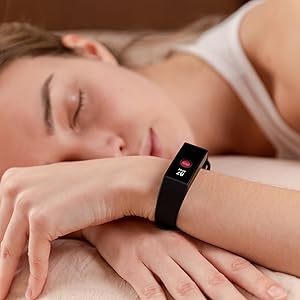
This is a solid product at a great price. I definitely recommend it for someone who wants to try something like this out and/or does not want to spend their life savings!!! I like it! (I've had it a couple months at this point.) That said, it does have some quirks... - Other than the time it can be hard to view in bright light (e.g., sun). I recommend staying with the solid black background to maximize contrast. - If you sit at a desk it can (and does for me) think I am sleeping! If I move around in the evening sleep tracking seems to be good, but resting my left hand on a keyboard often gets counted as sleep! (YMMV) HEY! I have slept 2 1/2 hours this evening! Really..??? - I am getting 2-3 weeks between charges with the pulse sampling set to 5 minute intervals. (YMMV) - Connection to my Samsung Galaxy S7 drops at times, probably because I use the Bluetooth for 2 or 3 other devices that assert a priority. Does not appear to be a Band problem. - Heart rate seems very accurate. I can relate spikes to activity (with surprises). This and sleep tracking were my primary motivation for getting this. - Sleep tracking on the Band shows status over time. In the app you only see the daily totals (bar graph for week.) Wish I could expand those on the app where the time scale would be more readable. - Step counts are ALWAYS less than my S7 shows -- and I know that under counts. It isn't a big difference so I consider this minor. If you have a target you will run a bit over but day-to-day comparisons are still valid. - The alarm and notifications work, but I do not generally feel the vibration if I am at all active. - You can set it up to remind you to get up and move around if you have been inactive for a period -- nice feature! And if I AM inactive a do feel the vibration! - I have not tried the "Find Phone" yet. - Don't forget that some settings are on the band and some are in the Wyze App. - The band has been swimming -- and it still works fine. (Another feature on my list and glad I looked for that!) Speaking of Wyze... THIS is a company to watch. Great products. Great customer-facing attitude. They fix bugs quickly and updates are easy to download/install.
L**E
Typical Wyze Product
For those of you unfamiliar with Wyze Labs, they are from appearances, a small outfit that periodically launches new product with those in the know able to get advanced product releases via early backing of the product. I own lots of their stuff (9?). They always deliver more than you expect from the price point as well as the rather benign exterior packaging. I've had nothing but success with each product I've backed and admiration as well for the company and their philosophy. There's got to be a catch, right? Well there is and it's the typically interminable waiting for the product to arrive. It matters not if you buy as a backer of new or from stock. You'll wait. So, to the band. As usual, I waited over a month. The band is well made and surprisingly smart looking and sturdy! I like the minimalist theme. One button and it's a capacitive touch device, at that. It does everything they advertise and does it well. I was surprised as how well it integrated into itself into my infrastructure. If what you're looking for is a basic fitness tracker with good integration, at a very good price point for the feature set, then this is your baby. Oh, I almost forgot. Their mobile app. Not the best I've seen. I wouldn't say it sucks but... Usable but not intuitive. The biggest complaint from myself and other users has been the issue of nearly non-usability on a tablet or laptop. The darn thing only works in portrait mode. No landscape. If you're using it to monitor cameras from anything other than a handheld mobile handset, you're gong to have to pick up your device and turn it sideways to view the image (unless you really lean your head to the side). their user web pages are rife with this particular complaint. They do work wonderfully with Amazon devices that have a screen, such as an Echo 5,8 or 10 inch. I don't yet own an Echo 15 inch, but it's on my list. I know it's long, but I hope it's helpful.
K**R
Great for the price
At this price, I would have been happy with just a watch that tracks activity and shows me incoming texts and phone calls. The fact that it allows me to give Alexa commands is a great added bonus. I use it to turn lights on and off, and to do quick searches. I also have used it several times to set an Alexa timer or alarm if I have something in the oven. So far it has an almost perfect record of recognizing voice commands. I'm coming to the end of the 2nd week of owning the Wyze Band, and I have only charged it once. Right now the battery is at 50%, and I charged it 5 days ago. Battery life is better than expected. I went for a 5K walk the other day, and the step counter worked perfectly. Before this I used a Fitbit, and I could not read the screen if I was wearing my sunglasses while on a walk. The Wyze Band is bright enough so that I can easily read it while wearing sunglasses. Also, you can set a preference on the Wyze so that the screen stays awake when it is in 'Run' mode. With the Fitbit it was frequently awkward to wake the tracker up to check my progress in the middle of an activity. I had one brief session with tech support, which went very well. A couple of days after the band arrived, there was a line of pixel across the width of the screen that stayed dark, which made the screen difficult to read. I was able to easily get in touch with tech support through the Wyze web site, and in a chat session I was given the instructions to reboot the Wyze band. The problem disappeared after the reboot and I've had no problems since then. It doesn't have the ability to store or play music, and you can't respond to texts or phone calls from the Wyze Band. But at this price it provides all of the basic functions that I need, with the added bonus of Alexa integration. I'm very happy with this purchase.
K**A
The Best of five trackers and smart watches I have.
Wyze Tracker Review Overview: I have six inexpensive trackers (two smart watchers and four simple trackers) and the Wyze band is the best of the lot by far. It is the King of keeping an accurate count of your steps. It also breaks new ground at this price point as it is the only one that gets routine updates including new functionality: two so far, and one added the ability to turn on the face as flashlight, great idea and unique and stopwatch, probably should have had that out of the box. You can organize the order of functions you see as you swipe through them and even remove those you do not want to see. Connects to Amazon Alexa and allows you to have that functionality, although you have to have the Wyze up running on your cell phone and currently synched to the tracker for this to work. It is fully functional, but I have those devices all over the house, so having it on the tracker is not important to me. They say 10 days on the battery and I think I may go beyond that. Keeping track of your steps: It is the only one of my five that keeps an accurate count while I am walking normally with a gentle arm swing and does not require you to swing your arms unnaturally high to get an accurate count. I have one tracker that simply will not count any steps if you are walking naturally along with a normal arm swing. (I keep it because it has other good features (good O2 meter). Using some of the Tracker Functions: I have done some activities under the two Workout functions on the tracker called Indoor Run and Free Training (no explanation why its called Indoor Run), but its differentiation from Free Training is that it keeps tracks of time, distance, heart rate calories and pace. Free training only keeps track of time, calories and heart rate. Not sure how the app changes steps to get the distance it reports. While not reported in Indoor running or Free Training, the Tracker continues to keep your steps no matter whether you are using or not using any of the other functions. Data from the Workout option Free Training does not get transferred to the Fit app as a unit. However, whenever the tracker monitors your heart rate either continuously or on demand, that will show up in the Fit app. Integration with Google Fit: The Tracker connects to Google Fit through the Wyze app but when data moves to Fit you lose some details and is not always perfect but that may have more to do with Google than Wyze. At the end of the day, the Fit app usually has a few less steps than the Tracker. I think that is because Google has to program how to count steps when you are also carrying the phone at the same time as the tracker and has to truncate steps to not double count. Once I even saw data in the Fit that was clearly the result of double counting, but after awhile it had corrected itself. The total on the Tracker are usually close but the same to what Fit has. The data moves to Fit from the Wyze app spontaneously and sporadically and in odd chunks that do not relate one to one to your events. However, sometimes when you are moving through the Wyze app and go from screen to screen reviewing your data, it appears to triggers a data move to Fit. Sleep: The sleep function on the tracker keeps a detailed view of your night’s sleep including periods you are awake, in deep sleep and light sleep and creates a detailed graphic of your night’s sleep. An issue is that the detailed graphic is on the tracker’s tiny screen and there is no way to tie any of those periods to a precise time of night or duration of the period. When you synch the data with the Wyze app, all the detail goes away and all you get is a bar graph showing the split between deep and light sleep. If you are sharing the Wyze data with your Google Fit app, when the data gets sent to the Fit app, it gets further aggregated to only the total time the tracker thinks you are in bed sleeping. If you read before sleeping, that is in the data as sleep time. In summary, it is my favorite tracker because I really mostly care about tracking my physical activity and the device is nearly perfect. The heart rate monitor also appears to be the most accurate of any device I have. On the other hand, heart issues are too important to rely on an inexpensive tracker or smart watch. It does not have blood pressure like nearly ever other tracker and smart watch, but blood pressure is probably even more important than simple heart rate, and I would never rely on one of these devices for that anyway. Its a five star device for my preferences and needs.
D**R
Decent value
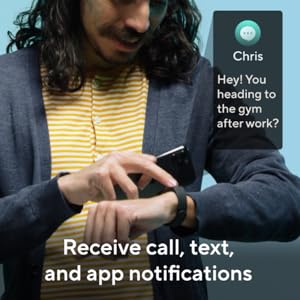
I waited a while to write this review to ensure I was giving it full consideration. For the price, you can't beat it as a time piece, and a simple tracking device. The find my watch/find my phone feature has come in handy- especially when I wasn't at home with access to Google Mini. The actual sleep and step tracking features are very basic and limited in what you can evaluate it for. I have doubts about the accuracy of the heart rate monitor, as I've tested it in various scenarios and the rates don't change much. The screen is small, but effective enough to glance to see who is calling or texting so you can make a quick decision if you want to grab your phone. The notifications come through even if the phone is in another room or upstairs in a home. You can personalize your screen with a photo or graphic and the clockface style of your choice. The battery lasts about 10 days for me between charging. Synchronizing is easy. For aprox $20, it is a decent watch/smart watch. I would recommend it for someone who wants a simple watch with notifications, but I wouldn't recommend it for someone who really wants to track their fitness or sleep or two-way communication/texting.
E**C
You should buy this watch!
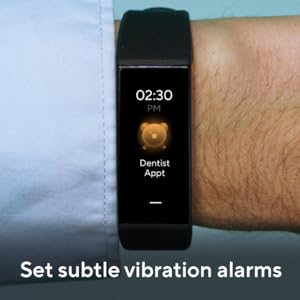
UPDATE: With updates to the Wyze Band software, "Cons/Nitpicky Things" (see below) numbers 3, 4, 6, 8, and 9 have all been resolved! Wish I could give 6 stars. I wanted to give this 4.7 stars, but since I can’t do tenths of stars, and since my critiques are fairly minor, 5 is appropriate enough. This is my first Wyze product. I was not paid or sponsored in any way. Just a normal consumer satisfied with her product. (: From the first time I opened the app, I knew I was going to love this watch. And I do! So much functionality for a tiny watch. Cool Features/Pros: 1. You can customize the background pretty extensively (for a watch). Wyze has premade backgrounds and clock styles, and you can choose any combination of them. You can also choose any photo from your phone to put as the background on the home screen, which I think is a pretty cool feature. To top it off, you can change the font color (of the clock, steps, date, etc.). This way, if you have a picture with a white background on your home screen, you can change the color of the font so that you can always see what time it is. 2. There are multiple menus that you can not only customize the settings for, but you can reorder the menus so that they are in whatever positions you’d like as you swipe on your watch. Additionally, the menus are in a loop, so once you get to the bottom menu, if you keep swiping up, you’ll come back to the home screen. Furthermore, you can swipe down from the home screen and be back at the bottom menu. I like this because I can have 2 important-to-me menus (weather and notifications) on either side of my home screen, so they’re each just one swipe away. 3. There are no side buttons. Just one touch-screen button on the bottom of the watch face. I like how small and sleek the watch is. I prefer this conspicuous look to the large, Apple-watch-looking watch. 4. It has a “shortcuts” menu. I don’t use them, so it doesn’t mean anything to me, but I thought it was cool that it was available for users that might rely on them. 5. ALEXA!!!!!!! I have a number of smart outlets in my house, and only one Echo dot. The echo is in my bedroom, and I always have windows open and/or fans running. Alexa often can’t hear my commands to turn things on and off. I love that I can control my smart devices directly from my watch. It also will give you answers to simple questions written out on the watch screen, so it’s not just for controlling in-home devices. 6. The battery life is pretty darn long. I think it lasts for 7 or 8 days with normal use. In 3 weeks I’ve charged it once (it came almost fully charged). 7. I like that the alarms can be named. I have one set to take my medication that specifically says “meds.” But I’m not sure you if you can only name them specific things or with only a few characters. I take diabetes medication to regulate my insulin. I’m not diabetic, but I think it’s funny to say “diabeetus!” When I typed that as the name of the alarm, it wouldn’t save it, and defaulted back to “wake up.” I changed it to “meds” and it was fine. Not sure what that’s about. Maybe it was the special character “!” that it didn’t like. 8. You can change the brightness of the screen from the app or the phone. 9. There is a setting in the app that allows the watch to turn on do not disturb automatically when it detects that you’re sleeping. You can also turn it on manually, but I sleep at different times throughout the week. Cons/Nitpicky Things: 1. There are only 2 sport modes (with the new/recent update; there used to only be “run”): “run” and “freestyle.” Not that it is really THAT important to me to have different modes, but I liked that I did on my old watch. I do a lot of hikes and I feel this is a normal-enough activity that it should be on there. 2. You can’t change the watch band, and I’m pretty sure there is only black available. I actually don’t know if I can take the band off at all… kind of gross. I like to change them because they get dirty. 3. I like that there’s a “find my phone” option, but it only vibrates. It doesn’t ring. That, to me, is fairly pointless. 4. You cannot hang up phone calls from the watch. Only see who's calling. 5. There is no “timer” option. HOWEVER, if you have it paired with Alexa, all you do is tell it to set a timer. I’m not sure how/if this would work if you’re a google home person or something… 6. Sometimes the phone disconnects from the app and it won’t reconnect unless I restart my phone. This can be frustrating and inconvenient. I’ve had the watch for about 3 weeks and I’ve had to restart my phone to reboot the connection about 5 times. BUT this has always fixed the issue. 7. The step counter is just a bit low; I’ve counted myself and compared to the watch. 8. Sometimes when I wake the device with the finger motion (not by raising it up to my face), and then try to swipe through the menus, it doesn’t register that I’m swiping, and these 3 arrows appear at the bottom of the screen, indicating that I need to swipe to move through menus. That’s annoying and I really don’t like it. Because then you HAVE to swipe up to go down through your menus, but sometimes I want to swipe up to get to my bottom menu (weather) right away. 9. You can’t control Alexa from the home screen if you’ve woken the watch with the finger swipe. You have to either bring your arm up the natural way or go to another menu before you can long press the watch button. I HATE this. Overall, HIGHLY recommend. Excellent watch at such a low price. BUY IT.
D**C
Well, you get what you pay for...
Initially I was fascinated with the notion we now have decent fitness trackers with limited smartwatch capabilities for $25-$30. Well, that idea went into the trash almost immediately, as I became acquainted with what the Wyze band can and more importantly--cannot--do. The Wyze band is a lot of things, and great isn't one of them. First, let me say, clearly, that for $25 or $30, this is a hard device to beat. If you keep your expectations (very) low, in line with the very low price of the unit, you will not be disappointed. The biggest frustration initially was with the lack of clear, helpful instructions. The instructions tell you it is charged out of the box, and that you should plug it in to charge to activate it. Um, okay. The home bar pulses when it is plugged in to the charger, leading you to think it is charging. Perplexingly, there is no charge indicator in the default display configuration while it is charging, so you just think it is still charging. In fact, pretty much everything in the default factory configuration is disabled, including Alexa, even once you set up your Alexa info in the app. Notifications are disabled by default, so nothing talks to the band. You have to turn on notifications, and then scroll through the entire list of all the apps on your phone to enable notifications for each specific app, including calendar reminders, messages, etc. Problem is, nowhere in the documentation (even online) does it tell you this step is necessary. People who are not comfortable messing around with their devices will be frustrated quickly. Nothing is intuitive, and there is no real guidance. It's fiddle-around time--geeks (like me) will be comfy with this. The average consumer will not be impressed at all, and may become quite frustrated. However, set up frustrations aside, it's the things the Wayz band lacks which may disappoint the consumer. It's a long list, but again, remember this thing is dirt cheap. To begin with, the band has no external speaker. This means Alexa’s responses, when you can raise them (which is by no means assured), are in text on the screen in a *tiny* font. In fact, this tiny font is everywhere. If you wear glasses for reading, you will definitely need them to use this band. This means if you are out walking or running, and you're not wearing your glasses, the band is almost useless. This is where not having a speaker is a real detriment: Alexa cannot speak responses, and without my glasses I can't read them. This is due to the very small screen which is only 240 x 120 pixels. There simply isn't enough screen real estate for a larger font. This screen is *tiny*, and feels about half the size of the screen on an Apple watch. Another design issue worth noting, the band is the cheapest design I have ever seen, and it both looks and feels like it. The plastic clasp feels like it may break at any moment. Also, if you have large wrists like I do, you’re potentially out of luck. The Wayz band ships with only one band, and no larger band seems to be available. You cannot really interact with this band much, which limits functionality. You can read your incoming text messages and notifications in that teeny tiny font, but you can't reply (or if you can, I've no idea how, as this is not covered anywhere and doesn't seem to be possible). You also cannot dismiss all notifications at once, and will have to scroll through all of them, dismissing them one at a time. A word to the wise: be conservative about which apps you allow to send notifications to the band. If you are all in, you are going to spend a LOT of time dismissing notifications. With the exception of talking to Alexa, which requires you to touch the screen, communication with this band is almost entirely one-sided--you cannot input anything on the band at all, and you must use the app on your phone to interact with it--which begs the question… why am I wearing this again? Wyze have also not included the ability to control music playback (or anything else) from your phone. With the exception of the heartbeat monitor and sleep tracker, this device primarily functions as a tiny supplemental screen for your phone to give you alerts (and the haptic buzz is STRONG). From what I can tell, the sleep tracking, step counter, and heart rate monitoring are far from accurate, rendering this device mostly useless. Also, if your activity of choice is not walking, running, or jogging, you’re out of luck--it can’t track anything but steps and heart rate, and as it seems to consistently get those wrong, it really does sort of feel like a waste of $30. Perhaps more than anything else, the Wyze band serves as a great advertisement for other, superior fitness trackers, as all the shortcomings of this device just make me want to get a really good fitness tracker/smartwatch and toss this thing. It should be noted there is also as serious issue with the way the band communicates with the phone. This really was not well-designed at all on the app side. In order for the band to interact with your phone, the WYZE app MUST be running on your phone at all times. This has several implications: 1) security (it can potentially capture everything you do on your phone), 2) it munches up phone battery, and 3) if you close the app, nothing will work, including Alexa. This is *really* uncool, and has contributed significantly to my decision to return it and spend a bit more on another, superior fitness tracker instead. It’s going back.
D**R
Great product value for the price
For around thirty dollars this is hard to beat. It's not the most attractive band or watch but it's not bad looking. I've had it for ten days or so now and it's still over 30% from the initial charge. I compared the heart monitor to my phone's built in monitor and they seemed consistent with each other so it appears accurate to me. My main reason for getting it was to track my heart rate as I'm running. For that it works great. There are a few nice extras like the Alexa built in mic and for work a nice periodic reminder to get up and move around and sleep monitoring that seems to work well also. The face is configurable but default options are a bit limited. As for the app I rate it a little lower for a few reasons. First I'd like to see some option for either a dedicated app or a way to set the Wyze app to default right into the band portion of the app. It just seems cheap to have to navigate through a home automation app to find my health monitor band around a bunch of lightbulbs etc. In addition the heart rate monitor is on a timed checking system. It works great but that data and the heart rate data from your workouts are kept completely separate. That might be a good thing but a combined view might be nice. For example during my workout I peaked around 160 but the daily monitor showed my max heartrate at 109 for the day. I had to view the workout directly to see the higher numbers. Lastly, I'd like to see the app integrate with GPS so when I start a workout it maps my path and distance until I stop the workout. Address some of those features and it's a 5 star for me. Update: Found one more small issue. It should not record time on my desk charging as me sleeping...but it does.
Trustpilot
Hace 3 días
Hace 1 mes