We remain fully operational. Our teams are working around the clock to ensure your deliveries continue safely.

Descargar la aplicación


Servicios al cliente
Sobre nosotros
Copyright © 2025 Desertcart Holdings Limited
Descargar la aplicación
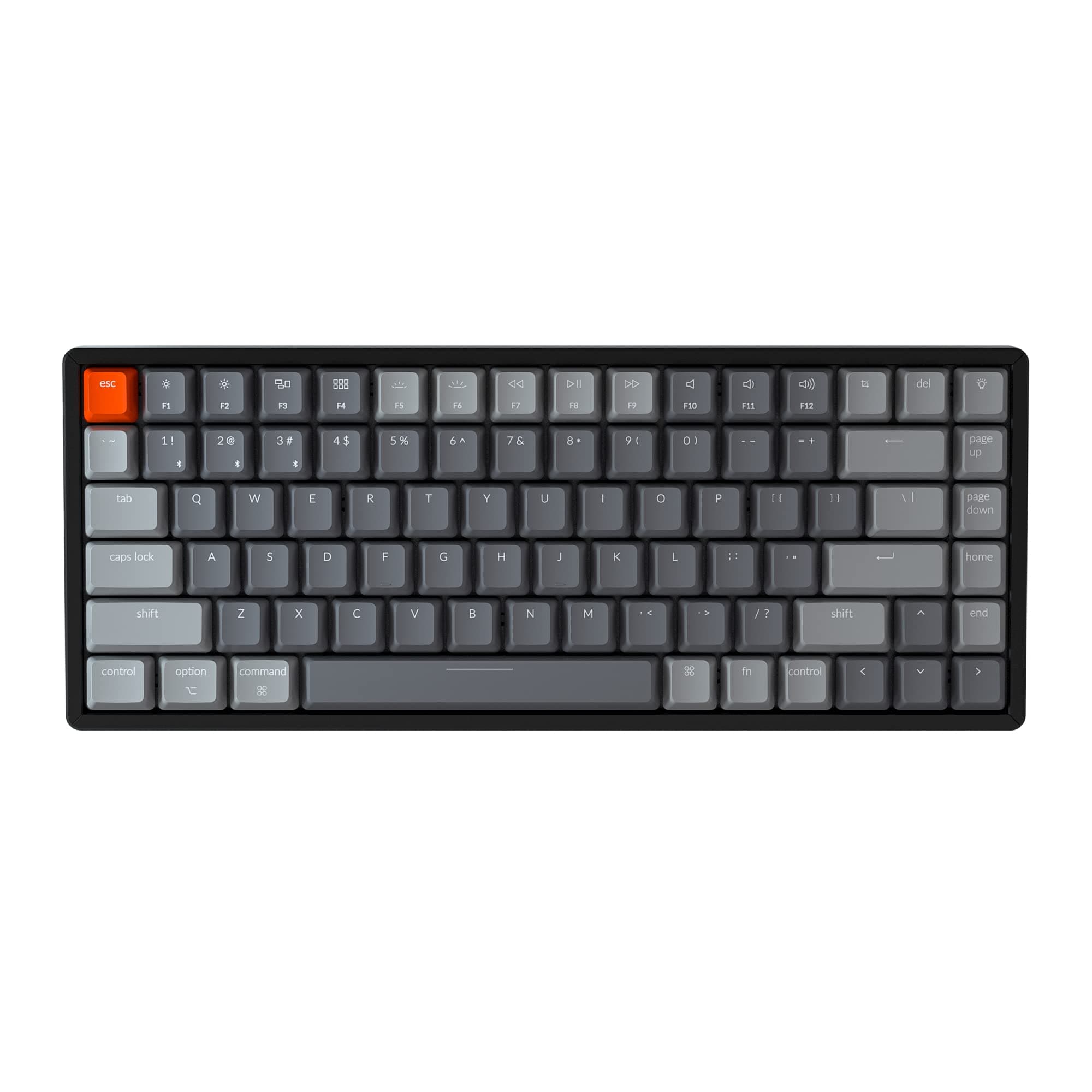





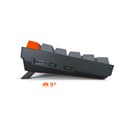
⌨️ Elevate your desk game — compact power meets pro-grade style!
The Keychron K2 Version 2 is a premium 75% wireless mechanical keyboard featuring 84 keys with a Mac-native layout and broad Windows compatibility. It offers Bluetooth 5.1 multi-device connectivity, a robust 4000mAh battery for up to 7 days of use, and durable Gateron Red linear switches rated for 50 million keystrokes. Housed in a sleek aluminum frame with customizable RGB backlighting, it’s designed for professionals seeking a compact, versatile, and stylish typing experience across work and play.


| ASIN | B07Y9Y69N7 |
| Additional Features | Ergonomic, LED Backlight |
| Antenna Location | Gaming, Office |
| Best Sellers Rank | #16,864 in Video Games ( See Top 100 in Video Games ) #1,018 in PC Gaming Keyboards |
| Brand | Keychron |
| Built-In Media | Keycap Puller, USB Cable |
| Button Quantity | 84 |
| Color | Gateron Red Switch |
| Compatible Devices | Laptop, PC, Smartphone, Tablet |
| Connectivity Technology | Bluetooth, USB-C |
| Customer Reviews | 4.6 out of 5 stars 1,268 Reviews |
| Enclosure Material | Aluminum, Plastic |
| External Testing Certification | Não aplicável |
| Hand Orientation | Ambidextrous |
| Item Dimensions L x W x H | 12.48"L x 5.08"W x 1.57"H |
| Item Weight | 1 Kilograms |
| Keyboard Backlighting Color Support | RGB |
| Keyboard Description | Mechanical |
| Keyboard Layout | QWERTY |
| Language | English |
| Manufacturer | Keychron |
| Model Number | K2C1 |
| Number of Keys | 84 |
| Power Source | Battery Powered |
| Recommended Uses For Product | Gaming, Office |
| Special Feature | Ergonomic, LED Backlight |
| Style Name | Contemporary |
| Switch Type | Linear |
| UPC | 753610396765 753610395737 |
| Unit Count | 1 Count |
| Warranty Description | 1 year |
A**R
Awesome lighting and a very comfortable mac native keyboard
I've been looking for a mac minded mechanical keyboard for a while and just stumbled upon the Keychron brand. The lighting was probably the least important factor for me in choosing a mechanical keyboard but I was really blown away by all the crazy features built into this keyboard. I also didn't do my homework but now realize this is a bluetooth compatible board which is awesome as well. Admittedly I'm not a keyboard connoisseur and I haven't had this but an hour, so this is more of a first impressions review. Overall the typing experience feels petty similar to other mechanical keyboards I've used in the past with a few exceptions: They keytops have a sort of "rubber" feel to them which is very different from my PBT double shot Leopold keyboard. It almost feels like I have something sticky on my fingers which I imagine would take some getting used to. For example, if I'm sliding my fingers on from the "E" to the "D" there is some added resistance (this is probably bad typing form but it works for me). The case is indeed very high as some other reviewers have pointed out, and though I don't usually use a wrist pad it does feel more natural to have one with this keyboard. I'm using the "red" switch board and it feels pretty good. It's definitely not super quiet like my mx cherry silent Leopold but it's also not nearly as clicky as the blue or buckling springs I've used in the past. I think this really comes down to personal preference. This keyboard has a TON of features built in and the mac native designed is very much appreciate, which grants this a 5-star rating. Check out the video review attached to see the keyboard in action and the awesome lighting programs. For what it's worth I'm mostly typing "The quick brown fox jumps over the lazy dog" over and over, or just mashing the keys to show off the light functions.
N**D
Keychron is doing it right
I have searched long for a keyboard that has almost no compromise on the features I need, without building a custom. As a software developer, I have grown used to the home and end keys, but as a gamer I wanted a keyboard smaller than a tenkeyless. I wanted dedicated F-keys, I preferred dedicated arrow keys, and RGB is something I crave more than I should. The Keychron K2 has it all, and then some. I wasn't seeking out a wireless keyboard, but having that option is amazing when I consider I would have paid the same or more for a keyboard without this feature. The lighting options are numerous and vivid, some of the best RGB I have seen, although sadly it doesn't have software to individually control each key at this time. I am impressed with Gateron switches. I typically prefer Cherry MX Clears, but for my gaming rig I wanted to try out linears so I have a red switch variant. I also chose the aluminum rails, which make the keyboard feel like an absolute tank. There is a lot to like with the Keychron K2, but there are a few key downsides. Firstly, the keycaps on mine are not very good quality. The page says they should be double-shot not, but I don't think mine came with double-shot as the legends are wearing on some keys. This is compounded by the difficulty in replacing the full keycap set, since many of the keys are uniquely shaped/sized for this form factor. The shift key, and the home, end, pgup, and pgdn keys are all abnormal sizes compared with a fullsize keyboard. My second gripe with this keyboard, which I assume extends to Keychron's full wireless lineup, is that it takes multiple seconds for the keyboard to start accepting key inputs after my login screen appears--even though I am using it as a wired keyboard with Bluetooth turned off. They really should take the time to correct this in a firmware patch. Last issue I have, and this could so easily be corrected, is that there isn't a single page on their site or in a manual with all the possible hotkeys to control the keyboard. A reddit page exists that has most, but even it is missing some. Why not have your firmware dev just make a list of all the hotkey combos so they can be in one place? This next item isn't an issue, but more of a request to Keychron: please do invest, as I think you already are, in software engineers to create software for your keyboards. They are amazing products and they deserve to have software controls and keymapping available. I spent most of this review talking about what I didn't like, and that is because a good keyboard shouldn't stick out. When I interact with this keyboard, it is an extension of my mind. I sometimes stutter as the layout isn't familiar, even after months, when aiming for home, end, or delete--but they keyboard itself is almost flawless in execution. I will be buying more Keychron keyboards in the future, and potentially leaving their competition on the shelves.
I**O
Great feel, sturdy build. I recommend taking the leap to mechanical with this one
Nice and sturdy, might need a palm rest, but love the feeling. Great for gaming, great for typing, if you come from a laptop or low profile keyboard might take a little bit of getting used to, but it's a great upgrade and it will last you a while, this thing can take a beating Lights are nice, you first sort through the light patterns, then you can select a single color or multicolor profile for that pattern, all of this is done through the keyboard, no software, so, unless you want to change it a lot, it's no hassle at all to find a profile you like, set the color, and you are done. Cable it's pretty nice quality too, braided to avoid tangling, it's a bit odd the choice of making the USB C an L shape and putting it on the side of the keyboard, instead of straight and on the back, but I like better having to look on the side instead of the back to plug it in/turn off and on (although it has a auto sleep mode of... 10mins or so), or changing from Bluetooth to Cable... On Bluetooth and M1 mac's Bluetooth side, seems to have been patched out, this is the only Bluetooth connected at the moment to the Mac, but there's still several devices around: No connectivity issues so far!
K**T
All my worries are gone. It's an amazing Keyboard!
had a few worries because some Youtuber said it's shit. After the first test typing, I realize that it's the Youtuber who's full of shit. This is an amazing keyboard. 1. The K2 looks a bit fat with the aluminum housing in some pictures, but in actuallity, it's very sleek and compact. 2. Some find the Gateron Red Switches a bit meek compared to Cherry Reds. I am a all time Cherry Red user myself, and this is my first time trying these switches. Honestly, it feels great. It's pleasantly light and yet has a satisfying accoustics when the switches hit the bottom and then the top. It's not a silent switch, but it's not annoyingly loud like some blue switches. The factory lubrication is perfect and I couldn't have done it better myself. It could be used in some office settings where it's not too quiet. 3. It had one defect though. One key (i.e. the Y-key in the picture) had a little bump that was very noticeable when typing. I was going to change to custom keycaps anyway, but it's not some thing that you would expect in a over $100 keyboard. For the time being, I had to remove the bump with a sandfile but visually, it is damaged now. Overall, even with the defect, I am completely satisfied. I was looking for a keyboard with very specific specs: 75% 84-key layout, Bluetooth 5.0 or better, alluminum housing, and, preferably, hot-swappable PCB. The last requirement had to go because hotswappable models are out of stock everywhere, but with these amazing switches, I don't think I need it anymore. Keychron keyboards are amazing and don't let anyone tell you otherwise.
M**F
Not the best compact mechanical, but EASILY the best value for your money (and it's wireless!)
Let's get the objective stuff out of the way first: the keyboard has really solid build quality on the surface. The metal back panel version feels like it's built like a tank, and the keycaps seem extremely high quality. The switches are definitely gateron reds, but the key stabilization is a little inconsistent (the backspace key in particular feels odd to press, and it keys are a little mushy compared to my corsair K62 wireless which has cherry reds). That being said, none of that really matters, this is EASILY the best keyboard if you're looking for the following things: 1: Compact 2: Wired/Wireless 3: Mechanical 4: USB-C 5: Backlit To the best of my knowledge, there are only a handful of other keyboards that hit all those boxes, and they're mostly knockoffs with nebulous build quality. Heck, there aren't too many keyboards that satisfy 3 of the 5 qualities. The Keychron feels like a premium product, for less than you'd think, and comes with some really neat accessories (Mac and windows key caps, an angled USB-C wire, and perhaps the most unique and functional keycap remover I've ever seen...good job guys!) So do yourself a favor, if you're looking for a keyboard that has all of the qualities listed above, stop looking, this is it. If you're looking for a wireless keyboard that has at least 2 of the other qualities listed above, the Keychron should certainly be in the running. While it's not the BEST compact mechanical keyboard, it's DEFINITELY the best value!
R**H
Hands down the best keyboard ever made!!!!!
I am not a gamer or a mechanical keyboard enthusiast by any means. I had only heard about/seen Mechanical keyboards while casually scrolling through Reddit. Because of Corona, I am working from home a lot more often and began to use my home office a lot more often and after extended use, the cheap Logitech keyboard I had purchased for my desktop began to annoy my fingers and hands and began to feel like a chore to type on. In addition, I had a multi-device setup for my home office with multiple keyboards that became annoying to switch between and took up an immense amount of desk space So I did some research and found out that Mechanical keyboards were popular among people who aren't gamers because they felt more comfortable to type on and some also claimed that the tactile response improved their typing accuracy. I began searching for a compact bluetooth mechanical keyboard that could connect to multiple devices and I stumbled on the Keychron K2. I immediately purchased it and it is one of the best tech purchases I've ever made and would say it is easily the best keyboard I have ever used. My experience with mechanical keyboards is limited but the K2 feels amazing to type on and I didn't think I would, but I have seen my accuracy increase, which is important as a programmer. Switching between bluetooth connections is super simple just press the Fn key and either 1, 2, or 3. I liked the keyboard so much I purchased another one ! To take to the office when everything re-opens, because I also have a multi-device setup there. My only negative about the keyboard is that there is no home button for the iPad, I tried everything and referenced the k2 manual, but the Home key on the keyboard does not take you back to the homescreen on iPad even when the keyboard Operating system switch is flipped to iOS/Mac. Instead I use option + tab to get back to the homescreen. Its a minor complaint, but the keyboard is so fantastic, I don't think it should sway you from purchasing it. 5/5 - Typed on the K2
B**A
Great for mechanical keyboard beginngers
This is my first mechanical keyboard, I previously used the Logitech MX Keys and I must say that this is quite an improvement if it's what you're looking for. I should mention that I do not game, I just browse and do schoolwork mainly. The keys are a world of difference coming from a membrane keyboard, and it's just extremely satisfying to type on. The noise is very ASMR to me, and I enjoy the clicky sound of the gaetron red switches. The backlighting quality is astounding, as well as the number of different options. I do recommend this keyboard particularly if you're looking for a wireless mechanical keyboard that was designed with Mac users in mind. For the price point, honestly, you can't really go wrong, it's an excellent desk companion. It is also an excellent starter mechanical keyboard.
K**O
Excellent keyboard, questionable QC (Version 1)
This is for the V1, but it may also apply to V2. Owned for 1 1/2 years now, and about a year in the power/BT switch has gone faulty. If I push the tab or caps lock button slightly hard the keyboard would powercycle in the middle of my game. Recently now it would just not power on at all. Taking it apart the ground pin on the switch didn’t have enough solder to make a reliable joint and lifted off the pcb. Most likely the solder paste was not properly applied before being reflowed. Issue is somewhat fixed by re soldering the said pin. See the images for more details. Overall I absolutely love this keyboard. Enough for me to fix and keep using it. The form factor and the features are everything I can ask for in a keyboard. However I’m still stuck with a faulty keyboard and the issue is with the switch they used. It’s just not durable and still has issues with making a solid connection in the on state. If anyone for some reason know the part # please lmk. This may still be a problem if the same switch is used on the V2.
Trustpilot
Hace 1 mes
Hace 1 semana